
 Book a migration call

A CRM migration rarely happens in a quiet moment. Sales keeps logging calls, marketing keeps capturing leads, and service keeps closing tickets while the data moves. By the time the main migration finishes, the source system already holds records and activities the new CRM has never seen. If nothing picks them up, the new CRM is out of date on its first day.
That gap is what delta CRM migration closes. This guide is for RevOps leaders, CRM admins, and agencies planning a move who need to understand the difference between a full migration and an incremental one, when each is needed, how new and updated records are handled, and how to plan the final cutover. It also explains how SuprSwitch, SuprDense’s CRM migration platform, fits into a full plus delta approach.
What Is Full CRM Migration?
A full CRM migration moves the complete agreed dataset from the source CRM to the destination in one main run: objects, properties, activities, files, owners, associations, and pipelines, in dependency order.
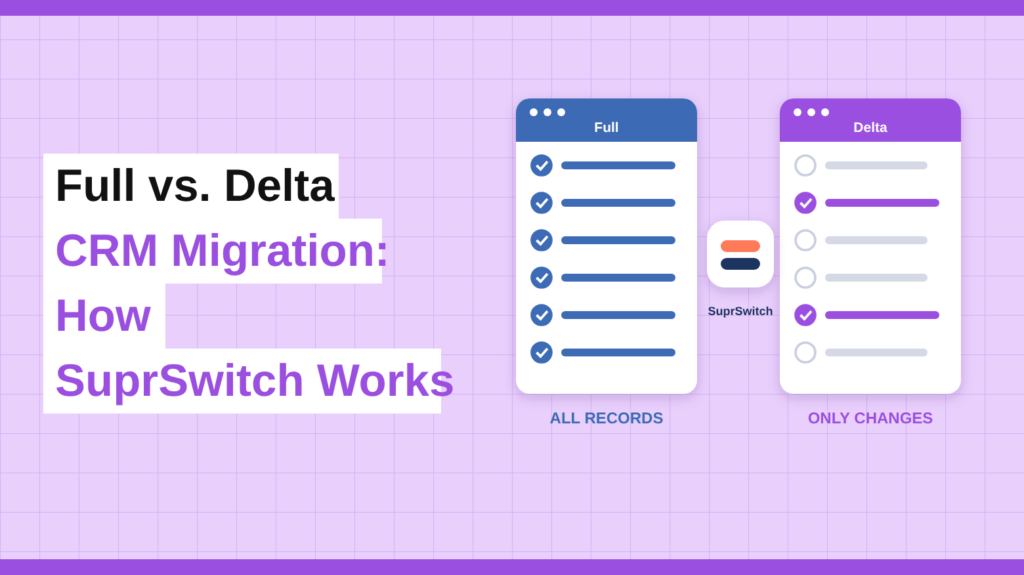
A full migration is the foundation of any move. It:
- Establishes every record: Companies, contacts, deals, and custom objects are created in the destination.
- Builds the relationships: Associations between records, and between records and their activities, are created.
- Sets the baseline: The destination now matches the source as of the moment the data was extracted.
That last point is the limitation. A full migration is a snapshot. Anything created or changed in the source after extraction is not in it.
What Is Delta or Incremental CRM Migration?
A delta or incremental CRM migration moves only what has changed since an earlier run. Instead of moving the whole dataset again, an incremental data transfer looks for:
- New records: Contacts, companies, deals, and other records created after the last extraction.
- Updated records: Existing records whose values changed after the last extraction.
- New activities: Calls, emails, meetings, notes, and tasks logged on new or existing records.
- New relationships: Associations created between records since the last run.
Delta data migration depends on two things: a reliable way to find what changed, usually through created and last modified dates in the source, and a reliable way to match those changes to records already in the destination, usually through a stored source ID. Without both, a delta run either misses changes or creates duplicates.
Full Migration vs. Delta Migration: Key Differences
| Factor | Full CRM migration | Delta CRM migration |
|---|---|---|
| What moves | The complete agreed dataset | Only records and activities created or changed since the last run |
| When it runs | Once, as the main load | After the full migration, often more than once, and finally at cutover |
| Purpose | Build the destination CRM | Keep the destination current until go-live |
| Volume | Large | Smaller, depending on activity since the last run |
| Main risk | Mapping and relationship errors at scale | Missing changes, or duplicating records that already exist |
| Matching | Creates records, establishing their source IDs | Matches changes to existing records through those IDs |
The two are not alternatives. A full migration builds the new CRM, and delta runs keep it in step with the source until the business switches over.
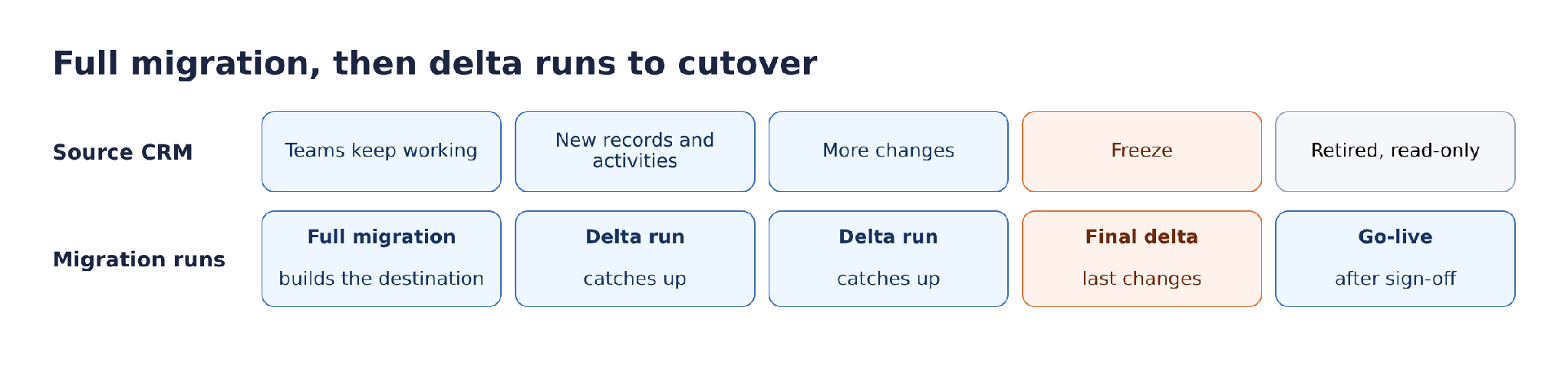
A full migration followed by delta runs, ending with a final delta at cutover.
When Should Businesses Use Full Migration?
Every migration starts with a full run. A full migration on its own, without later delta runs, can be enough when:
- The source can be frozen: Teams can stop working in the old CRM for the whole migration window.
- Volumes are small: The full dataset moves quickly enough to fit inside a short freeze.
- Activity is low: Few records are created or changed while the migration runs, for example over a weekend.
A full migration is also the right choice when you are testing. Running the complete dataset into a sandbox or test portal shows how mapping, associations, and volumes behave before production.
When Are Incremental Migration Runs Needed?
Incremental CRM migration is needed whenever the business cannot stop using the source CRM for the length of the migration. Common cases include:
- Large datasets: The main load takes longer than any acceptable freeze.
- Busy teams: Sales, marketing, or service keep creating records and activities throughout the project.
- Several sources: Consolidating more than one CRM means some sources keep running while others are moved.
- Phased go-live: Teams switch to the new CRM at different times.
- Validation time: The business wants time to check the migrated data before switching, without the destination falling out of date.
In all of these cases, delta runs keep the destination current, so the final freeze only has to cover the last set of changes rather than the whole migration.
How SuprSwitch Supports Delta Migration
SuprSwitch is SuprDense’s SuprSwitch CRM migration solution, and delta, or incremental, migration is one of the capabilities SuprDense lists for it, alongside migrating objects, records, files, and activities with associations intact.
SuprDense’s consolidation case study shows how this works in a real project. After an acquisition left the business with a Salesforce org and a long-running HubSpot portal to consolidate, SuprSwitch completed the main migration into HubSpot, and then, according to the case study, “a delta run then captured activities created after the initial Salesforce extraction so the destination did not become stale before cut-over.” The project ended with a final delta run inside a narrow freeze window.
The safeguards SuprDense documents for SuprSwitch migrations include:
- Saved mapping: Objects, properties, users, and pipelines are mapped in SuprSwitch, and a migration cannot start until the mapping is saved.
- Sample first: A full migration can only start after a sample migration is complete, and a mapping change requires another sample.
- Real-time record validation: SuprDense states that every migrated record is validated in real time to check that it has reflected in the destination CRM.
- Retries: A built-in retry mechanism handles failures and prevents halts in the migration.
- No storage: Migration data transfers directly between source and destination, without being stored on the platform.
For teams evaluating SuprSwitch delta migration, the practical questions are how many delta runs the project needs, when they run, what each one covers, and how each is validated. Settle those points with SuprDense while scoping the migration, alongside the objects, activities, and files in the full run, so the delta plan and the cutover plan are agreed together rather than improvised in the last week.
The SuprSwitch migration workflow explains how these steps fit together for RevOps teams planning a move.
Manual Re-Runs vs. SuprSwitch
| Task | Manual exports and imports | With SuprSwitch |
|---|---|---|
| Changes after the main load | Re-exported, filtered by date, and imported again by hand | Handled through SuprSwitch’s delta, or incremental, migration |
| Activities logged during the project | Often left behind | Captured with a delta run, as in SuprDense’s consolidation case study |
| Matching to existing records | Lookups in spreadsheets, with a risk of duplicates | Matching rules defined in the migration, such as reference IDs and primary and secondary emails in the case study |
| Confirming each record | Spot checks after import | Real-time record validation, with failures retried |
| Data handling | Export files saved and shared between people | Data moves directly between source and destination, without storage on the platform |
Planning a migration while your teams keep working? Try a sample migration with SuprSwitch, or book a migration call with SuprDense to plan your full and delta runs.
Mapping and Validating Data During Migration
The mapping and validation you set up for the full migration are what make delta runs safe. If the full run and the delta runs follow the same rules, changes land in the same place as the original records.
In SuprSwitch, default objects and properties are mapped automatically, custom objects and properties are mapped or created, users are matched by email or created, and pipelines and stages are mapped, merged, or created. SuprSwitch does not allow two source objects or properties to be mapped to a single destination object or property, which SuprDense says prevents data inaccuracies.
Validation runs at two levels:
- During the migration: Every record is checked in real time against the destination, and the status screen shows progress and any errors.
- After the migration: Compare counts and key values between source and destination. In SuprDense’s consolidation case study, automated difference checks, sign-off, and smoke testing followed the final load before the freeze was lifted.
Delta migration does not remove the need for validation. It adds more loads, and each one needs the same checks.
Handling New and Updated CRM Records
New and updated records behave differently, and a delta plan should treat them separately.
- New records: Created in the destination, with their associations to records that already exist there. A new deal logged against an existing company, for example, must link to the company created in the full run.
- Updated records: Matched to the record already in the destination, then updated. This needs a stable identifier, such as the source record ID or a reference ID, stored on every migrated record.
- New activities: Attached to the correct record, whether that record was created in the full run or in the delta run.
- Conflicting values: Decide which value wins if a record changed in both systems. In SuprDense’s consolidation case study, values already present in the new portal remained authoritative, legacy data filled only blank fields, and records with conflicting key values were skipped for review.
- Deleted records: Records deleted in the source after the full run need an agreed approach, such as listing them for manual review.
CRM data synchronization between two live systems is different from a migration. A delta run is not a permanent sync. It is a controlled catch-up step that ends when the source is retired. Agree with SuprDense during scoping exactly which records, activities, and changes each delta run will cover for your migration.
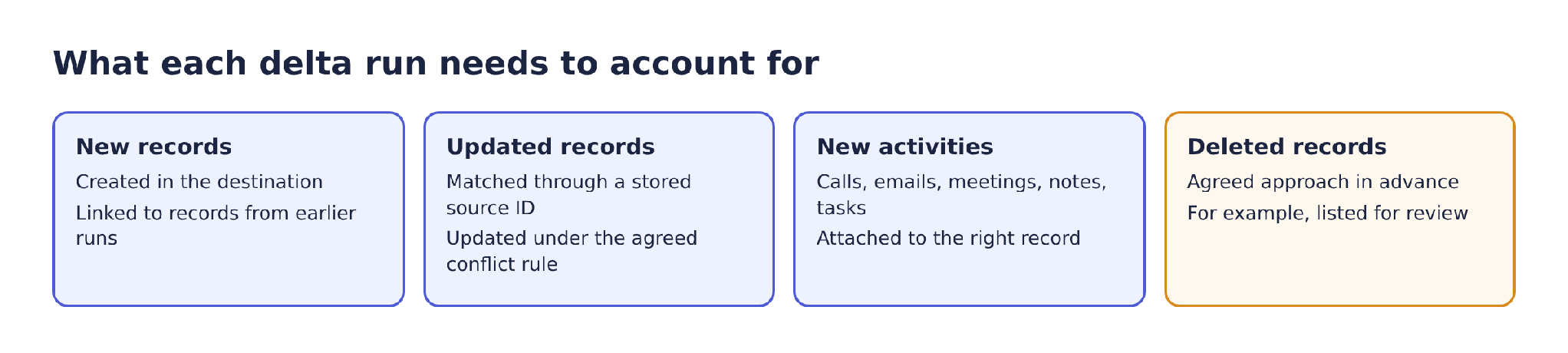
What each delta run needs to account for.
How to Plan Your Final CRM Cutover
The final cutover is where full and delta migration come together. A clean cutover usually follows this order:
- Complete the full migration: Load and validate the main dataset while teams keep working in the source.
- Run deltas as needed: Keep the destination current during validation and training.
- Pause automations: In the consolidation case study, production began only after automations were paused, so workflows did not act on records mid-load.
- Start the freeze: Stop changes in the source for the shortest possible window.
- Run the final delta: Capture the last records and activities created or changed before the freeze.
- Validate and sign off: Run difference checks and smoke tests, and get business sign-off.
- Go live: Lift the freeze, switch teams to the new CRM, and set the source to read-only.
Because delta runs carry most of the changes before the freeze, the freeze itself can stay short. In the consolidation case study, the wider freeze stayed within the agreed one-week limit.
Full and Delta Migration Readiness Checklist
| Area | Check |
|---|---|
| Scope | Objects, activities, and files for the full migration agreed |
| Delta scope | Records, activities, and changes covered by each delta run agreed with SuprDense |
| Identifiers | Source IDs stored on every migrated record for matching |
| Mapping | Mapping saved and sample migration completed |
| Conflict rules | Rule agreed for values that change in both systems |
| Deletes | Approach agreed for records deleted after the full run |
| Validation | Counts, key values, and associations checked after every run |
| Automations | Destination automations paused during loads |
| Freeze | Freeze window and final delta timing agreed |
| Sign-off | Business owner signs off before the source is retired |
Conclusion
A full CRM migration builds the new system, and delta CRM migration keeps it current while the business keeps working. Together, they let teams move large or busy CRMs without a long freeze, as long as each run follows the same mapping, matching, and validation rules.
SuprSwitch supports this approach, with delta or incremental migration listed among its capabilities and shown in SuprDense’s consolidation case study, where a delta run captured activities created after the initial extraction before cutover. Combined with saved mapping, sample migrations, real-time record validation, and retries, it gives teams a controlled path from the first load to go-live.
Frequently Asked Questions
01 What is delta CRM migration?
A delta CRM migration moves only the records and activities created or changed in the source since an earlier run. It follows a full migration and keeps the destination current until the final cutover.
02 What is the difference between full and incremental migration?
A full migration moves the complete agreed dataset in one main run and builds the destination CRM. An incremental migration moves only what changed since that run, matching changes to records that already exist in the destination.
03 When should a business use delta migration?
When teams cannot stop using the source CRM for the length of the migration, for example with large datasets, busy sales or service teams, several sources being consolidated, or a phased go-live. Delta runs keep the destination current so the final freeze can stay short.
04 Can incremental migration transfer newly updated CRM records?
An incremental migration is designed to capture records created or changed since the last run, provided changes can be identified in the source and matched to existing records through a stable identifier. Agree with SuprDense during scoping exactly which changes each delta run will cover for your migration.
05 How does SuprSwitch support delta migration?
SuprDense lists delta, or incremental, migration among SuprSwitch’s capabilities. In SuprDense’s consolidation case study, a delta run captured activities created after the initial extraction so the destination did not become stale before cutover. SuprSwitch migrations also include saved mapping, sample migrations, real-time record validation, and retries.
Manual migrations cost more than engineer hours.
Skip the QA cycles, data cleanup, and errors found weeks after go-live. SuprSwitch runs the full migration in 3-4 days, validated record by record.