
 Book a migration call

Search for Salesforce to HubSpot migration cost and you will find price ranges that often do not say what they include or how they were worked out. A small Salesforce org with accounts, contacts, and a single sales process is a different project from one with custom objects, flows, Apex code, years of activity history, and a dozen connected tools. The same headline number cannot describe both.
This guide does not add another range. It shows what moves the cost, what you can count yourself before asking for a quote, and how to compare Salesforce to HubSpot migration pricing from different providers on the same terms. It treats the total as a HubSpot migration budget, not just the project fee.
What Determines Salesforce to HubSpot Migration Cost?
The total is rarely one line. It is made up of five budgets.
| Budget | What it covers | What often gets missed |
|---|---|---|
| Migration project | Audit, data mapping, automation rebuilds, testing, and go-live support | A pilot run and a reconciliation check |
| HubSpot subscription | The plan you need and the seats your team uses | A plan that does not include custom objects, workflows, or custom field mappings when the design needs them |
| Internal team time | Decisions on what to keep, mapping approvals, and testing | Nobody counts it, so nobody plans for it |
| Overlap | Salesforce and HubSpot running until the cutover is validated | The Salesforce renewal date against your go-live date |
| Reserve | Room for issues found after the audit | Having none |
Salesforce adds its own pressure points. Custom objects and custom fields all need a destination in HubSpot. Flows and Apex code are not on the list of what HubSpot’s Smart Transfer carries over, so they are rebuilt as part of the project. Leads, contacts, and person accounts all end up as HubSpot contacts, so the data model has to be decided before anything is loaded. Each one is a decision, and each decision has a cost.
Data Volume and Record Complexity
Volume affects how long extraction and checking take. Complexity affects how much design work the project needs. They are easy to confuse, and they move different parts of the budget.
Volume changes the schedule
Salesforce limits how often you can export your data. Weekly exports are available only in Enterprise, Performance, and Unlimited editions, and Professional and Developer editions get monthly automatic exports. The export is a set of CSV files in a zip archive, large exports are split into several files, and the zip files are deleted 48 hours after the notification email is sent. Attachments and files are included only if you select them. A large org therefore needs its extraction planned, not left to the last week.
If you extract through the API instead, the limit is a daily allowance for the whole org. Salesforce calculates it from your edition, the number of licenses, and any add-ons, and calls from managed packages count toward it. A migration that runs next to live integrations shares that allowance with them, so heavy extraction is paced.
On the HubSpot side, paid accounts can import files of up to 512 MB and 1,048,576 rows each, with up to 10,000,000 rows and 500 imports in a rolling 24 hours. Large orgs are split into files and sequenced, and the sequencing is project time.
Complexity changes the design work
Salesforce data is relational. Accounts, contacts, opportunities, and cases are linked by lookups, and Smart Transfer rebuilds the main ones as HubSpot associations: contact to company, deal to company, contact to deal through contact roles, and ticket to company and contact. Anything outside those links, such as lookups between custom objects, needs its own design.
Some Salesforce field types are not moved by Smart Transfer, including encrypted, calculated, reference, junction ID list, and master record fields. Formula fields need a decision: a HubSpot calculation property where the logic fits, or a report.
HubSpot also matches records differently. It deduplicates contacts by email address and companies by domain name, and an import without a unique identifier creates duplicates. Salesforce accounts without a website, and contacts without an email, need a plan before the import, because that is where duplicate and orphaned records come from.
Custom Objects, Associations, and Activity History
This part of the budget sits outside the standard objects.
Custom objects
HubSpot’s Smart Transfer does not support custom objects. In HubSpot, creating custom objects requires an Enterprise subscription, and each subscription has its own limits on objects, properties, and associations. Every Salesforce custom object is therefore one of three things: moved into HubSpot custom objects, folded into standard objects and properties, or left behind. The first needs the right plan and a separate load. The second needs a redesign.
Leads, contacts, and person accounts
Smart Transfer maps Salesforce leads, contacts, and person accounts to HubSpot contacts. HubSpot also has a leads object, which requires Sales Hub Professional or Enterprise. Which one you use depends on how your team qualifies leads today, so decide it before the load.
Activity history
Smart Transfer maps Salesforce tasks to tasks, events to meetings, email messages to email activities, and notes to notes. Attachments are transferred once after the sync and are not kept up to date. HubSpot’s import tool can create emails, meetings, notes, and tasks, but it cannot update the ones that already exist. A wrong load cannot simply be fixed by importing again, so the first load has to be right.
One more detail: after the initial sync, Smart Transfer keeps running in the background and is designed for a one-time migration. The cutover plan needs to say when it stops. HubSpot also warns that running Smart Transfer and the HubSpot-Salesforce integration at the same time creates duplicate records, because they match records on different identifiers, so pick one.
Integrations and Workflow Rebuilding
Salesforce rarely sits alone. Marketing automation, sales engagement, quoting, support, billing, and data warehouse tools are often connected to it, and each connection needs a decision: reconnect it to HubSpot, replace it, or retire it.
- Flows and Apex code. These are rebuilt as HubSpot workflows or other automation. Count how many are active, and retire the ones nobody uses.
- Validation rules and assignment logic. Each one has a purpose that has to be rebuilt as required properties, workflows, or ownership rules.
- Managed packages and connected apps. Some will have a HubSpot connector, some will not, and some may need a paid plan on the other tool’s side.
- Email and calendar sync. Reps who log email and meetings in Salesforce need the HubSpot equivalent set up before the cutover.
- Reports and dashboards. These are rebuilt on HubSpot’s data model, starting with the ones leadership uses.
HubSpot documents workflows as available with Professional or Enterprise subscriptions. If the design depends on them and the plan does not include them, the plan itself is part of the cost.
Rebuilding is a chance to ask what each flow was meant to achieve, then rebuild that outcome. Copying the old logic step by step usually carries the old clutter with it. List every system that sends data to Salesforce or reads from it before you ask for a quote.
Internal vs. Partner-Led Migration Costs
Both are reasonable. The right one depends on what is in your org.
| DIY | Partner-led | |
|---|---|---|
| Best when | Standard objects only, few flows, no custom objects, someone on your team knows HubSpot | Custom objects, Apex code, several integrations, long activity history, or a tight go-live date |
| Cash cost | Lower. Often only the tools and the HubSpot plan | Higher. You pay for scoping, rebuilds, testing, and support |
| Your time | High. You own mapping, cleanup, testing, and fixing mistakes | Lower. You review and approve |
| Main risk | Missed associations, duplicate records, flows rebuilt without testing | Paying for scope you did not need if the quote is not specific |
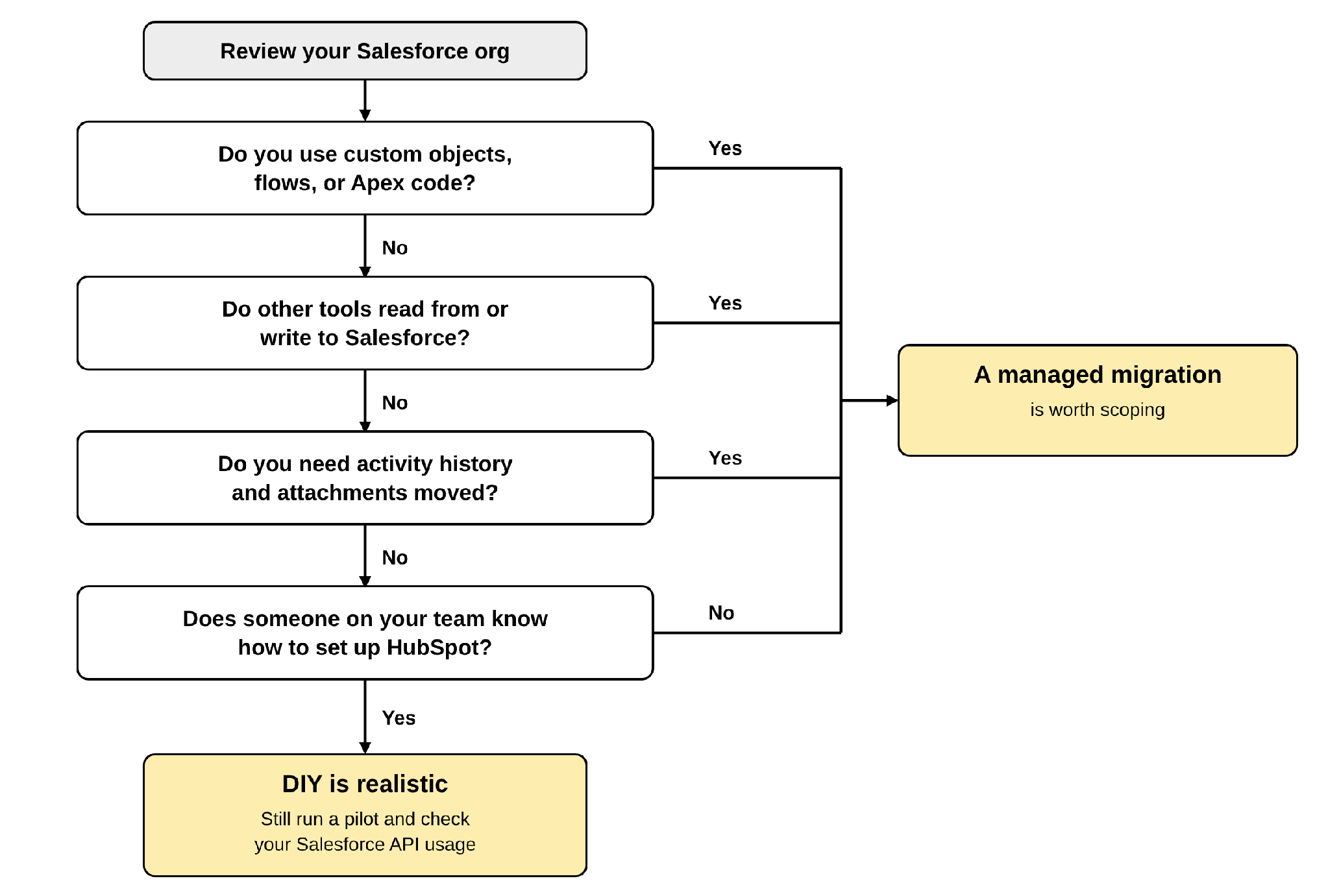
HubSpot’s own Smart Transfer is one DIY route for Salesforce. Only Super Admins can run it, mapping your own custom Salesforce fields through it requires a Data Hub subscription, and it does not move custom objects. A DIY migration therefore still includes rebuilding work, and that is where the time goes.
Between a spreadsheet-and-import approach and a fully managed project there is a middle option: tool-assisted migration. A platform such as the SuprSwitch CRM migration tool analyzes the source CRM first, maps objects and fields, runs a pilot on a sample, and then migrates and validates the full dataset. A tool does not replace the decisions on scope and design, so those still need an owner.
If you are weighing HubSpot migration services against doing it yourself, compare your own hours against the quote, not the quote against zero.
How to Estimate Your Migration Budget
You can build a useful CRM migration cost estimate before you talk to anyone. Start by counting what is in your org.
| What to count | Where to find it | Why it moves cost |
|---|---|---|
| Records per object: accounts, contacts, leads, opportunities, cases | Reports, or a record count per object | Drives extraction time and import batches |
| Custom objects and custom fields in use | Object Manager | Each needs a destination, and custom objects need a HubSpot Enterprise plan |
| Active flows and Apex code | Flows and Apex classes in Setup | Rebuilt and tested one by one |
| Integrations and managed packages | Installed Packages and connected apps | Reconnect, replace, or retire |
| Activity history: tasks, events, emails, notes | Activity reports | Loaded once, and not updatable by import afterwards |
| Attachments and files | Files and attachments | Transferred once after the sync |
| Reports and dashboards | Reports and Dashboards tabs | Rebuilt on the new data model |
| Users, including inactive owners | Users in Setup | Records owned by inactive users need an ownership decision before import |
Then work through four steps:
1. Decide what to leave behind. Inactive records, dead flows, and unused fields come off the list.
2. Choose the HubSpot plan. This is your recurring cost, and it should be set before the data moves.
3. List what must be rebuilt. Flows, reports, and integrations, each with a priority.
4. Ask for a scoped quote. Share the table above with each provider so they quote the same thing.
When quotes come back, compare what each one includes: automation rebuilds, a pilot migration, validation, activity history, attachments, and a support window after go-live. A lower quote that leaves several of these out is not lower.
Ways to Control Migration Costs
- Export early. Salesforce export files expire after 48 hours and are limited by frequency, so plan the timing.
- Protect your API allowance. Schedule heavy extraction away from your busiest integrations.
- Run a pilot. A small test finds mapping problems while they are cheap to fix.
- Check the renewal date. Do not let your Salesforce renewal force a choice between another term and a rushed cutover.
When to Get a Migration Assessment
An assessment is worth asking for when your org has any of these:
- Custom objects, or data that does not fit HubSpot’s standard objects
- Apex code, or a large number of active flows
- Several integrations or managed packages
- Years of activity history and attachments your team still needs
- A fixed go-live date, such as a Salesforce renewal
- Reports and dashboards that leadership depends on
A good assessment ends with a written scope: what moves, what is rebuilt, what stays behind, and which HubSpot plan the design needs. That document is what lets you compare quotes on the same terms. If you want a second opinion on yours, our CRM migration services are a place to start.
Conclusion
Salesforce to HubSpot migration cost is not one number. The fastest way to a reliable budget is to count what is in your org first and ask every provider to quote the same scope.
Frequently Asked Questions
01 How much does a Salesforce to HubSpot migration cost?
There is no single figure, because the cost depends on your records, custom objects, flows and code, integrations, activity history, and HubSpot plan. Count what is in your org, then ask for a scoped quote based on that count.
02 What factors affect CRM migration pricing?
The main factors are data volume and quality, custom objects and fields, automations to rebuild, integrations, activity history and attachments, reports to recreate, testing and validation, the HubSpot plan, and whether you do it yourself or work with a partner. Use the worksheet above to count each one.
03 Does data volume affect migration cost?
Yes. Volume affects how long extraction and checking take, and it is shaped by Salesforce’s export limits and API allowance and by HubSpot’s import limits. Complexity, such as custom objects, associations, and flows, adds design work on top of that.
04 Are integrations and custom objects charged separately?
That depends on the provider, so ask for them to be listed as separate lines. Custom objects need a HubSpot Enterprise subscription, and Smart Transfer does not move them, so they are loaded as their own step. Integrations are reviewed one by one and reconnected, replaced, or retired.
05 How can a business reduce migration costs?
Clean data before the move, retire flows you no longer use, settle the HubSpot plan early, decide how much history to move, and run a pilot. Keep validation and the overlap period in the plan.
Manual migrations cost more than engineer hours.
Skip the QA cycles, data cleanup, and errors found weeks after go-live. SuprSwitch runs the full migration in 3-4 days, validated record by record.