
 Book a migration call
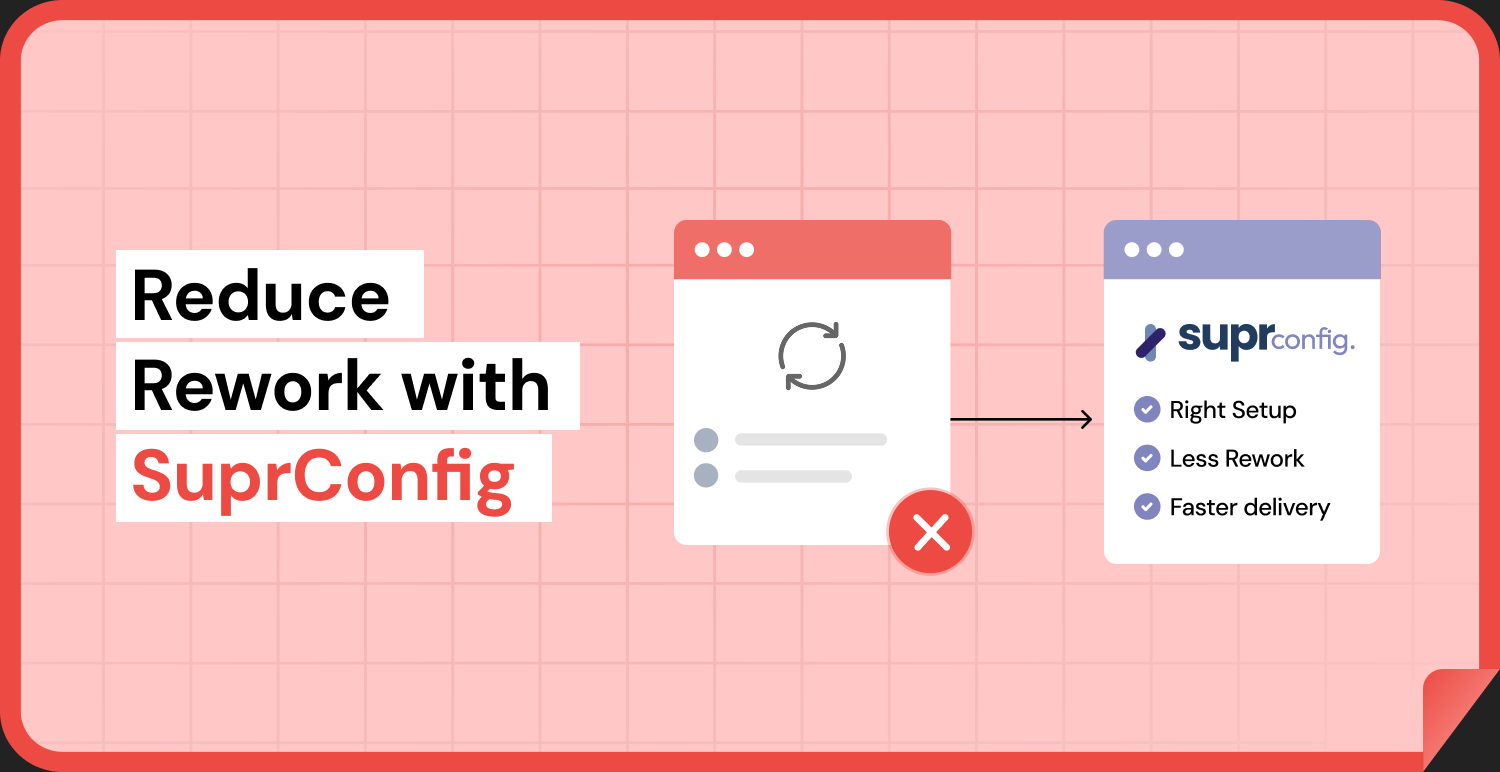

Rework rarely shows up as a line on an invoice, but it is one of the most expensive hidden costs in HubSpot agency operations. A pipeline is rebuilt because a stage was misunderstood, a workflow is fixed after it emailed the wrong list, or properties are renamed after the client sees them for the first time. Each fix takes hours the agency cannot bill, delays go-live, and chips away at the client’s confidence.
For agencies, implementation partners, and consultants managing many client portals, the problem compounds. The same lifecycle properties, lead routing workflows, forms, and lists are rebuilt by hand for client after client, each consultant builds them a little differently, and every manual rebuild is another chance to carry over an old client’s values or miss a step. The work is not difficult. It is repetitive, and repetition done by hand is where inconsistency and rework come from.
Most rework is not caused by a lack of skill. It comes from gaps in process: requirements that were never written down, decisions made differently on every project, assets copied without checking, and changes approved in a chat message. This guide covers why rework happens, and how better discovery, standard configuration decisions, safe reuse, review checkpoints, change control, documented handoffs, and the right metrics reduce it. It also shows where SuprConfig, SuprDense’s HubSpot configuration and deployment tool, removes the manual rebuilding that sits behind much of it.
Why HubSpot Projects Need Rework
Rework is any work done twice because the first attempt was wrong, incomplete, or no longer matched what the client wanted. In HubSpot projects, it usually comes from a handful of sources:
- Unclear requirements: The team builds what it understood, not what the client meant.
- Inconsistent decisions: Each consultant structures properties, pipelines, and workflows differently, so reviews and handovers catch problems late.
- Copied errors: Assets reused from a previous client carry that client’s names, values, or mistakes.
- Late review: Problems are found by the client after go-live rather than by the team before it.
- Uncontrolled change: Requests arrive mid-build and are added without anyone assessing the impact.
- Weak handoffs: Information is lost between sales, delivery, and support, so later teams redo or undo earlier work.
Rework also compounds. A misunderstood requirement leads to the wrong data model, which leads to workflows and reports built on that model, which all have to change once the mistake is found. The later a problem is caught, the more work depends on it, which is why the cheapest way to reduce implementation rework is to catch problems at the start.
The fixes for each are process changes, not heroics. The rest of this guide takes them one at a time.
Improve Discovery and Requirements Capture
The cheapest place to prevent rework is before anything is built. Discovery should produce decisions, not just notes.
- Use a standard discovery template: The same questions for every client, covering processes, lifecycle stages, pipelines, data, integrations, reporting, and users.
- Capture decisions explicitly: For each area, write down what was decided, who decided it, and any open question.
- Confirm definitions: Agree what a lead, a qualified lead, and each deal stage mean in the client’s words.
- Collect real data early: Ask for sample exports from the client’s current systems, so field formats and data quality are known before mapping.
- Play it back: Send a short summary of decisions and ask the client to approve it before configuration starts.
Involve the right people from the client side. A discovery session with only the project sponsor often misses how sales reps, marketers, or service agents actually work. Ask for at least one person from each team that will use the system, and confirm who has the authority to approve decisions, so the answers you build on are the answers that will stick.
A written, approved requirements summary turns later disagreements into simple checks. When a client asks why something was built a certain way, the answer is already on paper.
Standardize Configuration Decisions
Many HubSpot configuration choices have a best answer for most clients, yet each consultant makes them from scratch. Standardizing those decisions removes much of the avoidable rework.
Create agency standards for:
- Naming conventions: Properties, property groups, workflows, lists, and reports follow one pattern.
- Data model rules: When to use a standard property, a custom property, an association label, or a custom object.
- Pipeline design: How stages are named, what each stage requires, and how won and lost are handled.
- Lifecycle stages: The default lifecycle and lead status setup, and when to change it.
- Workflow patterns: Standard structures for routing, notifications, and lifecycle updates, with enrollment and re-enrollment rules.
- Permissions: Default teams and permission sets for common roles.
Write the standards into a short playbook and link it from your project template. New team members learn the agency’s way of working faster, and reviewers check work against a known standard instead of personal preference. These HubSpot agency processes also make it easier to hand a project from one consultant to another without rework.
A playbook on its own still depends on people rebuilding each standard by hand. The standards hold up best when they also exist as working HubSpot configuration that every consultant deploys the same way, which is what the next section covers.
Reuse Proven Assets Without Copying Errors
Reusing properties, pipelines, workflows, lists, and templates is one of the fastest ways to cut delivery time. Done carelessly, it is also one of the fastest ways to spread a mistake across many clients.
Safe reuse depends on a few rules:
- Reuse from a master, not from the last client: Keep a clean, tested library of assets, rather than copying from whichever portal was built most recently.
- Separate fixed parts from client values: Keep owners, email addresses, stage names, and other client-specific values out of the master assets, and fill them in during deployment.
- Version the library: Record changes to master assets, and test them before they reach clients.
- Check after deployment: Confirm every asset arrived, is named correctly, and has the client’s values in place.
Why Manual Reuse Breaks Down
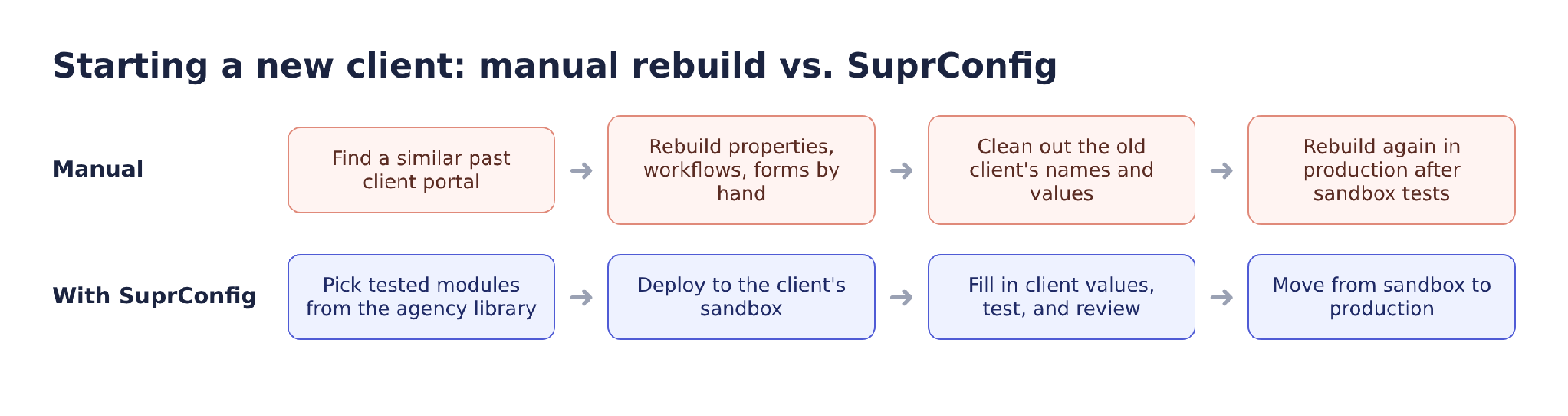
Most agencies already reuse work. The problem is how. Reusable assets live in past client portals, shared documents, and individual consultants’ memory, so starting a new client means finding a similar old portal and rebuilding its setup by hand. That approach causes three recurring problems:
- Repetitive manual work: Consultants spend billable hours recreating properties, workflows, forms, and lists the agency has already built many times.
- Configuration inconsistency: Two consultants rebuilding the same standard produce two slightly different setups, which makes reviews, handovers, and support harder.
- Deployment risk: Configuration tested in a sandbox is often rebuilt again in production, and every rebuild is another chance to introduce an error the test never saw.
How SuprConfig Supports Safe Reuse
This is where HubSpot configuration automation pays off. SuprConfig turns the rules above into a working system for agencies that manage many client portals:
- A centralized configuration library: Import the HubSpot assets your team has built and tested, such as workflows, forms, lists, email templates, and website pages, into one central library. Assets can be filtered and categorized, so the agency’s master copy is easy to find instead of buried in an old client portal.
- Reusable modules: Group related assets into modules that match how you deliver, such as a Sales Hub setup, lead routing, or lifecycle and lead status. SuprConfig also includes pre-built modules, from Sales Hub implementation to lead routing automation, that teams can use as a starting point.
- Deployment to client portals: Deploy assets and modules from the library to client HubSpot accounts, so every client starts from the same tested standard rather than from whatever was built most recently.
- Data model setup: Create properties in bulk through modules, CSV uploads, or SuprConfig’s property creation interface, and create custom objects with the associations they need.
- Sandbox to production: Move assets from a client’s HubSpot sandbox account to its production account, so the configuration that was tested is the configuration that goes live, without a second manual rebuild.
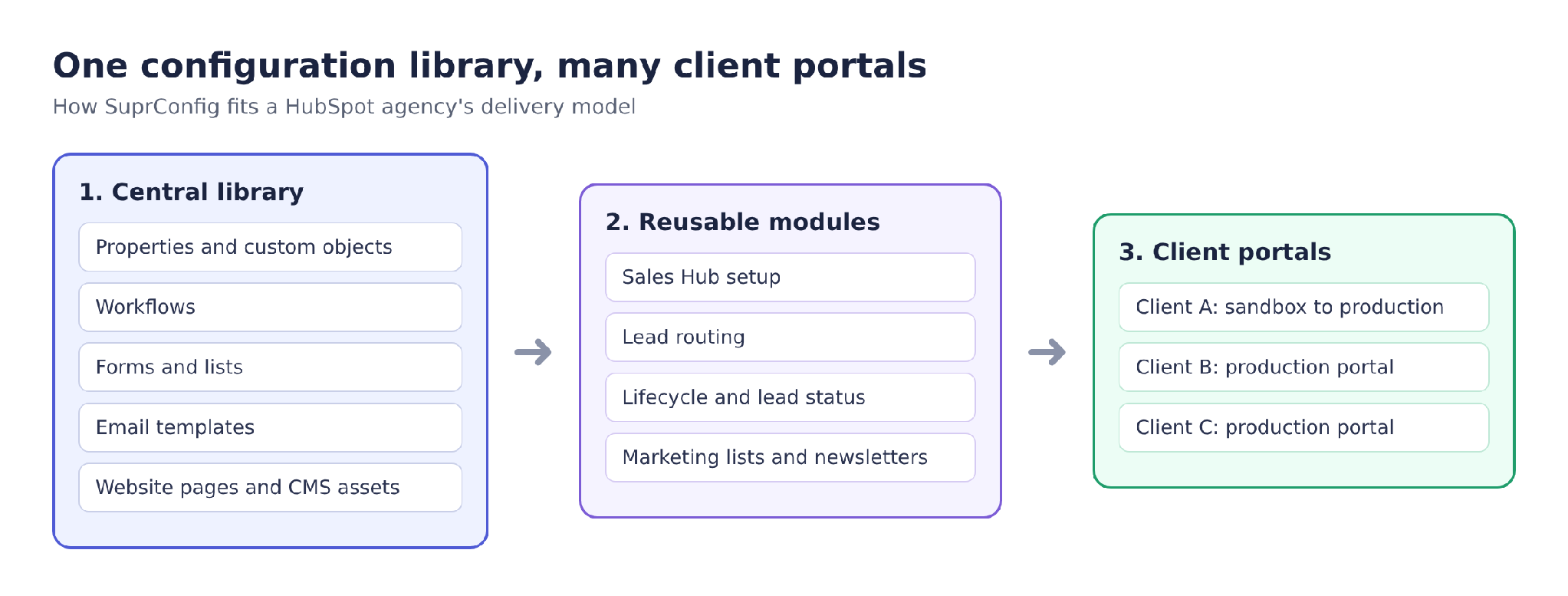
The rules for safe reuse still apply. Keep client-specific values out of master assets, review changes to the library before they reach clients, and check each deployment against your checklist. SuprConfig makes those rules practical at scale, because the master copy lives in one place and deploying it is a repeatable step rather than a manual rebuild.
Manual Delivery vs. SuprConfig
| Delivery task | Manual approach | With SuprConfig |
|---|---|---|
| Where reusable assets live | Past client portals, shared documents, and individual memory | One central library of the agency’s tested assets |
| Starting a new client | Rebuild properties, workflows, forms, and lists by hand | Deploy saved assets and modules to the client’s portal |
| Agency standards | Interpreted differently by each consultant | Packaged as modules that every consultant deploys the same way |
| Properties and custom objects | Created one at a time in each portal | Created in bulk through modules or CSV, with custom objects and associations |
| Sandbox to production | Rebuilt by hand in production after testing | Moved from the sandbox account to the production account |
| CMS assets | Recreated in each portal | Emails, landing pages, and event websites duplicated across portals |
| Onboarding a new consultant | Learning each colleague’s way of building | Working from the agency’s shared library and modules |
Rebuilding the same HubSpot setup for every client? Start a free trial of SuprConfig to build your agency’s configuration library, or schedule a demo with SuprDense to see modules deployed to a client portal.
Add Peer Review and QA Checkpoints
A second pair of eyes finds problems the builder misses. Reviews work best when they happen at set points and follow a checklist.
| Checkpoint | What to review |
|---|---|
| After discovery | Requirements summary is complete and approved |
| After data model setup | Properties, groups, and associations match the standards and the requirements |
| After pipeline setup | Stages, required properties, and pipeline rules match the agreed process |
| After automation | Each workflow is tested with records that should and should not enroll |
| After data import | Record counts, key fields, and associations match the source |
| Before handover | Reports show expected data, documentation is complete, client sign-off is ready |
HubSpot helps with some of these checks. On Professional and Enterprise subscriptions, HubSpot lets you test a workflow on a specific record before turning it on, and it states that no actual actions are executed during the test. HubSpot also offers standard sandboxes on Enterprise subscriptions, where configuration can be tested away from live data. When reviewed configuration is then moved from the sandbox to production with SuprConfig rather than rebuilt by hand, the review covers what actually goes live.
Keep reviews short and focused. A short, focused review against a checklist usually catches more than an unstructured look at the whole portal.
Control Scope Changes
Changes during a project are normal. Unmanaged changes are a major source of rework, because they arrive after related work is finished and quietly undo it.
Use a simple, consistent process:
- Capture every request in one place: Not in chat threads or meeting notes.
- Assess the impact: Which existing work it affects, what must be redone, and how long it will take.
- Decide and approve: Agree with the client whether the change goes ahead, in which phase, and at what cost.
- Update the documentation: Change the requirements summary so it stays the single source of truth.
Make the cost of change visible. When a client sees that a late change means redoing finished work, they can make an informed choice about whether it is worth it now, later in a second phase, or not at all. Clients tend to appreciate the transparency, and it protects the project timeline.
Encourage clients to batch non-urgent changes into planned review points. Building a change once at the right time is cheaper than building it, changing it, and changing it again.
Document Handoffs and Client Approvals
Rework often appears at the boundaries: from sales to delivery, from one consultant to another, and from delivery to the client or support team. Each handoff should transfer decisions, not just access.
Document at each handoff:
- Sales to delivery: What was sold, the scope, the assumptions, and any promises made to the client.
- Within delivery: What is done, what is in progress, open decisions, and known issues.
- Delivery to client: What was built, how to use and maintain it, and where the documentation lives.
- Delivery to support: Configuration standards used, any exceptions, and the change history.
Record client approvals formally at key points: the requirements summary, the data model, and final acceptance. Approval by email or in a shared document is enough, as long as it is findable later.
Handoffs are also easier when the configuration itself is standard. If a client’s portal was set up from the agency’s SuprConfig modules, and the handoff notes record which modules were deployed, the support team knows exactly which standard it is supporting and can focus on the documented exceptions.
HubSpot keeps some history you can use. Its audit logs record user actions in the account and are available to Super Admins, and its restore tool lets Super Admins roll back recent CRM changes from imports, integrations, workflows, or edits within a limited window. Neither replaces your own project log, but both help when you need to understand or undo a change.
Track Rework and Delivery Metrics
You cannot reduce what you do not measure. Track rework as its own category of time, separate from planned delivery work.
Useful metrics include:
- Rework time: Hours spent fixing or redoing work, per project and per phase.
- Rework causes: Each rework item tagged with its cause, such as requirements, configuration, reuse, data, or change.
- Defects found by phase: How many issues are caught in internal review versus by the client.
- Change requests: Number, size, and whether they were approved and billed.
- Estimate accuracy: Planned versus actual effort by phase.
- Time to go-live: Elapsed time from kickoff to launch.
Review these across projects regularly. Patterns point to the fix: frequent requirements rework calls for better discovery, frequent configuration rework calls for clearer standards, and frequent reuse errors call for a better asset library. It is also worth tracking how many hours go into rebuilding standard setup by hand, because that is the time a deployable library gives back. Reducing rework is also one of the most direct ways to reduce HubSpot implementation time, because hours not spent redoing work go straight back into the schedule.
Agency Process Improvement Checklist
Use this list to assess your current delivery process and pick the next improvement.
| Area | Check |
|---|---|
| Discovery | A standard template is used, and an approved requirements summary exists for every project |
| Standards | Naming, data model, pipeline, workflow, and permission standards are documented |
| Asset library | Reusable assets live in a tested, central library, not in past client portals |
| Modules | Standard setups are packaged as modules that every consultant deploys the same way |
| Deployment | Assets are deployed from the library, and tested configuration moves from sandbox to production without a manual rebuild |
| Reviews | Peer review checkpoints with checklists are part of every project plan |
| Testing | Workflows, imports, and reports are tested before handover |
| Change control | Every change is logged, assessed, approved, and reflected in the documentation |
| Handoffs | Sales, delivery, client, and support handoffs are documented |
| Approvals | Client approvals are recorded at key milestones |
| Metrics | Rework time and causes are tracked and reviewed regularly |
Conclusion
Rework in HubSpot projects is mostly a process problem. It shrinks when discovery produces approved decisions, configuration follows agency standards, reusable assets come from a tested library, reviews happen at set checkpoints, changes go through one process, handoffs are documented, and rework is measured. None of these steps is complicated, but together they make CRM delivery efficiency something the agency controls rather than hopes for.
For agencies managing many client portals, the biggest gains usually come from the reuse step. As long as standard setup is rebuilt by hand, every new client brings the same repetitive work, the same risk of inconsistency, and the same chance of errors between sandbox and production. SuprConfig gives the agency one central library of its tested HubSpot assets, packages them as reusable modules, and deploys them to client portals, including from sandbox to production.
Start by tracking rework and its causes on your next few projects, then fix the biggest cause first. Agency project standardization works best one step at a time.
Frequently Asked Questions
01 What causes rework in HubSpot implementation projects?
Mostly process gaps: unclear or unapproved requirements, inconsistent configuration decisions, assets copied from previous clients with their errors, late reviews, uncontrolled scope changes, and poor handoffs between teams.
02 How can agencies standardize HubSpot implementations across multiple clients?
Agencies can standardize HubSpot implementations by establishing consistent naming conventions, data models, pipeline structures, workflow patterns, and reusable configuration templates. SuprConfig helps operationalize these standards by allowing agencies to organize tested HubSpot assets into reusable modules and deploy them across connected client accounts.
03 How can you reuse HubSpot workflows and configurations across multiple portals?
Agencies can reuse HubSpot configurations by maintaining a centralized library of tested assets rather than copying them from previously completed client portals. SuprConfig enables teams to import assets into a central library, organize them into modules, and deploy them across connected HubSpot accounts, reducing repetitive manual configuration.
04 How does SuprConfig help HubSpot agencies improve implementation efficiency?
SuprConfig helps HubSpot agencies manage reusable configurations through a centralized asset library, reusable modules, and deployment across connected client accounts. It also supports moving validated configurations from sandbox to production, helping agencies avoid manually rebuilding tested setups and maintain greater consistency across client implementations.
Manual migrations cost more than engineer hours.
Skip the QA cycles, data cleanup, and errors found weeks after go-live. SuprSwitch runs the full migration in 3-4 days, validated record by record.