Skip to content

CRM Migration Checklist: 12 Things to Verify Before You Go Live

The most dangerous sentence in any CRM migration is “the record counts match.” I’ve heard it in kickoff calls, in Slack channels at 11pm the night before cutover, and in post-mortems after everything went wrong. It feels like confirmation, but it isn’t. A record count tells you the data moved. It tells you nothing about whether the data matches. Did associations survive? Did deal stages land in the right place? Did three years of call history attach to the right contacts, or dissolve into a pile of untimestamped notes?

Go-live is not a moment. It’s a validation gate. Most failed migrations pass through that gate unverified because the team checked the wrong thing. This crm migration checklist covers the 12 verifications that separate a clean cutover from a support-ticket avalanche, and where each one belongs in a structured, four-phase migration that front-loads validation instead of discovering failures after cutover.

Why “the record counts match” is not a go-live signal
Why -the record counts match- is not a go-live signal

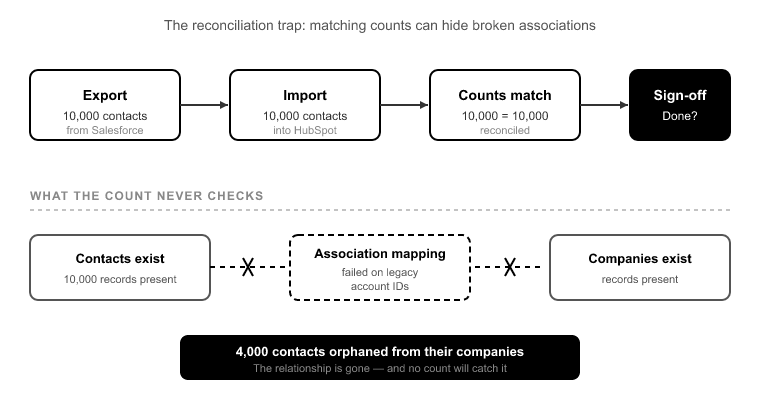
Here’s the reconciliation trap. You export 10,000 contacts from Salesforce. You import 10,000 contacts into HubSpot. The numbers reconcile. Sign-off, done.

Except 4,000 of those contacts are now orphaned from their companies. The association mapping failed on every record where the source used a legacy account ID that no longer resolved. The contacts exist. The companies exist. The relationship between them does not. Your count reconciliation will never catch this, because both objects imported at full count. It’s the links between them that broke.

Scale that up. In a 400,000-record Salesforce org, a 1% association failure rate is 4,000 broken relationships.[1] It’s invisible in a count check and catastrophic in daily use, because a rep opens a company record and sees no contacts, or opens a deal and sees no associated company. This is the single most under-validated part of any migration, and it’s exactly why counting records is the wrong go-live signal.

Counts confirm volume. They do not confirm integrity. The rest of this checklist is about integrity.

Verify before you move: what schema analysis catches on Day 1
Verify before you move- what schema analysis catches on Day 1

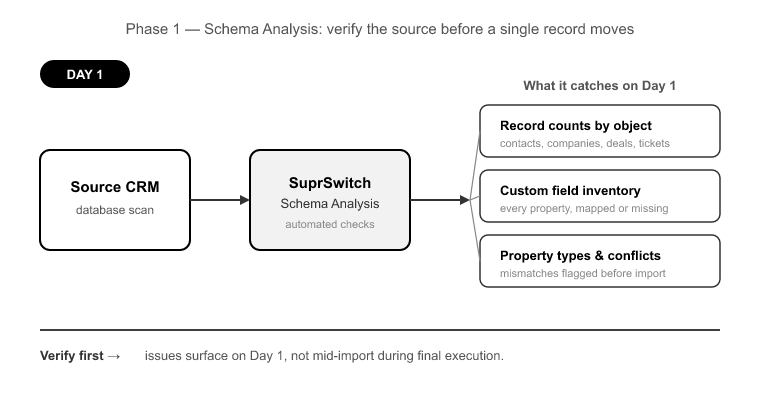
Half of a good migration checklist should be verified before a single record moves. This is the part most teams skip, because manual migrations don’t have a natural place to do it. So problems surface mid-import instead.

In a SuprSwitch migration, this is Phase 1 Schema Analysis, and it runs on Day 1. SuprSwitch scans the source CRM database and surfaces the data quality issues that would otherwise blow up your final execution: record counts by object, custom field inventory, property type mismatches, duplicate records, empty required fields, and broken source-side associations. Nothing moves during this phase. It’s discovery.

Four checklist items get verified here:

1. Record counts by object, not in aggregate. Not “how many records total” but how many contacts, companies, deals, tickets, and custom object records. Each is counted separately so you have a per-object baseline to validate against later.

2. Required-field gaps. HubSpot rejects records missing a required property. If your source has 800 contacts with no email address and email is a required property in your target portal, those 800 records fail.[2] A naive import discovers this as 800 failed rows mid-run. Schema analysis catches it on Day 1, while you can still decide whether to relax the requirement, backfill the field, or route those records differently.

3. Duplicate detection on the source. Two “Acme Corp” records in Salesforce become two “Acme Corp” records in HubSpot unless you catch them first. Finding duplicates before migration means you dedupe once, at the source, instead of untangling split associations after cutover.

4. Broken source associations. Some relationships are already broken in the source CRM before you touch anything. Migrating a broken association faithfully reproduces the breakage in HubSpot. Surfacing these on Day 1 lets you decide what to repair versus what to leave.

Association integrity: the checklist points most teams skip

If you only pressure-test one part of this crm migration checklist, make it this one. Associations are where migrations quietly fail.

5. Contact-to-company associations. Every contact that had a parent account in the source should have the equivalent company association in HubSpot. Verify by counting associations, not just records. A portal with 10,000 contacts and only 6,000 contact-company associations is telling you 4,000 contacts are orphaned.

6. Deal-to-contact and deal-to-company associations. A deal with no associated contact is a deal no rep can work. A deal with no associated company breaks account-level reporting. Both need explicit verification.

7. Ticket associations. If you’re migrating Service Hub data, tickets need to stay attached to their contacts and companies, or your support team loses case history.

8. Association labels. HubSpot lets you label associations: “decision maker,” “billing contact,” “primary company.” These carry business meaning. A migration that preserves the association but drops the label loses the context that made the association useful.

This is what SuprSwitch’s association integrity mapping is built for: 1:1 relationship preservation between objects. During Phase 2 Mapping Logic on Day 2, association rules are defined explicitly, before any live data moves. The transformation layer maps how source relationships translate to the HubSpot data model. That includes object-type mismatches like Salesforce Leads, which have no native HubSpot equivalent and must map to Contacts, often with a defined lifecycle stage, sometimes to Contacts plus Companies.[3] Teams that don’t decide this in the mapping phase discover it mid-import, when Lead-specific fields have nowhere to land.

Ownership, pipelines, and stages: the mapping decisions that break forecasting
Ownership, pipelines, and stages- the mapping decisions that brea

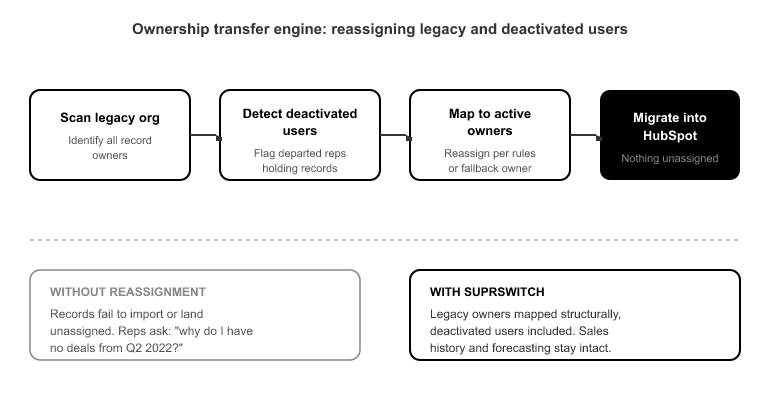
9. User ownership, including deactivated users. Every Salesforce or Pipedrive org that’s been running for years carries records owned by people who left the company. If ownership isn’t reassigned before migration, those records either fail to import or land unassigned, and no rep ever sees them. Sales history looks intact until a rep asks, “why do I have no deals from Q2 2022?”

SuprSwitch handles this structurally with the ownership transfer engine, which maps legacy owners, including deactivated users, to active users or a defined fallback owner during the mapping phase, before the migration runs. This turns a manual, error-prone reconciliation into a rule set you define and review up front.

10. Pipeline and deal stage mapping. This is where forecasting quietly breaks. Your source pipeline has 7 stages. Your HubSpot pipeline has 5. The mapping either collapses two stages into one, losing granularity, or, worse, dumps unmapped deals into the default first stage. Now every affected deal reports as early-stage, your forecast is wrong on day one, and nobody notices until the first pipeline review when the numbers don’t match reality.

Stage mapping is a decision, not a default. It gets made in Phase 2 Mapping Logic, explicitly, deal stage by deal stage, so the probability-weighted forecast in HubSpot reflects the same pipeline reality it did in the source.

Activity history: what the object-model mismatch destroys

11. Activity and engagement history. This is the item that looks fine until a rep goes looking for a call they logged in 2022.

Salesforce splits activities into two objects: Tasks and Events. HubSpot uses one unified Activities model with typed engagements: calls, meetings, emails, notes.[4] A migration that doesn’t handle that split does one of two bad things. It loses call and meeting history entirely, or it dumps everything into generic notes with no engagement typing and no timestamps preserved. Either way, three years of sales context evaporates.

Verifying this means checking that a call in the source is a call in HubSpot, a meeting is a meeting, and the timestamp on each engagement matches the original. Activity history sorted by the wrong date is nearly as useless as no history at all.

This is one of the things Phase 3 Pilot Validation exists to catch. On Day 2–3, SuprSwitch migrates a representative sample into HubSpot to validate relational integrity, activity history formatting, field-level truncation, and association chains, before the full dataset runs. Field truncation is a real risk here too. HubSpot has character limits and specific property types, so a source free-text field longer than the target limit truncates silently, while a source picklist value not present in the HubSpot property gets dropped. The pilot is where these surface. Issues found in pilot get fixed in the mapping layer, not discovered post-migration in a support ticket.

Deduplication and the re-import trap

12. Deduplication strategy and stable dedupe keys. The classic way to double your record count is to re-run a failed import. Partial failure, restart the whole job, and every record that succeeded the first time imports again. Now you have two of everything, associations split across both copies, and reps working from the wrong record.

Two things prevent this. First, a stable dedupe key, email for contacts, domain for companies, so re-processing a record updates the existing one instead of creating a new one. Second, retrying at the record level instead of restarting the full job.

SuprSwitch’s retry mechanism does exactly that: failed records are automatically retried without restarting the full migration. This directly avoids the re-import-everything pattern that multiplies records, because the job never re-processes records that already succeeded. It retries only the ones that failed.

Rollback readiness: defining “broken enough to reverse” before you cut over

The final thing to verify isn’t a data point. It’s a plan. Teams treat go-live as irreversible, so when something breaks post-cutover, there’s no clean state to return to and no defined criteria for what “broken enough to roll back” even means.

Rollback readiness has three parts. Keep the source CRM in read-only state after cutover, so you always have a clean, unmodified reference. Do not decommission it on go-live day. Define reversal criteria in advance: what failure threshold triggers a rollback versus an in-place fix? A 2% association failure you can patch is not the same as a pipeline mapping error corrupting every forecast. And define go-live sign-off explicitly: who confirms, against which validations, that the cutover holds.

This is where Phase 4 Final Execution and real-time record validation change the equation. When the full dataset runs through the migration engine, SuprSwitch validates every record in real-time. If a record doesn’t appear in HubSpot within the expected window, it flags the failure during transfer, not three weeks later in a support ticket. Go-live sign-off becomes “confirmed record by record” instead of “we hope it worked.” For the IT and security side of the checklist, SuprSwitch’s no-storage architecture means customer data is never held on SuprSwitch servers. The data moves from source to target without being retained in between.

Conclusion

Go-live isn’t the finish line. It’s the gate, and the whole point of a crm migration checklist is to make sure you don’t walk through it blind. Matching record counts prove volume moved. They say nothing about whether associations survived, ownership reassigned, stages mapped, or activity history landed with its timestamps intact. Those are the twelve things that actually decide whether the migration holds.

The teams that get burned are the ones who treat validation as a post-migration cleanup task. By then, the failures are already live, reps are already working from broken records, and every fix is a production change. The teams that get it right move the discovery work to the front: schema analysis on Day 1, mapping decisions on Day 2, pilot validation before full execution. Most of this checklist is verified before live data ever moves.

That’s the entire design principle behind SuprSwitch’s four-phase process. Front-load the discovery, validate the mapping on a pilot, and confirm every record in real-time during final execution. Run the checklist against that structure and go-live stops being a moment you hope survives. It becomes a gate you’ve already verified you can pass.


References

  1. Salesforce Developer Documentation, “Data Migration Best Practices: Relationship and Association Integrity,” Salesforce Architect Guides, 2023.
  2. HubSpot Knowledge Base, “Set and edit required properties for records,” HubSpot Help Center, 2024.
  3. HubSpot Developer Documentation, “Understanding the CRM Object Model and Object-Type Mapping,” HubSpot Developers, 2024.
  4. HubSpot Knowledge Base, “Log and manage activities (calls, meetings, emails, notes) on records,” HubSpot Help Center, 2024.
  5. RevOps Co-op, “Why CRM Migrations Overrun: A Survey of Implementation Timelines,” RevOps Benchmark Report, 2023.
 

Deduplication Before Migration: How to Clean Your CRM Data

Here’s the failure mode I see most often. A team migrates a Salesforce org into HubSpot, the record counts look right, everyone signs off. Three weeks later a sales rep opens an account and finds two versions of the same company, each holding a different half of the deal history. Nobody knows which record is real. The rep emails a dead address because it “won” the merge. The forecast is off because deals got counted twice. This didn’t happen because the migration engine failed. It happened because the duplicates sitting quietly in the source CRM got carried across, and then multiplied.

CRM deduplication before migration is not a cleanup task you tack on afterward. It’s a Phase 1 decision that determines whether your association chains survive the move. Duplicates don’t transfer one-to-one and land as a tidy pile of extra records you can delete later. They fracture the relationships between contacts, companies, deals, and activities. Untangling that after the fact costs 5 to 8 times what it costs to merge in the source while the associations are still intact.[2]

This is the case for treating deduplication as the first thing you do, not the last. Let me walk through why duplicates compound, which duplicate types actually cause damage, and how to sequence the merge work so it fits inside a 3 to 4 day migration instead of blowing up into a six-week cleanup project.

Why Duplicates Multiply Instead of Transferring 1:1

Why Duplicates Multiply Instead of Transferring 1-1

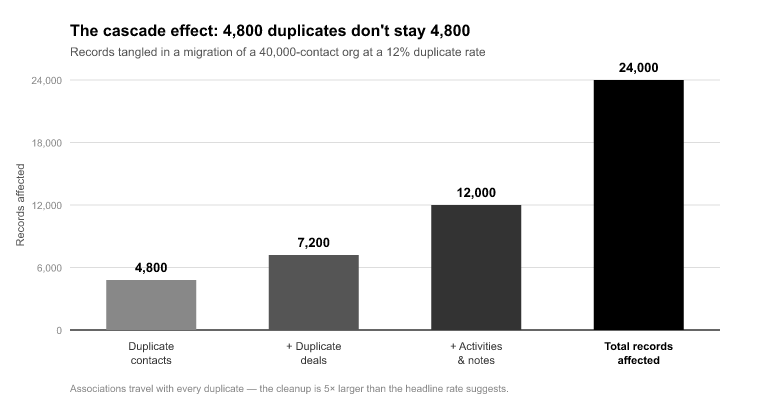
The intuition most people have is wrong. They assume a 12% duplicate rate means 12% too many contacts land in HubSpot. Annoying, but a delete-a-few-hundred-records problem. The reality is worse, because contacts don’t live in isolation. They carry associations.

Take a 40,000-contact org with a 12% duplicate contact rate, right in the middle of the 10 to 30% range that’s typical for CRMs running 3 or more years without governance.[1] That’s 4,800 duplicate contacts. If each duplicate averages 1.4 associated deals, a conservative number for a mature sales org, you’re not importing 4,800 extra contacts. You’re importing 4,800 contacts plus roughly 6,700 deal associations that are now split across paired records.

Here’s the part that breaks things. “Bob Smith” holds the deal from 2022 and the early call notes. “Robert Smith” holds the 2024 renewal and the recent emails. Neither record is complete. When both land in HubSpot as separate contacts, the deal timeline is fragmented across two identities, the activity history is split, and the rep working the account has no single view. The duplication didn’t stay contained to the contact object. It corrupted the relational integrity of everything attached to it.

That’s why deduplication has to happen before the association chains are mapped. Once you’ve resolved the duplicate in the source, the surviving record inherits the correct, consolidated set of relationships. SuprSwitch’s association integrity mapping then preserves those 1:1 relationships on transfer. The merged contact carries its deals, companies, and activity history into HubSpot intact. But that only works if the merge happened first. Map associations against a duplicated source and you’ve just mapped the fracture.

The Four Duplicate Types That Actually Cause Damage

The Four Duplicate Types That Actually Cause Damage

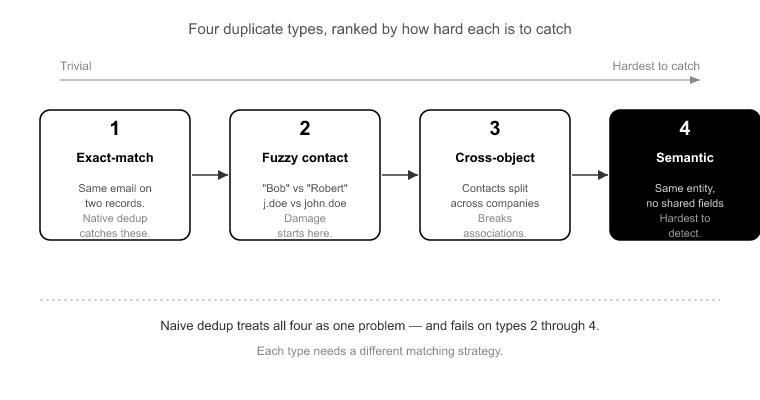
“Duplicate” is not one problem, and treating it as one is how naive dedup fails. There are four distinct types, ranked here by how hard each is to catch.

Exact-match duplicates are trivial. Same email address on two contact records. Every dedup tool catches these, including HubSpot’s native deduplication. If this were the whole problem, you wouldn’t need to think about it.

Fuzzy contact duplicates are where the damage starts. “Bob Smith” vs “Robert Smith.” “j.doe@acme.com” vs “john.doe@acme.com.” Same human, different strings. Email-based dedup never touches these because the emails genuinely differ. They survive a naive pass and land in HubSpot as two people.

Fuzzy company duplicates are the worst offender for account-based teams. “Acme, Inc.,” “Acme Inc” with no comma, and a company record keyed on “acme.com.” That’s three separate company records, each holding a subset of the contacts and deals. HubSpot’s native dedup works on domain, so if the domain formats differ or one record has no domain at all, it does nothing.[2] Your reps get three partial views of one account and no way to know they’re looking at the same company.

Split-ownership duplicates hide in plain sight. The same account exists twice, once owned by a rep who left the company eighteen months ago, once owned by the active rep who inherited the territory. They look like two legitimate records because they have two different owners. They’re the same account, and if you don’t catch them before mapping, they compound your ownership-transfer logic.

The point is that exact-match dedup, the kind that runs automatically, solves the easy 20% and leaves the 80% that actually breaks your crm migration. You need to surface the fuzzy and split-ownership cases before anything moves, with a full picture of the source data.

Deduplicate at the Source, Not in HubSpot

The single most expensive decision you can make is deferring deduplication until after the data lands in HubSpot. I understand the temptation. The migration feels like the hard part, and dedup feels like tidying up afterward. It’s backward.

Merging a duplicate pair in the source CRM is one operation. You pick a survivor, define which fields win, and the associations consolidate onto the surviving record. Done.

Merging the same pair in a live HubSpot portal after import means re-associating deals, re-parenting activities, checking whether the merge triggers workflow enrollment, and re-validating your reporting, all under the pressure of a production system your sales team is actively using. That’s 5 to 8 times the effort per record, and it carries live-system risk the source merge doesn’t.[2] Merge two contacts in HubSpot and you can re-fire workflow enrollment, re-send an automated email, or skew quarter-to-date reporting mid-quarter.

HubSpot’s native dedup makes this worse, not better, because it lulls people into thinking it’s handled. It works on email and domain, so it catches your trivial exact-match cases and completely misses the fuzzy company and deal duplicates that cause the real damage. You “deduplicate in HubSpot,” feel done, and still have three Acme records.

This is exactly why SuprSwitch’s Phase 1 Schema Analysis runs before a single record moves. It scans the source database and surfaces the full duplicate picture, including the fuzzy and split-ownership cases native tooling never flags, so your merge decisions get made against complete information. Nothing moves on Day 1. You’re looking at the whole board before you touch a piece.

Survivorship Rules: Deciding Which Record Wins

Survivorship Rules- Deciding Which Record Wins

Once you know what’s duplicated, you have to decide which record survives and which fields it keeps. This is where migrations quietly destroy history, and it’s worth being precise.

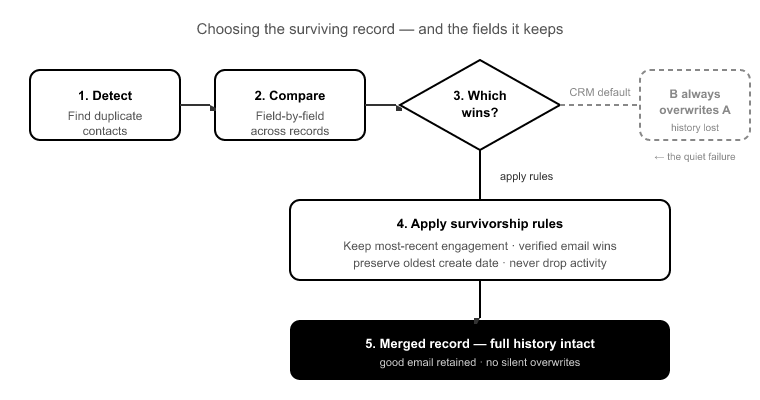
Most CRMs, when you merge Contact A into Contact B, let B’s data win on any field conflict. That’s fine if B is the good record. But if B is the stale one, you just overwrote three years of engagement history and kept a dead email address. Reps don’t discover this until a deal goes cold on an address that bounced.

You need explicit survivorship rules, defined field by field, before you merge. The three strategies I use, in order of how often they apply:

Most-recent-engagement wins for behavioral and contact fields like email, phone, and last activity. The record that’s been touched most recently almost always holds the current truth. This is your default for anything a rep acts on.

Most-complete wins for descriptive fields like job title, industry, and custom properties. Between two records, keep the value that’s populated over the one that’s blank, regardless of which record is “primary.”

Owner-priority wins for ownership and territory fields, resolved in favor of the active owner over a deactivated one. This ties directly into split-ownership handling below.

Define these before you migrate. SuprSwitch flags the duplicates and enforces your survivorship logic consistently across the dataset, but it does not auto-decide survivorship for you. That’s deliberate. The merge strategy is a business decision, not something a tool should guess. What SuprSwitch does is make the duplicates visible in Phase 1 and apply your rules uniformly in the mapping layer, so record 4,000 gets merged the same way record 40 did.

Handling Split Ownership and Deactivated Users

Split-ownership duplicates deserve their own treatment because they interact with the hardest part of any migration: ownership transfer.

When a rep leaves, their records don’t reassign themselves. In a CRM that’s run for years, you accumulate accounts owned by deactivated users sitting next to duplicate versions of the same accounts owned by active reps. If you migrate without resolving this, you get two problems stacked on each other, a duplicate and an ownership gap, because HubSpot has no active user to assign the deactivated-user record to.

The sequence matters. You resolve the duplicate first, merging the deactivated-user record into the active-owner record with owner-priority survivorship, and then ownership transfer runs cleanly against a single, correctly-owned record. Do it in the other order and you’re transferring ownership of records you’re about to merge, which is wasted work and a source of error.

SuprSwitch’s ownership transfer engine handles the ownership-gap logic in the mapping phase. Where a duplicate is split across a departed rep and an active one, the surviving record lands under the correct active owner in HubSpot. The deactivated-user gap gets resolved as part of the merge, not discovered as an orphaned-record problem after go-live.

Validating the Merge Before You Trust It

Validating the Merge Before You Trust It

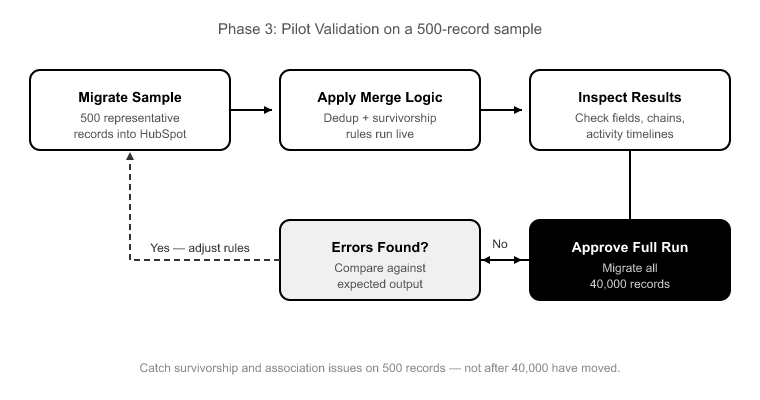
The mistake here is trusting your dedup logic because it looked right in a spreadsheet. Merge logic that’s correct in theory can still land wrong. A survivorship rule applies to a field you didn’t anticipate, an association chain doesn’t reattach, an activity timeline comes across truncated. You want to find that on a sample of 500 records, not after 40,000 have moved.

That’s what Phase 3 Pilot Validation is for. Before the full run, SuprSwitch migrates a representative sample into HubSpot so you can confirm the merged records landed with the right survivorship data: correct email, complete activity timeline, intact associations. If a merged contact shows up missing its pre-merge deal history, you fix it in the mapping layer and re-run the pilot. You do not discover it in production.

Then during Phase 4 Final Execution, real-time record validation confirms the result at scale. Every record is validated as it lands. If a merged record doesn’t appear in HubSpot within the expected window, it flags immediately, and the retry mechanism re-runs failed records without restarting the whole job. You confirm your deduped dataset before go-live, not in a support ticket weeks later.

One more thing worth stating plainly: SuprSwitch operates on a no-storage architecture, so your customer data is never held on SuprSwitch servers. The dedup and validation work happens in transit between source and HubSpot, which matters when the records you’re merging include everything your business knows about its customers.

Where CRM Deduplication Before Migration Fits in the 4-Phase Sequence

Here’s the whole thing in order, because sequencing is what makes CRM deduplication before migration cheap instead of catastrophic.

Phase 1, Schema Analysis (Day 1) : SuprSwitch scans the source CRM and surfaces custom fields, record counts, and data-quality issues including your full duplicate picture. This is where you see the fuzzy company duplicates and split-ownership cases native tooling misses. Nothing moves.

Phase 2, Mapping Logic (Day 2) : You define survivorship rules and SuprSwitch maps source objects to the HubSpot data model, creates custom properties, sets association rules, and configures ownership-transfer logic. Your merge strategy is encoded here and applied consistently.

Phase 3, Pilot Validation (Day 2 to 3) : A representative sample migrates so you validate that merged records landed with correct survivorship, intact association chains, and complete activity history. Issues get fixed in the mapping layer.

Phase 4, Final Execution (Day 3 to 4) : The full deduped dataset runs through the migration engine with real-time record validation on every record. Go-live is confirmed only after validation passes.

The reason most migrations drag to 3 to 6 weeks isn’t data volume. It’s duplicates and broken associations discovered mid-run, forcing a stop-fix-restart cycle.[3] SuprSwitch moves that discovery to Day 1 and 2, before live data moves, which is exactly why deduplication done this way doesn’t add weeks. It’s already inside the 3 to 4 day window.


Conclusion

Duplicates are not a cosmetic problem you clean up after the fact. They’re a relational-integrity problem, and the relationships are exactly what a migration moves. A 12% duplicate rate isn’t 12% extra records. It’s thousands of fractured deal associations and split activity timelines that turn a clean migration into a live-portal cleanup project measured in weeks.

The fix is sequencing. Surface the full duplicate picture on Day 1, define your survivorship rules before anything moves, resolve split-ownership and deactivated-user cases before ownership transfer runs, and validate the result on a pilot sample before the full execution. Done in that order, CRM deduplication before migration costs a fraction of what it costs to untangle the same duplicates in production, and it fits inside the same 3 to 4 day window instead of stretching your project into a month.

SuprSwitch doesn’t make dedup effortless. The merge strategy is still yours to define, and defining it well takes judgment. What it does is make the duplicates visible before they can multiply, enforce your rules consistently across the whole dataset, and validate every record as it lands. That’s the difference between a migration you sign off on with confidence and one you find out was broken three weeks later, in a support ticket.

Frequently Asked Questions

Should I deduplicate in my source CRM or in HubSpot after import?

In the source, before migration. Merging a duplicate pair in the source is one operation. Merging the same pair in a live HubSpot portal means re-associating deals, re-parenting activities, checking workflow enrollment, and re-validating reporting, 5 to 8 times the effort per record, done under production risk.[2] HubSpot’s native dedup only handles email and domain, so it won’t catch the fuzzy company and deal duplicates that cause the real damage anyway.

Does SuprSwitch automatically merge duplicate records for me?

SuprSwitch identifies duplicate records during Phase 1: Schema Analysis and applies your defined merge and survivorship rules consistently across the dataset. Which record to retain and which field values should take priority remains a business decision. SuprSwitch surfaces duplicates early and applies your rules uniformly, ensuring record 40,000 follows the same logic as record 40. 

How do I handle fuzzy duplicates that HubSpot’s native dedup won’t catch?

Fuzzy company-name variants like “Acme, Inc.” vs “Acme Inc” and deal-name duplicates get surfaced during Phase 1 Schema Analysis, which scans the source database rather than relying on email or domain matching. You resolve them in the source and encode the merge in the mapping layer before import, so they never land in HubSpot as separate records in the first place.

What happens to activity history when I merge two contacts?

It depends entirely on your survivorship rules, which is why you define them before merging. The risk is overwriting a complete timeline with a stale record’s data. Once the merge is defined correctly, SuprSwitch’s association integrity mapping preserves the surviving record’s consolidated activity history on transfer, so the merged contact lands in HubSpot with its full timeline intact rather than fragmented across two identities.

Will deduplicating add weeks to my migration timeline?

No. Deduplication is Day 1 Schema Analysis work. It happens before any live data moves, which is precisely why it doesn’t extend the timeline. The full migration still completes in 3 to 4 days. What blows timelines out to weeks is discovering duplicates and broken associations mid-run and being forced into a stop-fix-restart cycle.[3] Doing the discovery on Day 1 prevents that.

How do I know the dedup worked after migration?

Two checkpoints. Phase 3 Pilot Validation confirms merged records land with correct survivorship and intact associations on a real sample before the full run. Then during Phase 4, real-time record validation confirms every record as it lands. If a merged record doesn’t appear within the expected window, it flags immediately and the retry mechanism re-runs it. You verify record counts and association integrity before go-live is confirmed.

References

  1. Validity, “The State of CRM Data Management,” industry analysis reporting duplicate and decaying-data rates of 10 to 30% in CRM systems operating without ongoing data governance.
  2. HubSpot Knowledge Base, “Deduplicate contacts, companies, deals, and tickets,” documentation of native email- and domain-based deduplication limits and merge behavior in production portals.
  3. Gartner, “Improve Data Quality to Reduce CRM Migration Risk,” research on migration project delays attributable to late-stage data-quality discovery rather than data volume.

Why CRM Data Quality Is the First Thing to Fix Before Any Migration

Here’s the thing nobody tells you before your first migration: the tool doesn’t fix your data. It moves it. Faithfully. That includes every duplicate, every orphaned association, and every record owned by a rep who left in 2021. If you point a migration engine at a dirty CRM, you don’t get a clean HubSpot instance. You get the same mess, restructured into a data model that exposes it faster and multiplies it along the way.

I’ve run more than 120 migrations, and the single biggest predictor of whether one goes smoothly isn’t record volume or object complexity. It’s crm data quality before migration begins. A 400,000-record Salesforce org with clean associations migrates in 3 to 4 days. A 40,000-record org riddled with duplicate companies and deactivated-user ownership can burn three weeks in cleanup. Not because the migration engine is slow, but because you’re reconciling problems in HubSpot that should have been resolved at the source.

This post is about that cleanup work: what to do, why it matters, and exactly where SuprSwitch surfaces the problems versus where you have to fix them yourself.

The Compounding Cost: Why One Duplicate Becomes Forty Problems

The Compounding Cost- Why One Duplicate Becomes Forty Problems

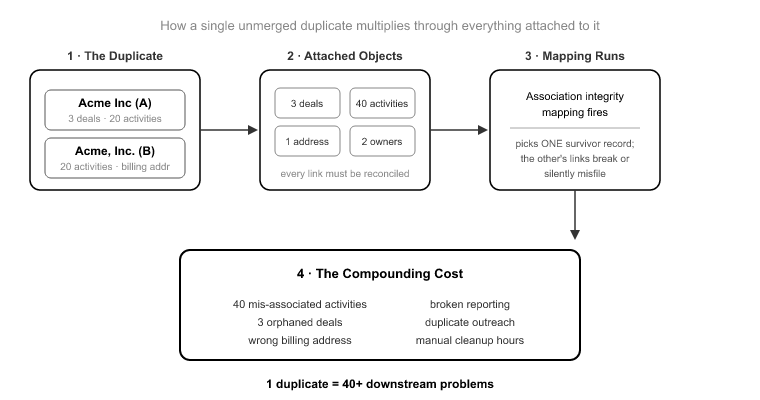
Let’s start with the failure mode most people underestimate. You look at your source CRM and see two records for “Acme Inc.” You think: that’s two problems, I’ll merge them later. Wrong. That single duplicate is a reconciliation problem that scales with everything attached to it.

Say “Acme Inc” (record A) has 3 open deals and 20 activities, and “Acme, Inc.” (record B) has 0 deals but 20 different activities and the correct billing address. When association integrity mapping runs, it doesn’t guess which twin is the real Acme. It preserves the relationships exactly as they exist in the source. So you land in HubSpot with two company records, three deals attached to one, forty activities split across both, and a sales rep who now sees half the call history on each.

That’s not one cleanup item. That’s a 44-object reconciliation problem: 2 companies, 3 deals, 40 activities, all fractured across a relationship graph that used to make sense in one place. Multiply that across the 10 to 20% duplicate rate common in un-deduplicated B2B CRMs[1], and company-level duplicates are usually worse because of naming variations. “Acme Inc”, “Acme, Inc.”, and “Acme Incorporated” all read as distinct records to a migration engine.

Here’s the honest core of it: SuprSwitch preserves association integrity faithfully. That’s the feature. That’s also exactly why source duplicates have to be resolved before the migration runs. The tool won’t invent a correct relationship you never had, and it won’t silently pick a winner between two duplicate parents.

What Actually Breaks When You Migrate Dirty Data

Four failure modes account for the overwhelming majority of migration cleanup pain. Each one poisons something different downstream.

Duplicates compound during association mapping, as described above. Every deal, contact, and activity attached to the wrong twin creates a fractured relationship graph. Your reporting double-counts, your deal totals inflate, and your reps lose trust in the pipeline view on day one.

Orphaned associations migrate as broken associations. A contact pointing to a company ID that no longer exists in the source doesn’t repair itself in transit. It lands in HubSpot as an orphan, and now your Company view is missing context that used to live somewhere. The migration didn’t break the association, the source did, but you inherit the break.

Deactivated-user ownership creates dead records the moment they land. A record owned by a user who no longer exists in the source, and who won’t be provisioned in HubSpot, arrives with no valid owner. It doesn’t route. It doesn’t trigger owner-based workflows. It doesn’t appear in anyone’s pipeline. At enterprise scale this can be 15 to 30% of your records[2].

Empty required fields either block the record from importing or force a garbage default value. HubSpot’s data model has required properties. A source record with a null value in a field mapped to a required HubSpot property will fail, or get stuffed with a placeholder that then pollutes every filter, segment, and report you build afterward.

The deeper problem is that all of your downstream automation assumes the underlying records are trustworthy. Lead scoring, routing, workflows, segmentation, revenue reporting: every one of those is built on the record layer. Migrate dirty data and you don’t have one problem. You have a broken foundation under every automation you build on top of it.

CRM Data Quality Before Migration Is Not the Tool’s Job Until It Is

Here’s the line I draw for every client, and it’s the most important thing in this post. There is a difference between what SuprSwitch surfaces and what you have to fix at the source.

Phase 1, Schema Analysis runs on Day 1. SuprSwitch scans the source CRM database and identifies custom fields, record counts, property types, and data quality issues, including duplicates, broken associations, and empty required fields, before a single record moves. This is the moment your data quality problems become visible instead of arriving as surprises mid-migration. The tool tells you what’s wrong before you’ve committed anything.

But surfacing is not fixing. Schema Analysis will show you that you have 4,200 duplicate contacts and 380 companies owned by deactivated users. It will not decide which duplicate is the real one, and it will not decide where orphaned-owner records should be reassigned. Those are business-rule and semantic decisions, and they belong to you, at the source, before Day 1.

What the tool does handle: transformation logic, association rules, property creation, and ownership routing all get defined in the Mapping Logic phase. What you handle: semantic deduplication and any judgment call about which record wins. Get that division right and the migration is predictable. Get it wrong and you’re doing cleanup in production.

The Pre-Migration Data Audit: What to Check Before Phase 1

The Pre-Migration Data Audit- What to Check Before Phase 1

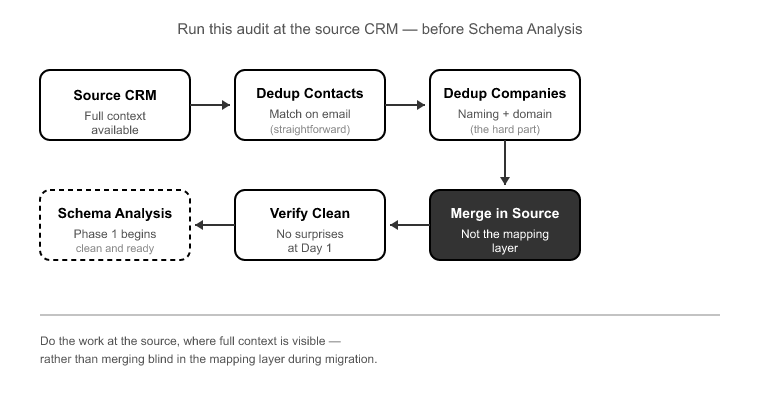
This is the practitioner checklist I run against every source CRM before Schema Analysis. Do this work at the source, and Day 1 confirms you’re clean instead of handing you a list of surprises.

1. Dedup pass. Run deduplication at both the contact and company level. Contacts are usually matched on email. Companies are the hard part because of naming variation and domain inconsistencies. Merge in the source, where you can see the full context, not in the mapping layer where you’re working blind.

2. Ownership reconciliation. Pull a list of every record owner and cross-reference against active users. Every owner who won’t exist in HubSpot needs a resolution decision: reassign to an active owner, route to a queue, or flag for review. Do this before Phase 2, because that’s where ownership transfer logic gets locked in.

3. Required-field completeness. Identify which source fields map to HubSpot required properties, then check for nulls. Decide whether to backfill at the source or define a mapping-layer default that isn’t garbage. Never let placeholder values leak into a required field you’ll report on later.

4. Association integrity check. Look for contacts pointing to company IDs that no longer exist, deals with no associated company, and activities referencing deleted records. These orphans migrate as orphans. Resolve them where the original relationship data still exists, in the source.

Ownership Is the Silent Killer

Of the four failure modes, deactivated-user ownership is the one that surprises people most, because it’s invisible until go-live. Duplicates you can see. Orphaned associations show up in a scan. But an unowned record looks completely normal in a spreadsheet. It has a name, an email, a company. It just has no living owner.

A 400,000-record Salesforce org with five years of sales turnover routinely carries 20 to 40 deactivated users still listed as record owners[3]. Without ownership transfer logic resolved before migration, tens of thousands of records arrive in HubSpot unowned. They sit silently until the first owner-based workflow fails to fire, or a rep asks why a whole book of business isn’t in anyone’s pipeline.

SuprSwitch’s ownership transfer engine resolves this in Phase 2, Mapping Logic. You decide, before Final Execution, where orphaned-owner records go: reassigned to an active owner, routed to a queue, or flagged for review. The decision is made and reviewed while nothing has moved yet, not discovered in a support ticket three weeks after go-live.

Where SuprSwitch Catches What You Missed

Even with a clean source, things slip through. That’s why there are three layers of quality-catching before go-live, not one.

Schema Analysis (Phase 1) is the first net. It flags duplicates, broken associations, empty required fields, and record counts on Day 1, before commitment.

Pilot Validation (Phase 2 to 3) is the second net. A representative sample migrates to HubSpot to validate relational integrity, activity history formatting, field-level truncation, and association chains against the real production data model. Anything the audit missed surfaces here, and gets fixed in the mapping layer, not in post-migration cleanup. This is where the pilot migration earns its keep: you catch a truncated custom field or a broken association chain on a 500-record sample instead of on 400,000 live records.

Real-time record validation (Phase 4) is the last net. During Final Execution, every record is validated as it lands. If a record doesn’t appear in HubSpot within the expected window, it flags immediately rather than letting you discover the gap later. Failures, usually data quality edge cases, hit the retry mechanism, which automatically re-attempts them without restarting the full job. With clean input, almost nothing reaches the retry queue. That’s the whole point: the retry mechanism is a safety net, not a workflow.

One more architectural note that matters for the technical buyers reading this: SuprSwitch runs a no-storage architecture. Your customer data is never held on SuprSwitch servers. It moves from source to HubSpot without being retained in between. Data quality work happens against your systems, not a vendor’s copy of them.

Clean Input, Predictable Output: What a 3–4 Day Migration Actually Requires

People assume crm migrations drag on for weeks because of data volume. They don’t. Record count is a runtime problem, and the migration engine handles volume fine. What turns a 4-day migration into a 4-week one is manual field mapping and late-discovered association breaks: problems that surface after live data has already moved.

SuprSwitch compresses the timeline to 3 to 4 days by front-loading discovery. Schema Analysis on Day 1, Mapping Logic on Day 2, Pilot Validation on Day 2 to 3, Final Execution on Day 3 to 4. The reason that works is that discovery and validation happen before any live data moves. But that compression assumes one thing: that the source data is clean, or that the dirt has been surfaced and a resolution decided.

CRM data decays at roughly 22 to 30% per year as contacts change jobs, emails go dead, and companies get acquired[4]. A CRM that hasn’t been actively maintained for three years can be 40% or more stale before you even count duplicates. That decay doesn’t slow the migration engine. It slows the prep. And the prep is where migrations are actually won or lost.

So the equation is simple: clean input, predictable 3 to 4 day output. Dirty input, and the engine still runs in 3 to 4 days, but you’ve now got weeks of source-side prep or post-migration reconciliation bolted onto either end. The audit is what keeps the timeline honest.

Conclusion

The migration tool is not where data quality gets fixed. It’s where unfixed data quality gets amplified. A duplicate company becomes a 44-object reconciliation problem. A deactivated-user record becomes an unroutable dead weight. An orphaned association migrates as an orphan. None of that is the engine’s fault. It’s doing exactly what you told it to, against exactly what you pointed it at.

The good news is that SuprSwitch is built to make the problem visible before it becomes expensive. Schema Analysis on Day 1 tells you what’s dirty before you commit a record. Pilot Validation catches what the audit missed. Real-time record validation and the retry mechanism guard Final Execution. Three nets, all before go-live. But the tool surfaces problems. It doesn’t make your business-rule decisions for you.

So do the audit first. Dedup at the source. Reconcile ownership. Check required fields and association integrity. Get crm data quality before migration to a place you trust, and the 3 to 4 day timeline holds. Skip it, and you’ll spend the time you saved cleaning up in production, which is the one place cleanup should never happen.

Frequently Asked Questions

Should I clean my CRM data before or after migration?

Before migration. Resolve duplicates, broken associations, ownership issues, and missing required data at the source. SuprSwitch identifies these issues during Schema Analysis so they can be addressed before data moves.

Can a migration tool clean up duplicate CRM records?

Not completely. A migration tool can identify duplicates, but deciding which record to keep requires business context. SuprSwitch surfaces duplicate records, while deduplication decisions are made at the source.

What happens if CRM records have broken associations before migration?

Broken associations can remain broken after migration because the migration preserves the source relationships. SuprSwitch identifies these issues before migration so they can be resolved before they affect the destination CRM.

What happens to records owned by deactivated users during migration?

They need to be reassigned, routed, or flagged before migration. SuprSwitch’s ownership transfer engine lets you define how these records should be handled before they reach the destination CRM.

How does CRM data quality affect migration time?

Poor data quality can extend pre-migration preparation and post-migration reconciliation. SuprSwitch surfaces data issues early, helping teams resolve them before migration and keep execution predictable.

References

  1. Validity, “The State of CRM Data Management” reported duplicate contact rates of 10 to 20% in un-maintained B2B CRM instances.
  2. Salesforce Admin Best Practices Documentation record ownership and user deactivation impact analysis on routing and workflow eligibility.
  3. HubSpot Solutions Partner Migration Field Notes deactivated-owner counts observed in enterprise Salesforce orgs with multi-year sales turnover.
  4. ZoomInfo, Marketing Data Benchmark Report annual CRM data decay estimated at 22.5 to 30% due to job changes, dead emails, and corporate acquisitions.

How to Audit Your CRM Data Before Switching Platforms

Here is the failure mode nobody warns you about. Your migration runs clean. Every record transfers. The transfer job reports success. Then three weeks later a sales rep opens a deal in HubSpot and the entire history is gone. The contact is not associated. The owner is a person who left the company eight months ago. The custom field that used to hold the renewal date is empty, because it was never filled in the source system to begin with.

The migration did not fail. It did exactly what it was told. It faithfully copied dirty source data into a clean new system, faster and more completely than you have ever seen your data move. That is the trap. Most teams treat migration as a chance to clean house. In reality, migration is a photocopier. A 22% duplicate rate in Salesforce becomes a 22% duplicate rate in HubSpot [1], except now it is tangled up with a new association model and much harder to unwind.

The crm data audit before migration is the single highest-leverage step in the whole project. It is where you find the duplicate rate, the broken associations, the ownership gaps from deactivated users, and the half-empty required fields before they become permanent data debt in your production portal. This is how you run that audit, and what happens when you skip it.

Why the CRM data audit before migration is where projects are won or lost

Why the CRM data audit before migration is where projects are won

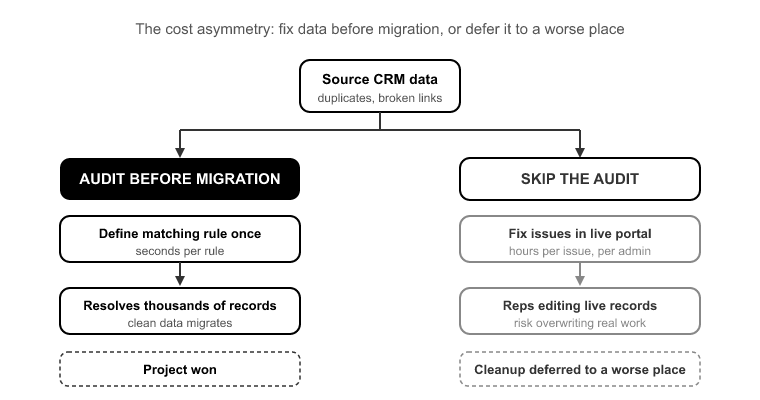
The cost asymmetry is the whole argument. Fixing a duplicate or a broken association in the source data during the audit takes seconds per rule. You define a matching rule once and it resolves thousands of records. Fixing that same issue in a live HubSpot portal after go-live, with reps actively editing records, takes an admin hours per issue and risks overwriting real work someone did that morning.

Teams that skip the audit do not save time. They just defer the cleanup to a worse place: a production environment where the data is now load-bearing. Routing depends on it. Reporting depends on it. Workflow enrollment depends on it. Every problem you did not catch upstream is now ten times more expensive to fix, and it is blocking the people who need the CRM to do their jobs.

This is also why migrations get the reputation for dragging on for three to six weeks. That timeline has almost nothing to do with data volume. A 400,000-record migration does not take longer than a 40,000-record one because of the transfer. Modern migration engines move records fast. It drags because field mapping was done by hand, associations broke mid-run and had to be re-traced, and post-migration cleanup turned into its own multi-week project. The audit front-loads all three of those discoveries. Find them on Day 1, not Day 30.

Record completeness: what “empty” actually costs you

Record completeness- what -empty- actually costs you
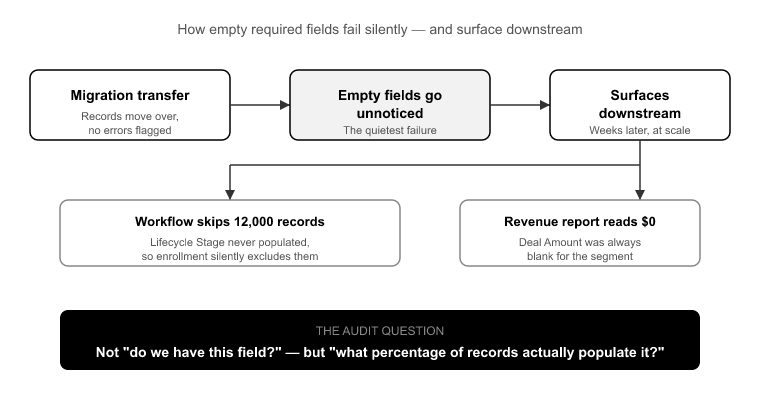
Start with required-field population, because empty fields are the quietest failure in a migration. Nobody notices them during the transfer. They surface downstream, when a workflow that enrolls contacts based on Lifecycle Stage silently skips 12,000 records because that field was never populated in the source, or when a revenue report reads zero for a segment because the Amount field on those deals was always blank.

The audit question is not “do we have this field?” It is “what percentage of records actually have a value in it?” A required field in HubSpot that is empty on 30% of your incoming records is a broken workflow waiting to happen. You have three choices, and you need to make them before mapping: backfill the value in the source, drop the field from the required set in HubSpot, or accept the gap and document it. What you cannot do is discover it after go-live.

Measure population rates on every field you plan to migrate, especially anything that will drive segmentation, routing, or reporting. Empty is not neutral. Empty is a decision you are making by default if you do not measure it.

Your real duplicate rate, and why the spreadsheet won’t show it

Ask a team what their duplicate rate is and you will get a guess. The guess is almost always low. In practice, SMB CRMs that have never run a dedup process routinely show 15 to 30% duplicate contact rates [2]. Enterprise orgs with multiple lead sources feeding in and no matching rules can run higher. You do not guess this number. You measure it.

And you cannot measure it properly from a flat CSV export, because duplicates are not always obvious string matches. The same person shows up as jsmith@acme.com and john.smith@acme.com, or as “John Smith” at “Acme” and “John Smith” at “Acme Inc.” Real dedup needs matching logic across email, name, and company, not a spreadsheet sort.

Dedup belongs in the source, before migration, always. Here is why. If you carry unmanaged duplicates into HubSpot, they do not just sit there. They get wired into your new association model. Both copies of John pick up different company associations, different deal associations, and different activity histories. Now merging them means reconciling two divergent relationship graphs instead of two contact records. You have made the problem structurally harder by moving it.

Association integrity: the failures you can’t see in an export

Association integrity- the failures you cant see in an export

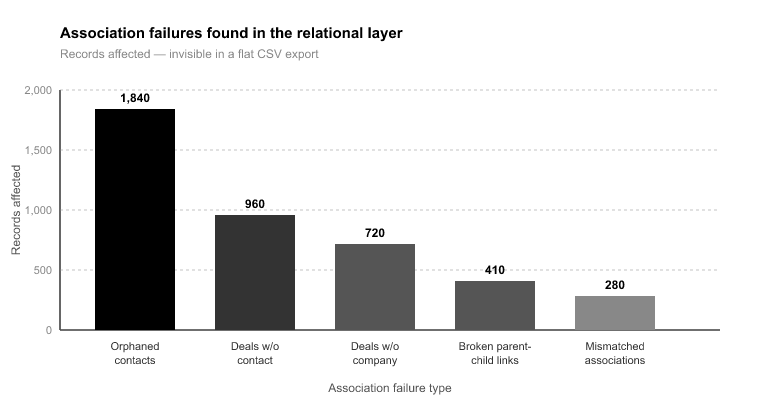
This is the category that catches even experienced teams, because association problems are invisible in a spreadsheet. A CSV export flattens relationships. It gives you a contacts file and a deals file, but the connective tissue between them lives in the relational structure, not the flat rows. You cannot audit associations from a flattened export. You have to read the source database’s relational layer directly.

What you are hunting for: orphaned contacts with no company association, deals with no associated contact, activities logged against records that were later deleted, and companies with no contacts attached. Each of these transfers “successfully” and lands broken.

Here is a concrete example. Picture a 120,000-record Salesforce org where 8,000 deals had no associated contact. Migrated as-is, those 8,000 deals arrive in HubSpot as unattributed pipeline: no contact, no email history, no way for a rep to work them. Caught in the audit, you define one association rule, and every one of those deals comes through connected. This is exactly what association integrity mapping is for. It preserves the 1:1 relationships between objects, so a deal that was tied to a contact in the source stays tied to that contact in HubSpot.

Source CRMs also store relationships in ways HubSpot does not. Salesforce’s object model does not map cleanly to Contacts, Companies, Deals, and Tickets. If you do not identify those structural mismatches during the audit, you find out weeks later when the history is missing.

Property usage: auditing 400 fields down to the 60 that matter

A typical mature Salesforce org carries 200 to 400 custom fields [3]. Field utilization follows the 80/20 pattern hard: roughly 20 to 30% of those custom properties hold more than 90% of the data that is actually used [3]. The rest are abandoned experiments, one-off campaign fields, duplicates of standard fields, and columns someone added for a project that ended in 2021.

Migrating all 400 does not preserve information. It clutters HubSpot with dead properties, forces you to build and maintain a mapping layer for fields nobody uses, and buries your reps under property groups full of empty boxes. More is not safer. More is slower to build, harder to validate, and worse to use.

The audit measures utilization per field, meaning what percentage of records have a value, and gives you a defensible cut line. Fields populated on more than 10% of records generally earn their place. Fields under that threshold need a specific reason to migrate, not just inertia. Get the typical org from 400 fields down to the 60 that carry the real data, and both your mapping work and your end-user experience get dramatically cleaner.

Ownership gaps and the deactivated-user problem

Ownership gaps and the deactivated-user problem

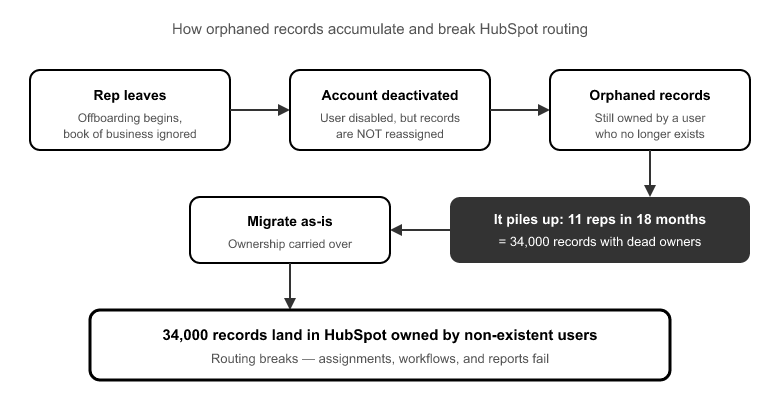
Reps leave. Their Salesforce or Pipedrive accounts get deactivated. But their records still carry them as owner, because deactivating a user does not reassign their book of business. Nobody does that cleanup at offboarding. So it piles up.

Here is the scenario: a 40-person sales team where 11 reps turned over in 18 months, leaving 34,000 records owned by deactivated users. Migrate that as-is and 34,000 records land in HubSpot owned by users who do not exist in the new portal. Routing breaks. Reporting attributes pipeline to ghosts. Workflows that enroll based on owner skip those records entirely. Broken on day one.

The audit finds every record owned by a deactivated user and lets you define transfer logic once: reassign to the territory owner, the manager, or a holding queue. The SuprSwitch ownership transfer engine handles this reassignment before the migration runs, so records arrive owned by real, active users. The alternative is a week of manual reassignment after go-live while routing quietly fails around you.

How SuprSwitch turns the audit into Day 1 of the migration

Everything above sounds like a separate, weeks-long cleanup project. It is not, at least not when the audit is built into the migration itself. In a SuprSwitch migration, the audit is Phase 1, Schema Analysis, and it happens on Day 1.

Phase 1 (Day 1), Schema Analysis : SuprSwitch scans the source CRM database and surfaces your custom field inventory, record counts, property types, and data quality issues: duplicate rate, broken associations, empty required fields, orphaned records, all before a single record moves. Because it reads the relational structure directly rather than a flat export, it catches the association problems a spreadsheet cannot show you. And its no-storage architecture means the source data being scanned is never held on SuprSwitch servers, which is worth knowing for anyone signing off on the security review.

Phase 2 (Day 2), Mapping Logic :The findings from Day 1 feed straight into the transformation layer. This is where your 400 fields get mapped down to the 60 that matter, custom properties get created in HubSpot, association integrity mapping turns those orphaned-deal findings into concrete rules, and the ownership transfer engine gets its reassignment logic for the deactivated-user records. Every decision is made and reviewed before live data moves.

Phase 2 to 3 (Day 2 to 3), Pilot Validation : A representative sample migrates into HubSpot on real records, so you can validate relational integrity, activity history formatting, field-level truncation, and association chains. Anything wrong gets fixed in the mapping layer, not in a live portal after go-live.

Phase 3 to 4 (Day 3 to 4), Final Execution : The full dataset runs through the migration engine with real-time record validation. If a record does not appear in HubSpot within the expected window, it flags immediately instead of surfacing three weeks later in a support ticket. Failed records hit the retry mechanism automatically, so there is no restarting the entire job. Every record is validated post-migration before go-live is confirmed.

That is how a migration that “takes three to six weeks” compresses to 3 to 4 days. The time was never in the transfer. It was in the discovery and the cleanup. Move both to Day 1 and Day 2, before any live data moves, and the execution runs against known, mapped, validated data.

Conclusion

A migration does not fail during the transfer. It fails because someone moved dirty source data faithfully into a clean system and called it done. The duplicate rate, the orphaned deals, the ghost owners, the empty required fields: none of that gets better by moving it. It gets worse, because now it is tangled into a new association model and it is blocking live users.

The crm data audit before migration is where you make those problems cheap to fix. Every issue you catch in the source costs seconds per rule. Every issue you catch after go-live costs an admin hours and risks real work. That is the entire economic case for front-loading the audit, and it is why the audit is the highest-leverage day in the whole project.

Do not start with a spreadsheet. Start with a Schema Analysis that reads your relational structure directly, surfaces the problems a flat export cannot show, and feeds straight into mapping, pilot validation, and execution. That is not a separate cleanup project bolted onto the front. It is Day 1 of a migration that finishes in 3 to 4 days with every record validated before go-live.

Frequently Asked Questions

How long should a CRM data audit take before migration?

A CRM data audit should happen before migration, not as a separate post-migration cleanup project. With SuprSwitch by SuprDense, Schema Analysis is completed on Day 1, covering record counts, duplicate rates, field usage, broken associations, and ownership gaps.

Should CRM data be cleaned before or after migration?

Clean and validate your CRM data before migration. Identifying duplicates, incomplete fields, broken associations, and ownership gaps in the source makes them easier to resolve before they become issues in the new CRM.

What should you check during a CRM data audit?

Review duplicate records, field completeness and usage, object associations, ownership gaps, record quality, and fields that actually need to be migrated. SuprSwitch by SuprDense surfaces these data-quality issues during Schema Analysis before migration begins.

How do you identify duplicate CRM records before migration?

Use matching rules across key identifiers such as email, name, and company rather than relying only on spreadsheet comparisons. SuprSwitch by SuprDense analyzes the source data to identify duplicate records before they are transferred into the new CRM.

Do you need to migrate all CRM custom fields?

No. Audit field usage first and migrate the fields that contain meaningful, relevant data. SuprSwitch helps identify field utilization so unnecessary or unused properties can be excluded from the migration.

References

  1. Validity, “The State of CRM Data Management,” analysis of duplicate and decay rates across enterprise CRM instances.
  2. DemandGen Report, “Data Quality Benchmarks for B2B Sales and Marketing Databases,” duplicate contact rate ranges in undeduped CRMs.
  3. Salesforce Ben, “How Many Custom Fields Is Too Many? Managing Salesforce Field Sprawl,” typical custom field counts and utilization patterns in mature orgs.

Copper CRM to HubSpot Migration Guide

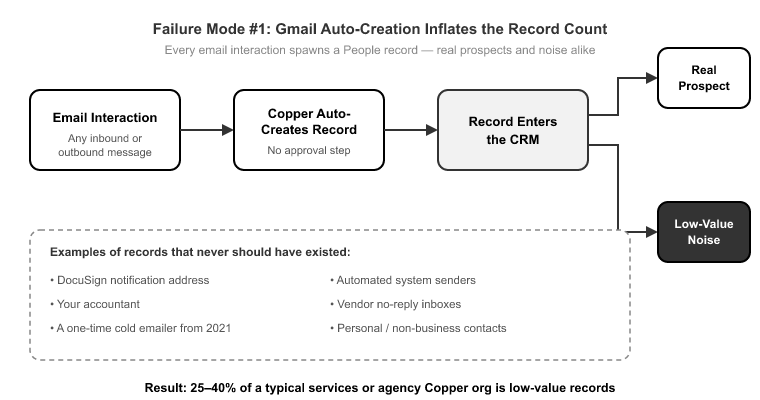
A Copper-to-HubSpot migration looks like the easy one. The orgs are small, everything lives in Google Workspace, and the object count is manageable. Then you run the export and find something else. That 40,000-contact Copper org is really 27,000 real people and 13,000 auto-created ghosts: vendors, one-off inbound emails, and personal Gmail addresses Copper created the moment a message hit an inbox. That’s the trap. The feature that makes Copper convenient day to day, automatic record creation from Gmail activity, is exactly what pollutes your new HubSpot instance and inflates your contact tier bill on import.

The other two landmines are Copper’s separate Leads object and its heavy use of Tags for segmentation. Neither has a clean HubSpot equivalent. Migrate them blind and you lose years of qualification logic and segmentation in a single afternoon. The real work in a copper crm to hubspot migration isn’t moving volume. It’s reconciling the data model and stripping out the noise before anything transfers. Done right, with a proper discovery phase, this is a 3 to 4 day job, not a three-week cleanup project.[1]

What Actually Breaks in a Copper-to-HubSpot Migration

What Actually Breaks in a Copper-to-HubSpot Migration

Three failure modes account for nearly every bad Copper migration I’ve seen. None of them are about record volume.

Gmail auto-creation inflates the record count. Copper creates a People record the moment an email interaction happens. That’s helpful when you’re capturing a real prospect. It’s a disaster when it captures the DocuSign notification address, your accountant, and the guy who cold-emailed you once in 2021. A typical services or agency Copper org carries 25 to 40% low-value records.[2] Migrate those blind and you don’t just clutter HubSpot, you pay for the privilege, since HubSpot’s marketing contact tiers price on volume.[3]

Copper Leads have no clean HubSpot home. Copper carries a separate Leads object that behaves differently from People. It’s a pre-qualification holding area. HubSpot’s data model has no object that works the same way. Teams either flatten the distinction by dumping everything into Contacts, or they lose the Lead records entirely. Both outcomes destroy the qualification stage that Copper users built their pipeline around.

Tags don’t translate. Copper runs its segmentation on Tags. HubSpot has no native contact-tag system. It uses properties and active lists instead. Migrate Tags without an explicit mapping decision and they simply vanish, taking your entire segmentation logic with them. This is the single most common “where did my lists go?” panic ticket after a DIY Copper migration.

Two more bite less often but hurt just as much: Copper’s Connect fields (the relationship links between records) and the Projects object have no default HubSpot counterpart. Without an explicit custom-object decision, those relationships orphan on import.

How Copper’s Data Model Maps to HubSpot

How Coppers Data Model Maps to HubSpot

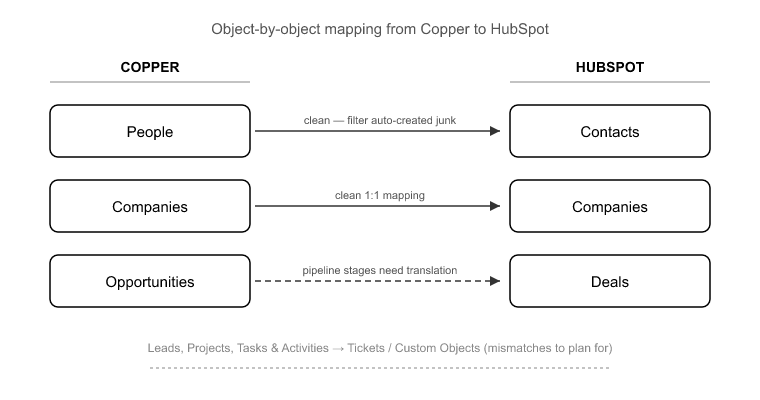
Before you map anything, you need to know which objects translate cleanly and which are the mismatches. Copper’s core objects are People, Companies, Opportunities, Leads, Projects, Tasks, and Activities. HubSpot’s targets are Contacts, Companies, Deals, Tickets, and Custom Objects.

Here’s how they line up:

  • People → Contacts: clean, once you’ve filtered the auto-created junk.
  • Companies → Companies: clean 1:1.
  • Opportunities → Deals: clean, but your pipeline stages need explicit translation (more on that below).
  • Leads → ?: the first real mismatch. There is no native Leads object in HubSpot that behaves like Copper’s. This needs a conversion decision, not a mapping.
  • Projects → Custom Object: the second mismatch. If Projects carry real relationships you need to preserve, they become a HubSpot custom object. If not, they may fold into Deals or Tickets.
  • Activities → Engagements: Copper’s Emails, Calls, Meetings, Notes, and Tasks each need to land as their correct HubSpot engagement type.

The Opportunities-to-Deals map is the one people worry about, and it’s actually the straightforward part. It’s Leads and Projects, the objects HubSpot doesn’t have, that need real thought. This is exactly where SuprSwitch’s contextual object mapping earns its place. Instead of dumping Copper Leads into Contacts with no logic, you define conversion rules up front. A Lead becomes a Contact with a specific lifecycle stage, or a Lead becomes a Contact plus an associated Company. That way the qualification distinction survives the move.

The Google Workspace Contact Sync Problem

This section matters more for a copper crm to hubspot migration than for any Salesforce or Pipedrive job I’ve run. Because Copper auto-creates a Person from Gmail activity, your record count is fiction until someone audits it.

This is where SuprSwitch’s Schema Analysis, in Phase 1 on Day 1, does the heavy lifting. Before a single record moves, SuprSwitch scans the Copper source database and surfaces the actual state of your data: real record counts versus auto-created duplicates, empty-required-field records, and broken associations. This is where the “your 40,000 contacts are really 27,000 real people” conversation happens, with data behind it instead of a guess.

Once you can see the duplicate rate and the auto-created cohort, you make a deliberate decision about what moves. Maybe you migrate only People with a logged Opportunity or a manual Tag. Maybe you set a last-activity threshold. The point is you decide before the migration runs, not after you’ve already polluted HubSpot and started paying for it.

One hard rule: do not try to re-sync historical Gmail threads through the migration. Historical logged emails migrate as engagement records. Going forward, HubSpot’s own Gmail integration takes over. Teams that don’t separate “historical activity migration” from “go-forward sync setup” end up double-logging every email, once from the migration and once from the new integration. Keep those two workstreams apart.

Translating Tags and Custom Fields Without Losing Segmentation

Translating Tags and Custom Fields Without Losing Segmentation

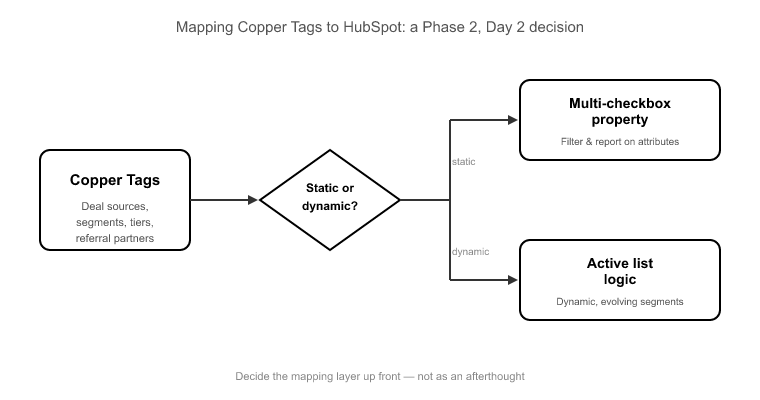
Tags are where Copper users have quietly encoded years of business logic: deal sources, industry segments, referral partners, service tiers. HubSpot doesn’t have tags, so the translation is a mapping-layer decision made in Phase 2 on Day 2, not an afterthought.

You have two sensible targets for Copper Tags in HubSpot:

  • A multi-checkbox property: best when tags represent static attributes you’ll filter and report on.
  • Active list logic: best when tags represent dynamic segments you’ll use for enrollment and workflows.

The right choice depends on how each tag is actually used, which is why this gets defined and reviewed before execution rather than improvised mid-run. SuprSwitch’s mapping logic is where you set that translation, so every Copper Tag lands in a known HubSpot property instead of evaporating.

Copper’s Connect fields, the relationship links between records, get handled by SuprSwitch’s association integrity mapping. Those relationships translate into native HubSpot associations, preserving the People↔Companies↔Opportunities chains rather than orphaning the links on import. Custom fields map to custom properties created in HubSpot during the same phase, with property types matched so a Copper dropdown doesn’t land as free text.

Migrating Pipelines and Activity History Intact

Migrating Pipelines and Activity History Intact

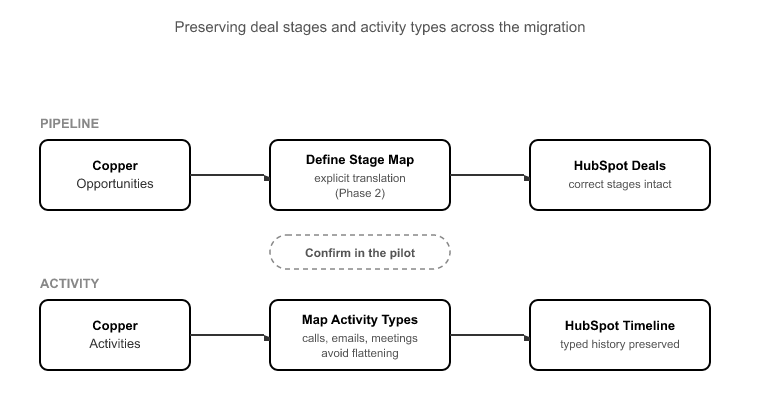
Two things break most often in the pipeline-and-history layer: deal stages that don’t match, and activities that flatten into generic Notes.

On the pipeline side, Copper Opportunities map to HubSpot Deals cleanly, but your Opportunity stages need an explicit translation to HubSpot deal stages. Skip this and every deal lands in the default stage, destroying your forecast and any historical stage-based reporting. Define the stage map in Phase 2 and confirm it in the pilot.

On the activity side, Copper stores Emails, Calls, Meetings, Notes, and Tasks as distinct activity types tied to Gmail and Calendar. HubSpot has matching engagement types: Calls, Emails, Meetings, Notes, and Tasks. The trap is that a lazy mapping collapses everything into Notes, so your reps lose their call and meeting timelines and your activity reporting goes dark. A 1:1 activity-type map has to be defined explicitly. Copper Calls become HubSpot Call engagements, and Copper Meetings become Meeting engagements. That’s the difference between a migration that preserves a rep’s timeline and one that erases it.

The 4-Phase SuprSwitch Migration, Day by Day

Most Copper migrations that drag on for weeks aren’t slow because of data volume. Copper orgs are usually 5,000 to 50,000 records.[4] They’re slow because of manual field mapping and broken associations discovered halfway through. SuprSwitch front-loads that discovery so the whole job runs in 3 to 4 days across four phases.

Phase 1, Schema Analysis (Day 1). SuprSwitch scans the Copper source and reports custom fields, real record counts, and data quality issues: auto-created duplicates, empty-required-field records, and broken associations. Nothing moves. This is where you decide what’s worth migrating.

Phase 2, Mapping Logic (Day 2). The transformation layer maps Copper objects to the HubSpot data model. Custom properties get created, Tag translations get defined, association rules get set, and Lead conversion logic gets specified. The ownership transfer engine resolves deactivated-Copper-user gaps here, reassigning records owned by departed reps before the migration runs, so ownership doesn’t orphan. Everything is reviewed before the first record moves.

Phase 3, Pilot Validation (Day 2 to 3). A representative sample migrates into HubSpot so you can confirm the mapping actually holds: calls stayed calls, Tags landed in the chosen property, deal stages translated correctly, and association chains held. Issues found here get fixed in the mapping layer, not in a post-migration cleanup project. The pilot migration is the single biggest risk reducer in the whole process.

Phase 4, Final Execution (Day 3 to 4). The full dataset runs through SuprSwitch’s migration engine. Real-time record validation flags any record that doesn’t land in HubSpot within the expected window, so you find out during the transfer, not three weeks later in a support ticket. The retry mechanism automatically re-runs failed records without restarting the entire job. Every record is validated post-migration before go-live is confirmed.

For the IT and technical buyers scoping this: SuprSwitch uses a no-storage architecture. Your Copper data is never held on SuprSwitch servers. It moves from source to HubSpot through the transformation layer without being retained.

Conclusion

The Copper migration that goes wrong isn’t the one with too many records. It’s the one where nobody audited the auto-created duplicates, nobody decided what happens to Leads, and nobody planned where Tags would land. All three are discovery problems, and all three are solvable before a single record moves.

That’s the whole argument for front-loading the work. When Schema Analysis runs on Day 1 and mapping logic is reviewed on Day 2, the actual data transfer becomes the boring, predictable part: validated in real time, retried automatically on failure, and confirmed record by record before go-live. A copper crm to hubspot migration handled this way is a 3 to 4 day project with no cleanup tail, not a month of chasing broken associations and rebuilding lost segments.

Start with the record count you can actually trust. Once you know how many of your Copper contacts are real, every other decision, what moves, what maps where, what gets left behind, gets easier to make.

Frequently Asked Questions

How do you migrate Copper CRM to HubSpot?

A Copper CRM to HubSpot migration starts with data auditing, object mapping, field and Tag mapping, association checks, and pilot validation. SuprSwitch by SuprDense manages these stages before executing the final data migration.

How do Copper Leads map to HubSpot?

Copper Leads are mapped to HubSpot Contacts using contextual object mapping. SuprSwitch by SuprDense can preserve qualification context by applying the appropriate lifecycle stage and Company association during migration.

How do Copper Tags map to HubSpot?

Copper Tags are mapped to HubSpot properties or active lists based on how they are used for segmentation. SuprSwitch by SuprDense defines and validates the mapping before migration to preserve your existing segmentation logic.

Can Copper activity history be migrated to HubSpot?

Yes. Copper emails, calls, meetings, notes, and tasks can be mapped to their corresponding HubSpot engagement types. SuprSwitch by SuprDense validates the activity mapping during the pilot migration to preserve historical activity.

How long does a Copper CRM to HubSpot migration take?

A Copper CRM to HubSpot data migration typically takes 3–4 days with SuprSwitch by SuprDense, covering schema analysis, mapping, pilot validation, and final execution. The timeline depends on the complexity and requirements of your Copper data.

References

  1. SuprSwitch by Suprdense, “CRM Migration Timelines and Phased Delivery Benchmarks,” Suprdense Documentation, 2024.
  2. Copper CRM, “How Copper automatically captures People and activity from Google Workspace,” Copper Help Center, 2023.
  3. HubSpot, “Understanding marketing contacts and contact tiers,” HubSpot Knowledge Base, 2024.
  4. G2, “Copper CRM customer profile and organization size distribution,” G2 Software Reviews, 20