Skip to content

7 Most Common HubSpot Onboarding Mistakes (and How to Fix Them)

Most HubSpot onboarding failures don’t come from the platform. They come from doing the right steps in the wrong order, or skipping the unglamorous foundation work entirely. A missing ownership map. 400 imported properties nobody uses. A pipeline designed after the data already landed. None of it looks like a problem on day one. All of it becomes structural by day ninety, when the cleanup project starts and someone asks why forecasting has been wrong since go-live.

I’ve overseen more than 120 migrations and onboardings, and the pattern is always the same: the mistakes that hurt most are invisible when you make them. Below are the seven HubSpot onboarding mistakes I see most often, why each one compounds silently, and exactly how to fix it before it costs you six months.

Mistake #1: Importing every legacy property instead of auditing first

This is the single most common onboarding drag I run into. A team decides to bring everything over so nothing gets lost, then imports the full property set from their old CRM. A mid-market Salesforce org usually carries 200 to 500 contact and deal properties combined, but in practice, fewer than 60 get used in reporting or automation.[1]

So you end up with 400 or more properties, half of them empty, and no rep able to find the 30 that actually matter. Property sprawl kills adoption faster than any missing feature. When a rep opens a deal record and sees forty fields, thirty of them blank and irrelevant to their process, they stop trusting the tool. They go back to spreadsheets.

The fix: run a use-based property audit before anything moves. Pull a usage report from your legacy CRM and rank every field by three things: is it populated, is it used in a report, is it used in automation. If a field fails all three, it doesn’t come over. Map the survivors into clean property groups so reps can navigate them. This is a human decision, not a tooling one. No tool can tell you which fields your business needs, but doing this audit before import is what separates a clean instance from a six-month cleanup.

Mistake #2: Designing pipelines and deal stages after the data lands

Legacy CRMs often carry 9 to 12 sales stages that map poorly to a clean HubSpot pipeline.[2] When teams import deals before having the stage-mapping conversation, deals land in the wrong stage, or default to a single stage, and forecasting is wrong from the first day of go-live.

The stage-mapping conversation has to happen first. Sit down with the sales leader and reconcile every legacy stage to a HubSpot deal stage, one by one. Some legacy stages collapse into one. Some get dropped. Some need a new stage in HubSpot to keep their meaning. Decide the win probability and forecast category for each stage before a single deal record moves.

The fix: build the pipeline and deal stages first, document the stage-to-stage mapping, and only then import. If your deals live in a legacy system with mismatched stages, that mapping becomes the ruleset your migration follows. This is where SuprSwitch’s contextual object mapping does the work, translating each legacy stage to its correct HubSpot deal stage on import instead of dumping everything into stage one.

Mistake #3: Rebuilding the same hub configuration by hand for every client

This one is aimed at the agencies. A manual onboarding of a full Sales Hub, with properties, property groups, pipelines, deal stages, lifecycle automation, workflows, and permission sets, takes 2 to 3 admin days per client.[3] Multiply that across 20 to 40 onboardings a year and it’s the biggest hidden cost in an agency’s delivery margin.

Worse, every hand-built configuration is a little different. A workflow named differently here, a permission set slightly off there. That inconsistency is impossible to support at scale, and it’s where errors creep in. An admin forgets to activate a lifecycle stage automation, or copies a stage probability wrong.

The fix: template it once, then deploy it consistently. With Suprdense CONFIG’s one-click hub deployment, you deploy a fully configured Sales, Marketing, or Service Hub module, properties, property groups, pipelines, deal stages, workflows, and permission sets, from a templated configuration in minutes instead of 2 to 3 days. Build your best onboarding baseline once, then push it to every client with the same structure every time.

Be clear about what this does and doesn’t do. SuprConfig doesn’t design your pipeline or audit your properties for you. Those are the human decisions from Mistakes #1 and #2. What CONFIG does is execute those decisions fast and identically across every project, so your admins spend their time on strategy instead of clicking through the same setup screens for the twenty-fifth time.

Mistake #4: Ignoring ownership and deactivated-user mapping

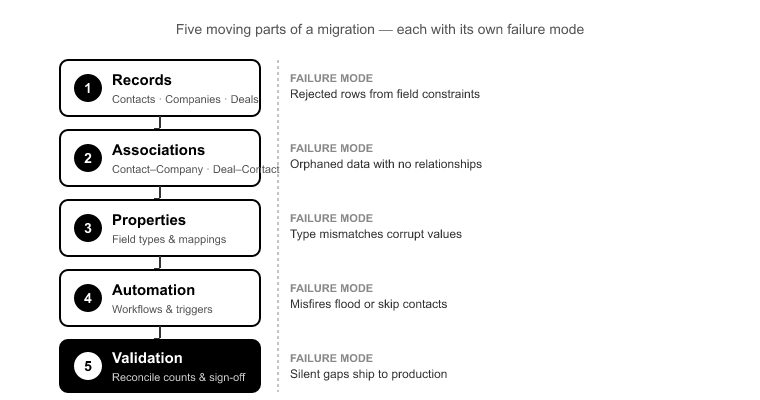
This is the HubSpot onboarding mistake that quietly breaks reporting. In a 40-rep company with three years of history, it’s normal to find 8 to 12 former reps still owning open deals and thousands of contacts.[4] Those users don’t exist in your new HubSpot instance. If you don’t remap ownership before import, every one of those records lands unowned.

Unowned records drop out of every owner-scoped report and every owner-based workflow. Your VP of Sales pulls a pipeline-by-rep report and it’s missing thousands of dollars in deals. Not because the deals didn’t import, but because they have no owner to be scoped to. It looks like a data loss problem. It’s actually an ownership mapping problem, and it’s entirely preventable.

The fix: build an ownership map before import. For every deactivated or departed user, decide who inherits their records: a current rep, a team lead, or a house account. This is where SuprSwitch’s ownership transfer comes in. It applies your remapping rules during migration so records land with a valid, active owner instead of orphaning into a reporting black hole. CONFIG builds the environment. SuprSwitch moves and validates the data into it. Keep those two jobs distinct in your plan.

Mistake #5: Going live without a validation gate

“It imported” is not “it worked.” I’ve watched teams flip the switch to production, see the import job complete, and call it done. Then weeks later, through a sales rep’s angry support ticket, they discover that associations didn’t hold or an automation misfired on every new contact.

The gap between config and go-live needs an explicit validation gate. Before you call an onboarding complete, confirm three things: records actually landed in the expected counts, associations held (contacts still linked to companies, deals still linked to contacts), and automation fired correctly on test records.

The activities split is a classic trap here. Salesforce stores Tasks and Events as separate objects. HubSpot unifies them into a single Activities timeline.[5] If your migration doesn’t plan for that split, you lose call and meeting history, the exact data reps need to trust the new system. Validate that activity history came across, not just contacts and deals.

The fix: don’t rely on manual spot-checks across hundreds of thousands of records. SuprSwitch’s real-time record validation checks every record as it migrates. If a contact doesn’t appear in HubSpot within the expected window, it flags the failure right away and its built-in retry mechanism tries again, rather than letting you discover the gap three weeks later in a support queue. That’s your validation gate: nothing gets called “live” until it’s confirmed present and correct.

Mistake #6: Skipping sandbox testing (or testing in a sandbox you can’t move to prod)

Some teams skip sandbox testing to save time. Others test carefully in a sandbox, then hand-rebuild the whole configuration in production, which introduces config drift between what they validated and what actually goes live. Both approaches produce the same result: failures that only surface in production.

What breaks when you skip proper sandbox testing? Workflows fire against live records before you’ve confirmed the enrollment logic. Permission sets have gaps that a rep hits mid-deal. Pipeline mismatches that a test run would have caught surface in front of your sales team on day one. These are exactly the failures that erode trust fastest.

The fix: test the full configuration in a sandbox, then move the tested module to production without rebuilding it by hand. Suprdense Config’s sandbox-to-production deployment moves your validated module, properties, pipelines, stages, workflows, permissions, to production exactly as tested. What you validated is what goes live. No drift, no “wait, this workflow was different in the sandbox” surprises.

Mistake #7: Training reps on HubSpot instead of on their own process

The last of the big HubSpot onboarding mistakes is treating training as a UI tour. Someone walks the sales team through the HubSpot interface, here’s how you create a deal, here’s the contact record, and calls it enablement. Then adoption collapses, and everyone blames the platform.

Reps don’t adopt a tool because they understand its buttons. They adopt it because they see their own daily workflow reflected in it. A UI tour teaches HubSpot. It doesn’t teach this company’s pipeline, required fields, and the specific sequence a rep follows from lead to close.

The fix: build training around the process, not the platform. Walk reps through their actual pipeline stages, the fields required at each stage, and the exact daily workflow: logging a call, moving a deal, handing off to CS. Use real records from their book of business. When a rep sees their own accounts and their own process inside HubSpot on day one, adoption follows. This is a delivery discipline, not a tooling feature, but it’s the difference between an instance people use and one they route around.

Conclusion

Every mistake on this list shares one trait: it’s cheap to prevent and expensive to fix. A property audit costs an afternoon. Cleaning up 400 sprawled properties after go-live costs weeks and a chunk of rep trust you don’t get back easily. The whole discipline of good onboarding is front-loading the unglamorous work, auditing, mapping, sequencing, so the compounding failures never get a chance to start.

The tooling helps where the work is repeatable and error-prone. Suprdense Config takes the hub configuration you’d otherwise rebuild by hand for every client and deploys it in one click, sandbox to production, exactly as tested. SuprSwitch handles the data: ownership transfer, contextual object mapping, and real-time validation, so records land owned, associated, and confirmed. Neither tool designs your pipeline or decides which properties you need. Those are your calls. The tools just execute them fast and identically, every time.

Get the order right, put a validation gate before go-live, and train reps on their process instead of the interface. Do that, and onboarding stops being the thing you clean up for six months and starts being the foundation everything else is built on.

References

  1. HubSpot, “Manage your properties” and CRM data model documentation, property usage benchmarks across mid-market Sales Hub instances, HubSpot Knowledge Base, 2024.
  2. RevOps Co-op, “Pipeline and Deal Stage Design for CRM Migrations,” industry practitioner survey, 2023.
  3. HubSpot Solutions Partner Program, “Onboarding Delivery Time Benchmarks,” Partner enablement resources, 2024.
  4. Salesforce-to-HubSpot Migration Field Report, aggregated ownership and deactivated-user data across enterprise migrations, 2023.
  5. HubSpot Developers, “Engagements (Activities) API” and Salesforce Object Reference for Tasks and Events, object model comparison, 2024.
HubSpot Onboarding Options: In-House vs Agency vs Automated Tool

Most teams pick the wrong onboarding approach because they treat it as one decision, in-house or agency or tool, when it’s really three different kinds of work stacked on top of each other. The instance gets turned on, someone declares onboarding “done,” and six months later RevOps is ripping out a pipeline that never matched the sales process. The build looked finished. The data model was wrong.

The mistake underneath all of this is confusing configuration with strategy. Configuration is the mechanical buildout: properties, pipelines, stages, workflows, permissions. Strategy is the judgment layer: what your stages should be, how leads route, what “sales qualified” actually means for your business. Each of the three HubSpot onboarding options handles those two layers differently. The real question is never “which one.” It’s “which work is repeatable enough to automate, and which needs a human.”

Let me break down what you’re actually comparing before you compare it.

What HubSpot onboarding actually involves (and why teams underestimate it)

When someone says “we’ll onboard ourselves,” they usually picture turning on Sales Hub and adding a few users. The real configuration surface area is much larger, and every piece has dependencies that fail quietly when you miss one.

A basic Sales Hub setup touches:

  • Contact, company, and deal properties, including custom fields that feed reporting and automation
  • Property groups that organize those fields so reps can actually find them
  • At least one pipeline with 5 to 8 deal stages, each with its own probability and required fields
  • Lifecycle stage automation, the logic that moves a contact from lead to MQL to SQL to customer
  • Lead rotation and assignment workflows
  • Deal-based workflows that trigger tasks, notifications, and stage-based automation
  • Role-based permission sets so the wrong people can’t edit the wrong records

Miss one dependency, say a lifecycle automation that references a property you renamed, and downstream automation stops firing without throwing an error. Nobody notices until a forecast looks off or a lead never gets assigned. A manual Sales Hub buildout runs 20 to 40 admin hours for an experienced HubSpot admin[1], and most of that time goes to this repeatable mechanical work, not the decisions that need judgment.

That distinction, repeatable buildout versus judgment work, is the frame for the rest of this comparison. Hold onto it.

Option 1: In-house onboarding full control, hidden costs

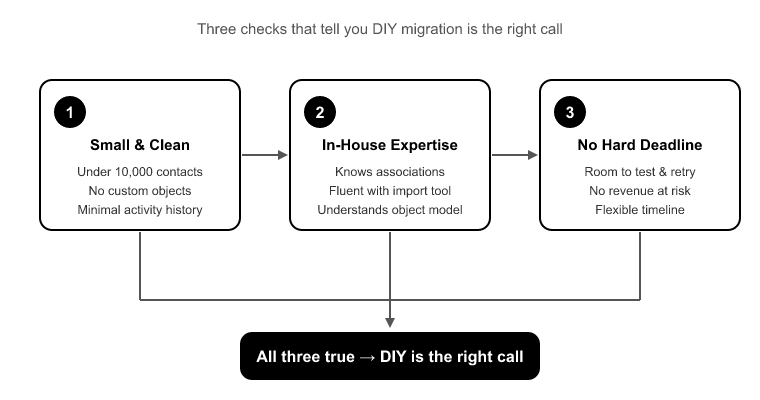
In-house onboarding works when the instance is genuinely simple and you have a strong internal admin who knows HubSpot’s data model. A 15-person B2B team with one pipeline, standard lifecycle stages, and no custom objects can absolutely stand up a clean instance without outside help. Full control, no external cost, and the person who built it understands it.

It fails in three predictable ways.

Complexity outruns staffing. The team underestimates the configuration surface area, hits a wall around lifecycle automation or multi-pipeline logic, and ends up with a half-configured instance. The build looks done. Ops then spends six months un-breaking a data model that was wrong from the start.

No rollback, no audit trail. Most in-house admins build directly in production because HubSpot sandboxes are limited and rebuilding by hand is tedious. I have seen a single misfiring workflow re-assign 300 open deals to a deactivated user, with no rollback and no record of what changed. When you build live, mistakes are permanent.

The build lives in one person’s head. When that admin leaves, nobody knows why a workflow fires or what a custom property feeds. There’s no documentation, no repeatability, and no way to reconstruct the logic. Onboarding that doesn’t survive the first admin change wasn’t really finished. It was just undocumented.

In-house is the right call for simple instances with strong internal ownership. It’s the wrong call the moment complexity or turnover enters the picture.

Option 2: Agency onboarding expertise you pay a premium for

A good HubSpot Partner agency earns its fee on strategy: process design, lead-scoring models, aligning your pipeline stages to how your team actually sells, and translating business requirements into a data model that holds up under reporting. That’s real, high-value work, and it’s what you should be paying premium rates for.

The problem is what agencies spend most of their time on. Roughly 40 to 60% of onboarding delivery hours go to mechanical configuration that’s nearly identical across clients[2]. Every hour a senior admin spends manually rebuilding the same seven deal stages for the fortieth time is an hour not spent on the strategy the client is actually paying a premium for.

There’s also a mismatch risk that shows up when you hire a generalist. A company brings on a marketing agency for HubSpot onboarding. The agency configures Marketing Hub competently but sets up deal stages that don’t reflect the client’s real sales process. Six months later, forecasting is unusable and RevOps rebuilds the entire pipeline from scratch. The agency did what it was good at and guessed at what it wasn’t.

For agencies themselves, this repeatable work creates a hard ceiling. You can’t grow onboarding volume without hiring another HubSpot admin for roughly every 15 to 20 concurrent clients[2]. The bottleneck isn’t sales, it’s human configuration time. That caps how many projects one admin can run per quarter and erodes margin on every fixed-fee package.

Agencies are worth it for the judgment layer. They’re expensive when you’re paying senior rates for buildout a machine could do.

Option 3: Automated deployment tools speed on the repeatable layer

This is where automated deployment fits, and it’s important to be precise about what it does and doesn’t do.

Suprdense CONFIG deploys a fully configured Sales, Marketing, or Service Hub module in one action: properties, property groups, pipelines, deal stages, workflows, and user permissions. The manual buildout that takes an experienced admin one to two days collapses to about twelve minutes[1]. This is the one-click hub deployment layer, and it targets the mechanical work that both in-house teams and agencies waste hours on.

It also kills the sandbox-to-production gap. Normally you build a clean configuration in a sandbox, validate it, then rebuild it by hand in production, introducing drift, missed workflows, and permission mismatches every time. Suprdense CONFIG moves a validated configuration from sandbox to production without hand-rebuilding it, which removes the “we rebuilt it live and something broke” failure mode entirely.

Now the honest boundary, because this is the credibility anchor: CONFIG deploys configuration, not strategy. It does not decide what your pipeline stages should be. It does not design your lead-scoring model or tell you what “sales qualified” means for your business. It removes the mechanical rebuild time so a human can focus on the decisions that actually need a human. Anyone who tells you a tool replaces strategic onboarding hasn’t run one.

One more distinction people confuse constantly: onboarding and migration are different problems. CONFIG sets up the instance. If you’re also moving data off Salesforce, Pipedrive, or Zoho, that’s SuprSwitch‘s job: data migration with real-time record validation and association integrity. Don’t mix them up when you’re scoping the project.

The decision that actually matters: repeatable vs. judgment work

Here’s the reframe that makes the choice obvious. The three HubSpot onboarding options aren’t competitors. They’re layers, and each one is good at a different kind of work.

Ask one question of every task in your onboarding: is this repeatable, or does it require judgment?

Repeatable work, deploying a standard pipeline, building property groups, wiring up standard lifecycle automation, setting role-based permissions, is nearly identical across teams. It’s mechanical. It should be automated with something like Suprdense CONFIG, because a human doing it by hand is just a slower, more error-prone machine.

Judgment work, deciding your stages, designing lead scoring, mapping automation to your actual revenue process, changes with every business. It needs a human, whether that’s your in-house admin or an agency strategist.

When you sort the work this way, the false “in-house vs agency vs tool” choice disappears. You’re not picking one. You’re assigning each layer to whatever handles it best.

How agencies use automation to scale delivery without hiring

For agencies, this reframe is the difference between a linear business and a scalable one.

The move is to productize your onboarding. Build your best-practice hub configuration once, your proven Sales Hub setup, your standard workflow library, your permission structure, and turn it into a repeatable deployable asset in Suprdense CONFIG. Then deploy it across every client in minutes instead of rebuilding it from memory each time.

The math changes immediately. If mechanical configuration was eating 40 to 60% of your delivery hours, reclaiming most of that means one admin can run substantially more concurrent projects before hitting the hiring ceiling. Those recovered hours don’t disappear. They get redirected to strategy, the work clients happily pay a premium for and the work that actually sets your agency apart.

You also get consistency. When every onboarding starts from the same validated config, you stop shipping subtle per-client variations that turn into support tickets three months later. Your delivery becomes a standard you can defend, not a fresh improvisation every time.

A hybrid model that works: tool for config, human for strategy

Here’s the sequence I actually recommend, whether you’re an in-house team or an agency.

Step one: do the strategy first. Define your pipeline stages against your real sales process. Design your lifecycle definitions and lead-scoring logic. Decide your permission model. This is human work. No tool does it for you, and doing it first prevents the “great config, wrong process” failure mode.

Step two: build and validate in a sandbox. Configure your decided setup once, in a controlled environment where mistakes are cheap.

Step three: deploy with CONFIG. Use Suprdense CONFIG‘s sandbox-to-production deployment to move the validated configuration live in one action, without hand-rebuilding it and without drift.

Step four: if you’re migrating data, run SuprSwitch separately. Once the instance is configured, move your records in with SuprSwitch‘s real-time record validation and association mapping. Configured instance first, data second, in that order.

This model gives you the strategy of a good agency, the speed of automation on the repeatable layer, and a validated, documented, repeatable setup that survives an admin change. Speed without validation is just deferred cost. This sequence gives you both.

Conclusion

The teams that get HubSpot onboarding right aren’t the ones that picked the “best” of the three options. They’re the ones who stopped treating it as one choice and started separating repeatable work from judgment work. Buildout gets automated. Strategy gets a human. Nobody pays senior rates for rebuilding the same pipeline for the fortieth time, and nobody lets a tool guess at their sales process.

That’s the whole argument. In-house control, agency expertise, and automated deployment each own a different layer, and the hybrid model, strategy first, validated config deployed with Suprdense CONFIG, data migrated separately with SuprSwitch, gives you all three without the trade-offs of committing to just one.

Before you scope your next onboarding, sort the work. Everything mechanical goes to the tool. Everything that requires judgment stays with a human. Get that division right and you stop deferring cost into month three, where broken onboarding always shows up.


References

  1. HubSpot Solutions Partner Program, onboarding delivery benchmarks and Sales Hub configuration scope, HubSpot, 2024.
  2. State of RevOps and Agency Delivery Report, analysis of configuration versus strategy hours in CRM implementation projects, RevOps Co-op, 2024.

Why Top HubSpot Agencies Are Productizing Their Service Offering in 2026

Here’s the failure mode I see in nearly every agency that hits a growth ceiling. They land their 11th onboarding of the quarter and realize they physically cannot deliver it without hiring another senior HubSpot admin. Their delivery capacity is bolted directly to headcount, so every new client means more billable hours from someone expensive and slow to ramp. That’s not a growth problem. It’s a systems problem wearing a growth problem’s clothes.

The agencies pulling ahead in 2026 have stopped treating every engagement as a blank canvas. They’ve figured out that hubspot agency productization, turning your repeatable delivery work into deployable assets instead of rebuilding it by hand every time, is the difference between scaling revenue and scaling payroll. This post is about how that shift actually works, where the margin is leaking today, and how to plug it.

The Margin Math That’s Forcing the Shift

Let’s start with the number that should keep delivery leads up at night. A standard Sales Hub onboarding, meaning properties, property groups, two or three pipelines with deal stages, the core workflows (lead rotation, deal stage automation, task creation), plus user permissions and teams, takes an experienced admin roughly 1.5 to 2 days of focused build work when done manually.[1]

Now multiply that across 20 to 40 clients a year. That single repeatable build is the largest recurring labor cost in most delivery practices. And here’s the part that stings: you’re doing the same thing 40 times. The 40th build is not more insightful than the 1st. It’s just more tired.

Agencies running fully custom typically cap at an effective ratio of one senior admin per 8 to 12 active onboarding projects before quality starts to slip.[2] Cross that line and you get missed enrollment criteria, half-finished property groups, and workflows that fire twice. So your growth model becomes brutally simple: to double revenue, hire and ramp more senior admins. That’s the linear-headcount trap, and it’s a terrible business to be in when the talent is scarce and takes months to get productive.

Productized agencies break that ratio because the base build is templated, not bespoke. Revenue growth decouples from hiring. That’s the entire game.

What “Productized” Actually Means for a HubSpot Practice

Let me be precise, because “productization” gets thrown around to mean “we put packages on our pricing page.” That’s not it. Packaging is a sales-side decision about how you sell. Productization is a delivery-side decision about how you build.

A genuinely productized HubSpot practice has three things:

Fixed scope. There’s a defined boundary to the standard offering. This pipeline architecture, this property set, these core workflows are in. Ticketing setup, custom object modeling, and complex multi-team routing are a scoped, billed add-on. Without this boundary, every client conversation is a fresh negotiation, and “can you also set up ticketing?” becomes an unbilled afternoon.

A standardized build. The Sales Hub you ship to Client A is architecturally identical to the one you ship to Client B. Same deal stage logic, same property naming conventions, same lifecycle workflow structure. This is what makes builds debuggable. When every instance is the same, a support ticket is a known problem with a known fix, not an archaeology project into whoever built it.

Deployable assets. This is the piece most agencies miss. Your gold-standard build exists as a thing you deploy, not a process you re-execute. This is where Suprdense CONFIG comes in. It lets you build your best Sales, Marketing, or Service Hub module once, save it as a deployable config, and ship it to every client that buys the standard package. The best build your team has ever produced becomes the floor for every project, not the ceiling.

The 80/20 Rule of HubSpot Onboarding

The uncomfortable truth about standard onboarding is that roughly 80% of what you build is functionally identical across clients.[3] The same pipeline architecture. The same core property set. The same lead-lifecycle workflows. Only about 20% is genuinely client-specific: their actual sales process nuances, their reporting requirements, their integrations.

Custom delivery treats 100% as bespoke and pays for it. You quote a fixed onboarding fee, then blow the budget rebuilding the same Sales Hub setup you’ve built 40 times, manually, from scratch. The margin doesn’t leak on the hard, custom 20%. It leaks on the repeatable 80% that’s priced like it’s easy but delivered like it’s custom.

The move is to industrialize the 80% and reserve your expensive human judgment for the 20%. That’s not cutting corners. It’s the opposite. Your senior people stop burning hours on property groups they could build in their sleep and start spending them on the process design work clients actually remember you for.

From Two-Day Build to Twelve-Minute Deployment

Here’s the mechanism that makes hubspot agency productization real instead of aspirational. Suprdense Config‘s one-click hub deployment takes a fully configured module, meaning properties, property groups, pipelines, deal stages, workflows, and user permissions, and deploys it in a single action. The 1.5-to-2-day manual build becomes roughly twelve minutes.[4]

That’s the difference between “custom rebuild” and “deploy an asset.” And it directly kills one of the nastiest failure modes in agency delivery: sandbox-to-production drift.

You know the pattern. Your team builds and tests everything in a sandbox, gets client sign-off, then rebuilds it by hand in production under deadline pressure and introduces new errors in the copy. The config that was tested and approved is not the config that ships, because someone recreated it manually at 6pm on a Thursday. A workflow enrollment trigger gets fat-fingered. A required property gets missed. The client discovers it three weeks later, and now it’s a support ticket eating into your next project’s capacity.

Suprdense Config’s sandbox-to-production deployment moves the tested module to production without manual recreation. What you tested and got approved is exactly what ships. No transcription errors, no drift, no rework.

I want to be honest about the boundary here, because overselling this is how you lose credibility with practitioners. CONFIG handles the standardized configuration and deployment layer. It does not replace discovery, process design, or the client-specific customization judgment. It removes the repetitive build labor so your people spend their time on the parts that require a human. That’s the entire point. Not to automate your expertise, but to stop wasting it on rebuild work.

How Productization Breaks the Senior-Admin Bottleneck

Think about the recognizable disaster scenario. An agency lands a bigger client and staffs three admins across the client’s business units. Each admin configures the deal pipeline slightly differently, with different stage names, different probability logic, different close criteria. Reporting breaks because the deal stages don’t map to a consistent revenue model. That’s two weeks of rework, unbilled, plus a client whose confidence in you just took a hit.

That happens because delivery quality is coupled to who got assigned. The client who got your best person gets a clean instance. The client who got your junior gets orphaned properties and a workflow that enrolls everyone. That inconsistency kills referrals and inflates post-handoff support hours, the hidden margin killer that quietly consumes the capacity you needed for the next project.

When the standard config is deployed rather than hand-built, a mid-level team member can ship a clean, consistent instance that looks exactly like the one your best admin would have produced, because it is the one your best admin produced, saved as a config. Your senior people stop being the bottleneck for baseline quality and get redeployed onto the high-value 20%. That’s how you push past the one-senior-admin-per-8-to-12-projects ceiling without a quality cliff.

Where to Draw the Line: What to Standardize vs. What to Keep Custom

Productization has a failure mode too: over-productizing. If you try to force a client’s genuinely unique process into your standard template, you’ll ship something that technically deploys but doesn’t fit how they actually sell. So here’s my opinionated framework.

Standardize the structure. Property naming conventions, property groups, the skeleton of your pipelines, your core lifecycle workflows (lead rotation, deal stage automation, task creation), and your permission-and-team scaffolding. This is the 80%. It’s the same because good HubSpot architecture is the same regardless of industry.

Keep custom the meaning. Which specific deal stages map to this client’s revenue model. Their unique qualification criteria. Their reporting requirements and the properties that feed them. Their integrations and data sources. This is the 20% that requires discovery and human judgment, and it’s what they’re actually paying a premium for.

The clean rule: standardize how things are built, customize what they mean for this client. CONFIG deploys the structure. Your consultants own the meaning.

Building Your First Productized Offering: A Practical Sequence

If you’re starting from a fully custom practice, here’s the order of operations I’d run.

1. Audit your last 10 builds. Line up the Sales Hub setups you shipped in your last ten onboardings and mark what was identical. You’ll find the 80% fast: the same pipeline shape, the same property set, the same core workflows showing up in nine of ten projects.

2. Extract the common config. Build the definitive version, your gold standard. Not the average of your ten builds, but the best one, cleaned up. This is the module every future client should get.

3. Template it in Suprdense Config. Save that gold-standard Sales Hub as a deployable config. Test the deployment in a sandbox to confirm it ships exactly as built, including workflows and permissions.

4. Price the package with a known cost floor. When your base build is a twelve-minute deployment instead of a two-day project, you can price the standard offering against a predictable cost and defend your margin instead of watching it leak into rebuild hours.

5. Define the add-on boundary. Write down explicitly what’s in the standard package and what’s a scoped, billed add-on. This is what stops scope creep before it starts.

Conclusion

The agencies winning in 2026 aren’t the ones with the most consultants. They’re the ones who turned their best implementation into a repeatable product and stopped paying senior-admin rates to rebuild the same Sales Hub for the 40th time.

The math is not subtle. When your base build drops from two days to twelve minutes, you break the linear-headcount trap, you kill sandbox-to-production drift, and you make delivery quality independent of who got assigned. Your margin stops leaking into rebuild hours, and your senior people go back to doing the work clients actually remember.

Start where the leak is biggest: audit your last ten onboardings, extract the 80% that was identical, and turn it into a deployable config. That’s the first move in real hubspot agency productization, and with Suprdense Config, it’s the difference between scaling your revenue and scaling your payroll.


References

  1. HubSpot Solutions Partner Program, “Onboarding Delivery Benchmarks for Sales Hub Implementations,” HubSpot Partner Resources, 2024.
  2. RevOps Co-op, “Agency Delivery Capacity and Admin-to-Project Ratios,” State of RevOps Report, 2024.
  3. Ascend2 & HubSpot, “The State of CRM Implementation: Standardization vs. Customization in Onboarding,” 2025.
  4. Suprdense, “CONFIG Deployment Time Benchmarks: Manual Build vs. One-Click Hub Deployment,” Product Documentation, 2025.

The Hidden Costs of a Manual CRM Migration (and How to Avoid Them)

The number on the migration SOW is almost never the number you pay. I’ve overseen more than 120 CRM migrations into HubSpot, and the pattern repeats every time. The quote covers extraction and load, everyone signs off, the data “moves over the weekend,” and then the real bill arrives over the next three months. It shows up as support tickets, corrupted pipeline reports, and sales reps quietly going back to spreadsheets because the CRM burned them one too many times.

That’s the honest truth about crm migration cost: it’s a lagging indicator. A manual migration doesn’t fail loudly on Day 1. It bleeds slowly. By the time you can see the damage, you’re not just cleaning corrupted data. You’re untangling the workflows, reports, and rep behavior that got built on top of it. This post breaks down where that hidden cost actually hides, why it compounds, and how to move the expensive discovery work to the front of the process, where it’s cheap.

The Quote Is Not the Cost: Where Migration Budgets Actually Go

The Quote Is Not the Cost- Where Migration Budgets Actually Go

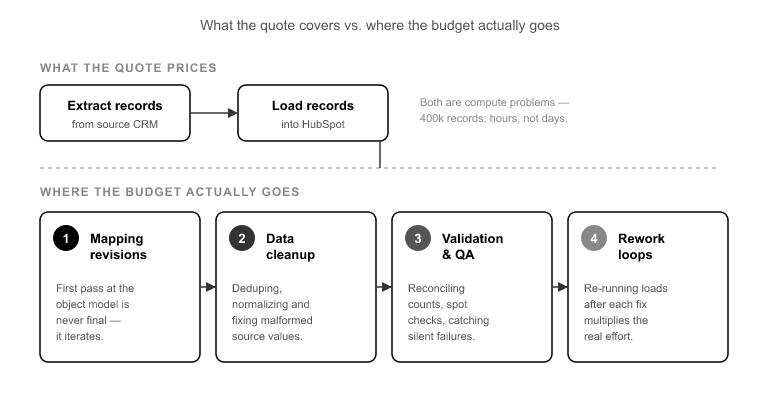
Most migration quotes price two things: pulling records out of the source CRM and loading them into HubSpot. Both are compute problems. Moving 400,000 records is a matter of hours, not days.[1] If data volume were the constraint, every migration would finish in an afternoon.

It isn’t the constraint. The budget disappears into four categories that rarely make it into the original estimate:

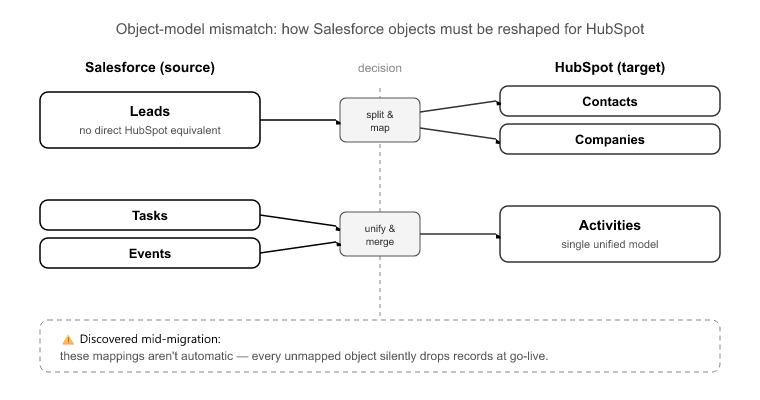
Mapping revisions. The first pass at mapping source objects to the HubSpot data model is never the final pass. Salesforce Leads have no native HubSpot equivalent. Custom fields collide. Property types don’t match. Every revision is engineer time nobody scoped.

QA and validation. Someone has to confirm that the contact-to-deal associations survived, that activity history formatted correctly, and that fields didn’t truncate. Doing this by hand across every object is engineer-weeks of spot-checking, and it almost never appears as a line item.

Post-go-live cleanup. The migration “finished,” but now you’re merging duplicates, reassigning orphaned records, and rebuilding reports that don’t reconcile.

Re-imports triggered by errors. A partial failure gets re-run, and without a clean dedupe key, records multiply. That’s a fresh cleanup project on top of the original one.

Add those four together and the real total routinely runs 2 to 3 times the quoted figure once cleanup labor is counted.[2] The quote was never wrong about extraction and load. It was silent about everything that surrounds them.

The Five Failure Modes That Generate Hidden Costs

The Five Failure Modes That Generate Hidden Costs

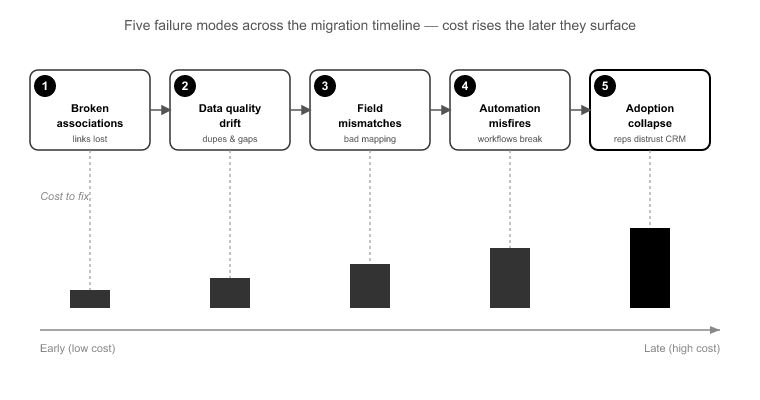
Every over-budget migration I’ve been called in to rescue traces back to some combination of the same five failure modes. Each one costs money at a different point in the timeline, and the later it surfaces, the more it costs.

1. Late-discovered broken associations. A contact migrates fine. A deal migrates fine. The link between them doesn’t. Nobody notices until a rep opens a company record and sees zero deal history. This is the single most expensive manual-migration failure mode because it’s invisible on load. The records are all there, so the migration “looks” successful. You find it in production, weeks late, which is the most expensive place to find anything.

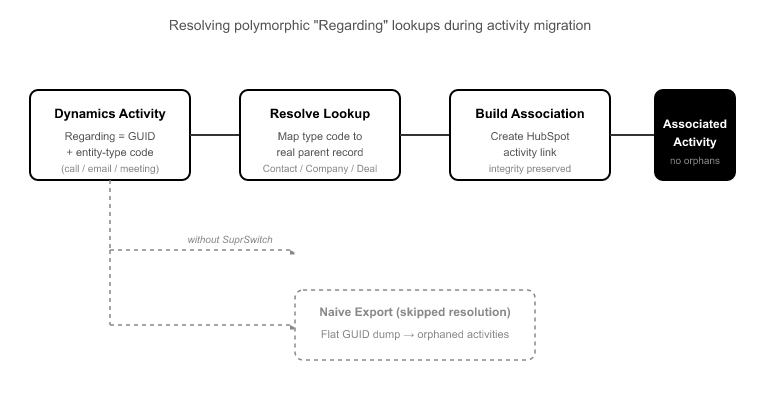
2. Activity history loss from object-model mismatches. Salesforce splits activities into Tasks and Events. HubSpot has one unified Activities object. Pipedrive and Zoho each handle notes, calls, and emails differently again. If your mapping doesn’t explicitly handle the Task/Event to Activities collapse, call logs and meeting history quietly drop. And nobody QAs 200,000 activity records by hand, so the loss goes unnoticed until a rep needs the context of a call that no longer exists.

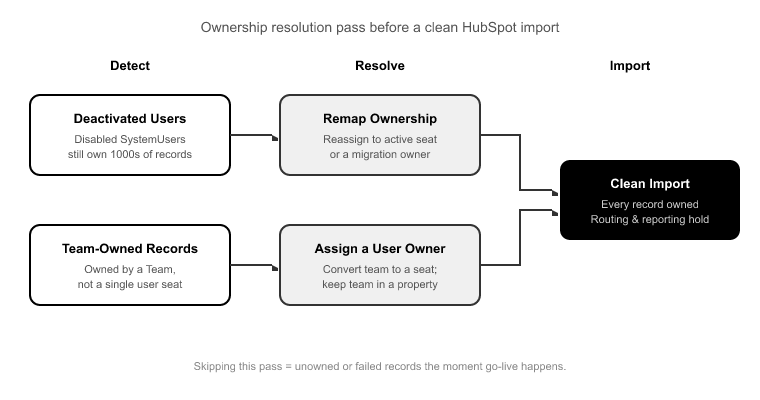
3. Deactivated-user ownership gaps. Records owned by ex-employees whose CRM seats were deprovisioned become orphaned on import. They’re assigned to no one, invisible to territory-based views and round-robin rules. This surfaces as “where did my pipeline go?” about three weeks after go-live, usually from a manager whose forecast just dropped for no visible reason.

4. Duplicate multiplication on re-runs. A manual import partially fails. Someone re-runs it without a clean rollback or a reliable dedupe key. Records multiply. A 40,000-contact import becomes 52,000 records, and now someone is merging by hand for a month.

5. The QA cycle nobody budgeted for. Even when nothing above breaks, validating relational integrity, field truncation, and activity formatting across every object is real work. It didn’t make the estimate, so it either gets skipped, which guarantees the first four problems surface later, or it gets done, which blows the timeline and the budget.

Why “It Finished Over the Weekend” Is a Warning Sign

When a project manager tells me the migration wrapped over a weekend and everything looks great on Monday, I don’t relax. I get concerned. “Looks great on Monday” tells you the records loaded. It tells you nothing about whether the associations, activities, and ownership survived, and those are exactly the things that don’t show up in a quick Monday-morning glance.

Here’s the scenario I’ve watched play out more than once. A Salesforce org with 12 custom objects and 80 active workflows migrates over a weekend. Monday, the deals look fine. Three weeks later, finance runs a pipeline report and the numbers don’t reconcile. The cause: Lead-object records had no HubSpot equivalent and were silently dropped during mapping. Nobody decided to drop them. The manual mapping just had no rule for them, so they vanished, and the gap didn’t become visible until a report depended on them.

That three-week gap between “done” and “discovered” is where crm migration cost actually lives. And there’s a cost inside it that never lands on a spreadsheet: trust. Once reps hit two or three records with missing history, they stop believing the CRM. They revert to their own spreadsheets. The migration technically succeeded and adoption failed, which is the most expensive outcome of all, because you paid for the migration and got none of the value.

The Compounding Cost of Errors: Day 2 vs. Production

The most important thing I can tell you about migration economics is this: the same error costs radically different amounts depending on when you catch it.

An error caught during mapping, say Day 2 of the process, costs minutes to fix. You adjust the association rule, add the missing property, set the ownership logic, and move on. Nothing downstream has been built yet.

The identical error caught after full execution, in production, costs hours or days. Now you’re not just fixing the data. You’re untangling the workflows that fired on the bad data, the reports built on top of it, and the rep behavior that formed around it. You may be re-running an import, which risks the duplicate-multiplication problem. The error didn’t get bigger. Your exposure to it did.[3]

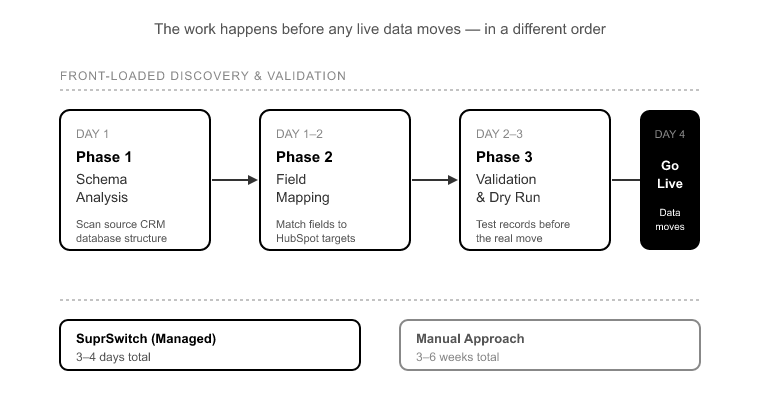
This is the entire argument for front-loading discovery and validation. The fix for a costly migration isn’t more careful manual work at the back end. It’s moving the discovery and validation work to the front, before a single live record moves. That’s a structural change to how the migration is sequenced, not a matter of working harder.

Where the Weeks Actually Go (and Why It’s Not Data Volume)

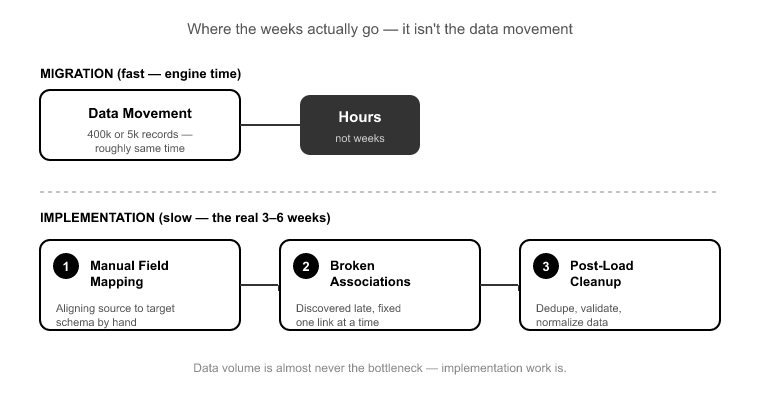
Manual enterprise migrations routinely drag on for 3 to 6 weeks.[4] When people assume that’s because of record count, they’re looking at the wrong bottleneck. Moving the data is a compute problem, and compute is fast.

The weeks are consumed by three things: manual field mapping, late-discovered broken associations, and post-migration firefighting. Every one of those is a discovery-and-validation problem, not a volume problem. You spend a week mapping fields by hand. You spend another week discovering, in production, that a set of associations broke. You spend two more weeks cleaning up what you found. The 400,000 records themselves moved in an afternoon somewhere in the middle.

Once you see that clearly, the solution is obvious: do the discovery and validation up front, in a compressed and structured way, before live data moves. That’s exactly how we built SuprSwitch.

How SuprSwitch’s Four Phases Move the Cost to the Front

How SuprSwitchs Four Phases Move the Cost to the Front

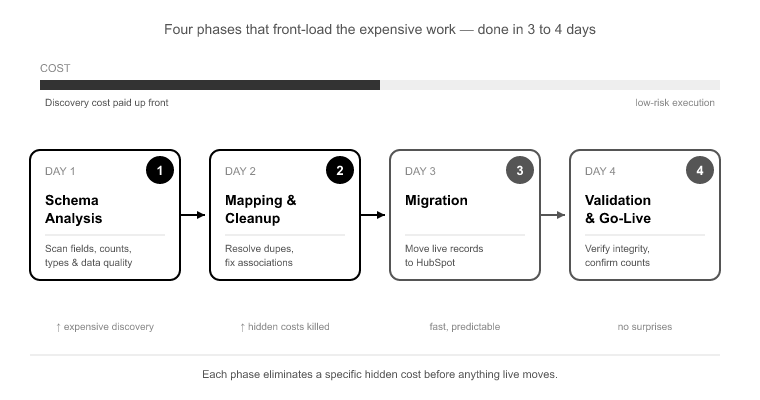
SuprSwitch runs a migration as four phases and completes even large jobs in 3 to 4 days. The reason it’s days and not weeks isn’t a faster engine. It’s that the expensive discovery work happens on Day 1 and Day 2, before anything live moves. Here’s how each phase kills a specific hidden cost.

Phase 1, Schema Analysis (Day 1). SuprSwitch scans the source CRM and identifies custom fields, record counts, property types, and data quality issues: duplicates, broken associations, empty required fields, before a single record moves. This is the direct answer to hidden cost number one, late discovery. You can’t be surprised in production by something you already scanned on Day 1.

Phase 2, Mapping Logic (Day 2). The transformation layer maps legacy objects to the HubSpot data model and handles the mismatches explicitly: Salesforce Leads with no HubSpot equivalent, the Task/Event to Activities collapse, and custom-property creation in HubSpot. The ownership transfer engine resolves deactivated-user gaps here, as a mapping step, not as post-migration cleanup, which kills the orphaned-pipeline cost before it can happen. Association integrity mapping preserves the 1:1 relationships between objects so contact-to-deal and deal-to-company chains don’t break on load. Critically, the mapping is reviewed before the first record moves, so the “fix it in production” cycle never starts.

Phase 3, Pilot Validation (Day 2 to 3). A representative sample migrates to HubSpot to validate relational integrity, activity-history formatting, field truncation, and association chains. Any issue found here gets fixed in the mapping layer, not after the full run. This is the QA cycle that nobody budgets for, front-loaded, compressed, and done against real records instead of the whole 400,000-record dataset.

Phase 4, Final Execution (Day 3 to 4). The full dataset runs through the migration engine with real-time record validation. If a record doesn’t appear in HubSpot within the expected window, it flags immediately, during transfer, not in a support ticket three weeks later. That single capability converts the invisible compounding cost into a visible flag you can act on the same day. And the retry mechanism retries failed records automatically without restarting the full job, which is precisely what prevents the partial-re-run duplicate-multiplication problem.

For the security and IT reviewers: SuprSwitch runs on a no-storage architecture. Customer data is never held on our servers, which usually clears the third-tool concern that stalls migration sign-off.

What to Ask Before You Approve a Migration Plan

Whether or not you use SuprSwitch, these are the questions that separate a plan that’s priced honestly from one that’s about to become a 2 to 3 times overrun:

When does validation happen, before or after the full run? If the answer is “after,” you’re paying for production cleanup. Validation belongs in a pilot, before the full dataset moves.

How are records owned by deactivated users handled? If ownership transfer isn’t a defined mapping step, you’re going to lose visibility on that pipeline three weeks after go-live.

What happens when a record fails mid-migration? The right answer involves real-time flagging and an automatic retry that doesn’t restart the whole job. “We re-run the batch” is the answer that multiplies your duplicates.

How are object-model mismatches mapped? Specifically ask about Salesforce Leads and the Task/Event to Activities collapse. If they can’t answer precisely, they haven’t thought about your activity history.

Where does my data live during the migration? For anything touching customer records, “never stored on the vendor’s servers” should be a hard requirement.

Conclusion

The reason crm migration cost blows past the quote so predictably is that manual migrations discover their problems in the most expensive possible place: production, weeks after everyone declared the project done. Broken associations, dropped activity history, orphaned records, and multiplying duplicates all cost minutes to fix during mapping and hours to fix after go-live. The error never changes size. Your exposure to it does.

The fix isn’t heroics at the back end. It’s sequencing. Move the discovery to Day 1 and the validation to Day 2 to 3, before a single live record moves, and the invisible weeks of cleanup simply don’t materialize. That’s not a promise that migrations become effortless. They’re still hard, and the mapping still requires judgment. It’s a claim that the expensive surprises get converted into cheap, early, visible flags.

Before you approve a migration plan, ask where validation happens, how deactivated users are handled, and what happens when a record fails mid-run. If the answers point to production, you’re not looking at a migration plan. You’re looking at a cleanup project with a delayed invoice. Front-load the discovery, and the cost stops hiding.


References

  1. Nucleus Research, “CRM Data Transfer Throughput Benchmarks,” 2023, measured load times for record volumes up to 500,000 across major CRM platforms.
  2. Validity, “The State of CRM Data Management,” 2023, analysis of migration cost overruns and post-migration data remediation labor.
  3. Gartner, “How to Reduce the Cost of Poor Data Quality in CRM Implementations,” 2022, the cost-multiplier of defects caught in production versus during design and mapping.
  4. Nucleus Research, “CRM Migration and Deployment Benchmarks,” 2023, typical enterprise migration timelines and the distribution of effort between data transfer and mapping/validation.

CRM Migrations Are About to Get a Lot Faster Here’s Why

Nobody tells you this before your first big migration: the delay was never the data. I’ve moved 5,000-contact SMB CRMs and 400,000-record Salesforce orgs with 12 custom objects. The transfer itself, the actual movement of bytes into HubSpot, is rarely what blows the timeline. What blows the timeline is finding a custom field type mismatch on day nine. It’s learning that 40% of your records have an empty required field after you’ve already started moving them. It’s opening a HubSpot contact three weeks after go-live and seeing its company link, deal associations, and three years of activity history cut clean off.

That’s the real cost of a bad migration: discovery that happens too late, and cleanup that happens after go-live. The future of crm migration isn’t about moving records faster. The network was never the bottleneck. It’s about moving all the discovery and validation work to the front, before a single live record crosses over. That’s what takes a migration from 3 to 6 weeks down to 3 to 4 days, and it changes who can run migrations and how many they can run at once.

Why Migrations Actually Take Weeks (It’s Not the Data)

Why Migrations Actually Take Weeks (Its Not the Data

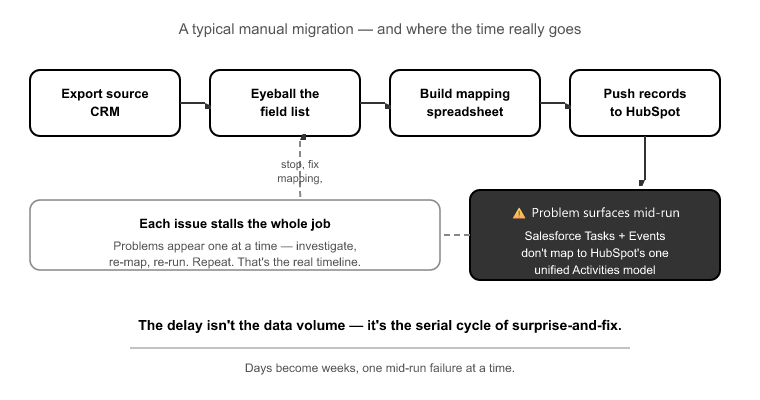
Walk through a typical manual migration and you’ll see where the time goes. Somebody exports the source CRM, eyeballs the field list, builds a mapping spreadsheet by hand, and starts pushing records. Then the problems surface, one at a time, mid-run, each one stalling the whole job.

The classic example is the Salesforce Activities split. Salesforce stores Activities as two separate objects: Tasks and Events. HubSpot has one unified Activities model. If your mapping doesn’t consolidate both into HubSpot’s single Activities object, you lose call logs and meeting history. Reps open records that used to have a full engagement timeline and find nothing. That’s not a data-volume problem. It’s a schema problem someone didn’t catch until after the records moved.

Same story with the Salesforce Lead object. HubSpot has no native Lead equivalent. Every Salesforce migration has to make a decision, Lead-to-Contact or Lead-to-Contact-plus-lifecycle-stage, and getting it wrong duplicates or orphans thousands of records. Get it wrong quietly, and you don’t find out until reporting doesn’t reconcile.

Then there’s duplicate multiplication. A source CRM with 5,000 known duplicates doesn’t stay at 5,000 on import. Bad import logic matches them against existing HubSpot records and multiplies the mess, so you exit the migration with more dedup work than you walked in with. Industry data consistently points to dirty data, duplicates, incomplete records, and decayed contacts, as the leading cause of CRM project failure.[1]

None of these are computational limits. They’re diagnostic failures. The delay is time spent discovering problems you could have found on day one, plus time spent cleaning up problems you should have caught in a sample before running the full job.

What’s Changing: The Shifts Reshaping the Future of CRM Migration

Whats Changing- The Shifts Reshaping the Future of CRM Migration

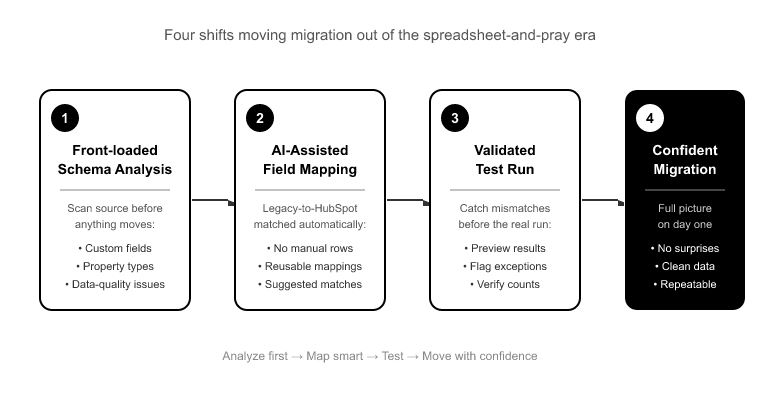
Four things are moving migration tooling out of the spreadsheet-and-pray era.

Front-loaded schema analysis. Instead of discovering field mismatches mid-run, the tooling scans the source schema first: every custom field, property type, record count, and data-quality issue, before anything moves. You get the full picture of what you’re dealing with on day one.

Automated and AI-assisted field mapping. Legacy-to-HubSpot field matching used to be manual, one row at a time, rebuilt from scratch on every project. Automated matching proposes the mapping as a first draft for human review. This speeds up the slowest, most error-prone part of the job. I’ll be blunt about its limits in a moment.

Real-time record validation. The old model had no validation layer, so records that didn’t make it across weren’t flagged. They were simply absent. The new model checks every record during transfer and flags failures the moment they happen, not weeks later when a report doesn’t add up.

No-storage architecture. Migration tools historically staged your customer data on their own servers. That’s an unnecessary security surface. The direction now is to move data source-to-destination without holding it anywhere in between.

This is the frame SuprSwitch is built around: a four-phase process that puts discovery and validation before execution, and compresses the whole thing to 3 to 4 days.

Moving Discovery to Day 1: Why Order Is Everything

The single most important change is the order of operations. In a manual migration, you discover problems while you’re solving them. In a front-loaded migration, you discover everything before you solve anything.

Phase 1, Schema Analysis (Day 1). SuprSwitch scans the source CRM database and surfaces custom fields, record counts, property types, and data-quality issues like duplicates, broken associations, and empty required fields, before a single record moves. This is the “no surprises mid-migration” phase. That empty-required-field problem across 40% of records? You know about it on day one, when it costs a mapping decision, not on day nine, when it costs a stalled job.

Phase 2, Mapping Logic (Day 2). The transformation layer maps legacy objects to the HubSpot data model. It creates the custom properties HubSpot needs, defines association integrity mapping to preserve 1:1 relationships between objects, and handles object-type mismatches like the Salesforce Lead. This is also where ownership transfer engine logic gets set. I’ll come back to why that matters more than most people expect. The whole mapping is defined and reviewed before the first record moves.

That ordering is the entire game. Every problem caught in Phase 1 or 2 costs a line in the mapping layer. The same problem caught after execution costs a re-run.

The deactivated-user problem nobody plans for

Every mature Salesforce or Pipedrive org is full of records owned by users who no longer work there. Without an ownership plan defined before the migration runs, those records either fail to import or land unassigned in HubSpot. On Day 1 your routing breaks, your reporting has a black hole, and reps are working leads nobody owns.

SuprSwitch’s ownership transfer engine handles this in Phase 2, before any data moves. Reassignment logic for deactivated users is defined up front, so records land with valid owners instead of dropping or defaulting to nothing. It’s a small piece of mapping work that prevents a Day 1 fire drill.

Automated Field Matching What It Solves and What It Doesn’t

Automated Field Matching — What It Solves and What It Doesnt

I want to be honest here, because overselling AI in migrations is how you lose credibility with people who’ve actually run them.

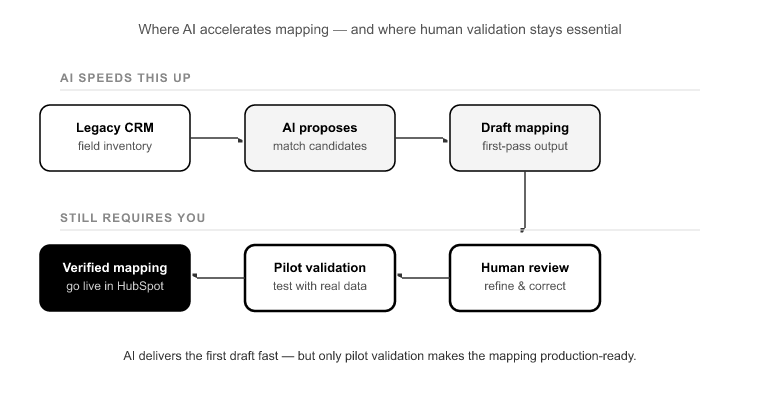
AI-assisted field matching genuinely speeds up Phase 2. It proposes legacy-to-HubSpot field matches, the first draft of your mapping, in a fraction of the time it takes to build by hand. For an agency rebuilding similar object mappings across 30 onboardings a year, that’s real leverage.

What it does not do is replace pilot validation. Automated matching gives you a strong first draft. It does not prove that draft against your actual data. A field-level truncation issue, where a source field with a 500-character limit maps into a shorter HubSpot property, won’t show up in a proposed mapping. It shows up when you run real records through and see the text get clipped.

So the model is simple: AI speeds the draft, the pilot proves it. Anyone telling you the AI removes the need to validate on a sample hasn’t watched a “clean” mapping truncate 8,000 records silently.

Real-Time Validation vs. Finding Out Three Weeks Later

This is the shift that changes the risk profile most.

Phase 3, Pilot Validation (Day 2 to 3). Before the full dataset runs, SuprSwitch migrates a representative sample into HubSpot to validate relational integrity, activity history formatting, field truncation, and association chains. That truncation issue from a moment ago? Caught in the pilot, it’s a one-line fix in the mapping layer. Caught after full execution, it’s a re-run of the whole job. The pilot exists to make expensive problems cheap.

Phase 4, Final Execution (Day 3 to 4). The full dataset runs through the migration engine, and here’s where real-time record validation earns its place. If a record doesn’t appear in HubSpot within the expected window, it flags immediately, during transfer, not in a support ticket three weeks out. When you’re moving 400,000 records, “some records didn’t make it” is useless if you can’t tell which ones. Real-time validation tells you exactly which ones, as it happens.

And when a record does fail, the retry mechanism automatically re-attempts it without restarting the full job. A transient API timeout on record 218,000 doesn’t mean you start over from record one. The failed records retry, the successful ones stay put. Every record is validated after migration before go-live is confirmed.

The New Timeline: A 400k-Record Migration in 3–4 Days

The New Timeline- A 400k-Record Migration in 3–4 Days

Let’s walk through a realistic enterprise example: a 400,000-record Salesforce org, 12 custom objects, deactivated users scattered through the ownership data.

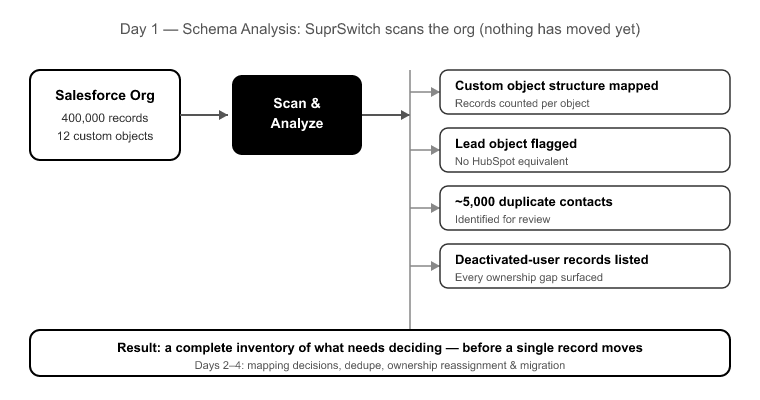
Day 1 (Schema Analysis): SuprSwitch scans the org. It surfaces the custom object structure, counts records per object, flags the Lead object with no HubSpot equivalent, identifies roughly 5,000 duplicate contacts, and lists every record owned by a deactivated user. Nothing has moved. You have a complete inventory of what needs deciding.

Day 2 (Mapping Logic): The transformation layer maps the objects. Leads become Contacts with a lifecycle-stage assignment. Tasks and Events consolidate into HubSpot’s unified Activities object so call and meeting history survives. Association integrity mapping preserves the contact-to-company and deal-to-contact relationships. The ownership transfer engine reassigns deactivated-user records to valid owners. The mapping gets reviewed.

Day 2 to 3 (Pilot Validation): A sample runs into HubSpot. You confirm associations hold, activities render on the timeline, and no fields truncate. One property caps shorter than expected, fixed in the mapping in minutes.

Day 3 to 4 (Final Execution): All 400,000 records run through the engine with real-time record validation checking each one. A few hundred hit transient failures and the retry mechanism re-attempts them automatically. Every record is validated before go-live is confirmed.

Three to four days, not three to six weeks. Salesforce’s own ecosystem research puts typical mid-market migrations at multiple weeks of effort.[2] The difference isn’t transfer speed. It’s that the discovery and validation work moved to the front.

What This Means for Agencies and RevOps Teams

The compressed timeline changes the economics, not just the calendar.

For an agency, the constraint on migration delivery has always been staffing. Every client needs mapping work, and rebuilding that logic by hand doesn’t scale without hiring a HubSpot admin per project. A repeatable four-phase process with automated mapping and pilot validation lets you deliver migrations in 3 to 4 days without adding headcount for every engagement. That means more migrations per quarter and margin that isn’t eaten by manual labor.[3]

For RevOps teams that own the HubSpot instance, the value is predictability and integrity. You know on Day 1 what you’re dealing with. You validate on a sample before you touch production. You get real-time flags instead of silent gaps. Three years of sales history survives because associations and activities are mapped and proven, not assumed.

For technical buyers, the no-storage architecture is the answer to the security question. Customer data is never held on SuprSwitch servers. It moves source-to-destination without staging in between, which shrinks the compliance surface you have to scope.

Conclusion

The migrations that dragged on for weeks were never slow because of data volume. They were slow because discovery happened mid-run and cleanup happened after go-live, the two most expensive places to find a problem. The future of crm migration is simply putting that work in the right order: scan the schema first, map and review before anything moves, prove the mapping on a sample, then execute with validation on every record.

That’s the whole logic behind SuprSwitch’s four phases. It doesn’t make migrations effortless. Data is messy, mappings need judgment, and edge cases are real. What it does is move the hard thinking to Day 1 and Day 2, where a mistake costs a line of mapping instead of a re-run, and it catches the failures during transfer instead of in a support ticket a month later.

If you’re scoping a move to HubSpot, don’t measure the vendor on transfer speed. Measure them on when they surface your problems. The right time to find your broken associations, your deactivated-user records, and your field truncations is before you migrate, not after your reps notice the context is gone.


References

  1. Validity, “The State of CRM Data Health” data quality and duplicate records as leading causes of CRM project underperformance, 2023.
  2. Salesforce Ben, “How Long Does a CRM Migration Really Take?” benchmarks on mid-market migration timelines and effort distribution, 2023.
  3. HubSpot Solutions Partner Program, “Scaling Delivery Without Scaling Headcount” agency onboarding economics and delivery repeatability, 2023.

Freshsales to HubSpot Migration: Data, Associations, and Pipelines

The first thing that breaks in a Freshsales to HubSpot migration is almost never the contacts. It’s the assumption that “contacts are contacts.” Teams export their Freshsales data, import it into HubSpot, and only then find out that half their pipeline was sitting in a separate Leads object HubSpot won’t natively accept. Their deals arrive with no company and no contacts attached, and three years of call history collapses into a wall of undifferentiated notes. None of that is a data-volume problem. It’s a data-model reconciliation problem, and it’s why so many of these migrations that should take days drag out for weeks.

Freshsales and HubSpot are built on two different philosophies. Freshsales, especially the older Freshsales Classic, treats Leads, Contacts, Accounts, and custom Modules as distinct object types with their own lifecycle logic. HubSpot uses a flat object model with no native Lead record and a single unified Activities timeline. If you migrate field by field without a strategy for those structural mismatches, you don’t get a clean HubSpot instance. You get orphaned deals, broken lifecycle stages, and a sales team that no longer trusts the CRM. This is the work SuprSwitch resolves at the mapping layer, before any live record moves.

Freshsales Classic vs. Freshsales Suite: Know Which Data Model You’re Actually Migrating

Freshsales Classic vs. Freshsales Suite- Know Which Data Model Yo

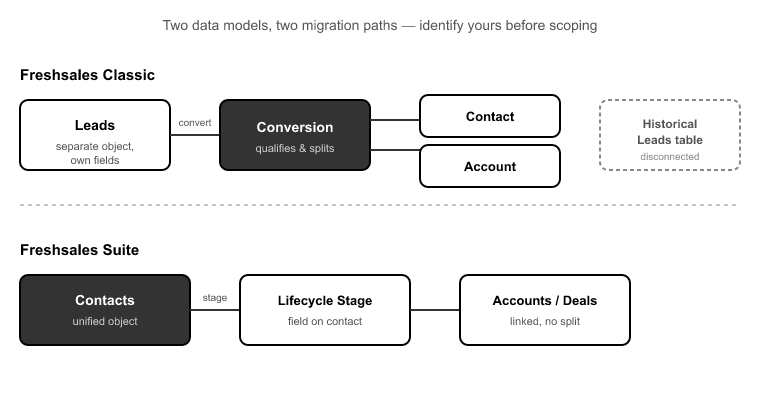
Before you scope anything, answer one question: are you on Freshsales Classic or Freshsales Suite? This single fork is the most common scoping error I see, and getting it wrong derails the whole plan.[1]

Freshsales Classic keeps Leads as a separate object with their own fields and conversion path. When a lead qualifies, you convert it, and that conversion generates a Contact and often an Account. Your historical Leads sit in their own table, disconnected from the Contacts model entirely.

Freshsales Suite merged Leads and Contacts into a single Contacts object, split by lifecycle stage. If you’re on Suite, your “leads” are already Contacts with a stage attached. That’s a much cleaner starting point for HubSpot, which also treats everyone as a Contact with a lifecycle stage.

The problem is that most teams don’t actually know which model they’re on until they’re mid-migration and half their pipeline is missing. That’s why SuprSwitch’s Phase 1 Schema Analysis exists. On Day 1, it scans the Freshsales org and detects whether Leads live as a separate object or are folded into Contacts, counts records per object, and flags data-quality issues like duplicates, broken associations, and empty required fields before anything moves. The Leads-object decision gets made here, on paper, not discovered live during execution.

Mapping Freshsales Contacts, Leads, and Accounts to HubSpot’s Flat Model

HubSpot has no core Lead object. People point to the Sales Hub Leads workspace and assume that’s the equivalent. It isn’t. The Leads workspace is a prospecting layer that sits on top of Contacts and Companies. It is not a distinct record type you migrate historical data into. So if you’re coming from Freshsales Classic, every Lead has to become something else.

The right answer, in nearly every case, is to map Freshsales Leads to HubSpot Contacts with a defined lifecycle stage. An unconverted Freshsales Lead becomes a HubSpot Contact set to a lifecycle stage like Lead or Marketing Qualified Lead, preserving the fact that this person never reached opportunity status. Migrate them naively and you either drop them entirely or create contacts with no lifecycle context, which means your funnel reporting starts life already broken.

Accounts map to HubSpot Companies, which is straightforward on the surface. The complication is the relationship layer, which I’ll cover below. What matters at the mapping stage is that SuprSwitch’s Phase 2 Mapping Logic handles these object-type mismatches explicitly. It creates the custom properties in HubSpot to hold Freshsales fields that have no default equivalent, assigns lifecycle stages to migrated Leads, and defines association rules, all reviewed and confirmed before the first record moves.

Deal Pipelines and Stage Probability: Getting Forecasts Right on Arrival

Your deals will migrate. The question is whether your forecasts survive the trip.

Freshsales deal stages carry win-probability values that almost never match HubSpot’s default deal-stage probabilities. If you migrate deals without mapping stage probability explicitly, every deal inherits HubSpot’s default forecast for its stage, and your pipeline reporting is wrong from the first day the sales team logs in.[2] A deal your reps knew was 80% likely to close now shows whatever HubSpot’s default says for that stage position, which might be 40%.

This isn’t a cosmetic issue. Revenue teams build commit numbers off weighted pipeline. A migration that silently rewrites probability across a few hundred open deals hands leadership a forecast that’s off by a material margin, and nobody notices until the numbers don’t reconcile at month-end.

The fix is to map Freshsales pipelines, stages, and their win-probability values into the matching HubSpot pipeline structure on purpose. In Phase 2 Mapping Logic, SuprSwitch maps deal-stage probabilities as part of the pipeline transformation rather than letting them default. If your Freshsales org runs multiple pipelines, say a new-business pipeline and a renewals pipeline, each gets mapped to its HubSpot counterpart with stage order and probability preserved.

Translating Freshsales Activities into HubSpot’s Unified Timeline

Translating Freshsales Activities into HubSpots Unified Timeline

This is where the most history gets destroyed, and where the damage is hardest to reverse.

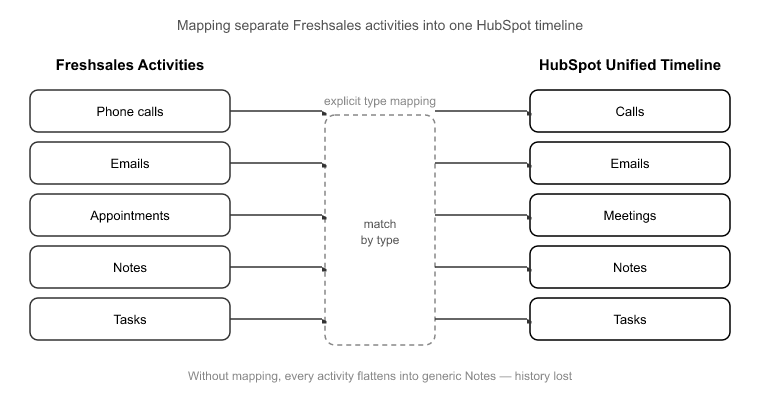
Freshsales stores Tasks, Appointments, Phone calls, Notes, and Emails as separate activity types, each with its own structure. HubSpot uses a unified Activities model with distinct types: Calls, Emails, Meetings, Notes, and Tasks, all living on a single timeline. Those two systems don’t line up automatically. Without explicit activity-type mapping, a migration flattens everything into generic notes, or worse, drops call and meeting records entirely.

That matters more than it sounds, because in a typical B2B Freshsales org, 40 to 60% of timeline entries are calls and meetings.[3] That’s the exact data reps rely on to remember what was discussed and when. Flatten it into notes and you haven’t just lost formatting. You’ve lost the ability to filter, report, and reference the interaction history that makes a CRM worth using. Reps end up re-asking questions clients already answered, which is the fastest way to lose adoption after a migration.

SuprSwitch maps each Freshsales activity type to its correct HubSpot equivalent: Phone calls to Calls, Appointments to Meetings, Tasks to Tasks, Emails to Emails, Notes to Notes, so the timeline arrives structured, not collapsed. The Phase 3 Pilot Validation run is where you confirm this. It migrates a representative sample first to check that activity history formats correctly and nothing truncates, and fixes any issues in the mapping layer rather than after go-live.

Freshsales Custom Modules in a Flat Object World

Freshsales’ higher tiers let you build custom Modules with their own fields and relationships. HubSpot’s flat model gives you two ways to handle these, and choosing wrong costs you either money or data.

Option one is HubSpot Custom Objects, which preserve the Module as its own record type with associations. The catch is that Custom Objects require HubSpot Enterprise.[4] Option two is folding the Module’s data into properties or property groups on an existing object, which works on lower tiers but flattens the relational structure.

The decision comes down to whether the Module carries genuine relational meaning. If your Freshsales Module represents something with its own lifecycle and multiple relationships, like subscriptions, properties, vehicles, or projects, it probably belongs as a Custom Object. If it’s really a cluster of attributes on a Contact or Deal, folding it into a property group is cleaner and saves you an Enterprise upgrade you may not otherwise need.

SuprSwitch handles both paths in Phase 2 Mapping Logic: mapping Modules to Custom Objects where the relational structure justifies it, or into property groups where it doesn’t. Making that call during mapping, not mid-migration, is what stops teams from buying an unnecessary tier or silently losing structured data.

Preserving Associations and Ownership Across the Move

Preserving Associations and Ownership Across the Move

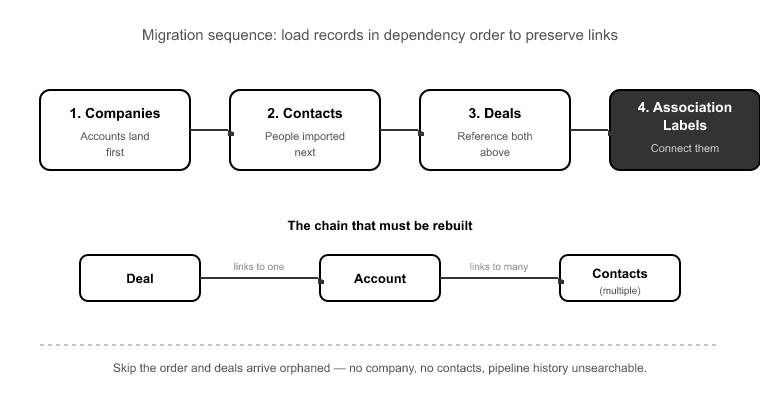
A Freshsales Deal links to one Account and multiple Contacts. That chain, Deal to Account to Contacts, has to be rebuilt in HubSpot in the correct order, or deals arrive orphaned: no company, no contacts, three years of pipeline history rendered unsearchable.

Order matters because you can’t associate a deal to a company that doesn’t exist in HubSpot yet. Companies have to land first, then contacts, then the deals that reference both, then the association labels that connect them. Get the sequence wrong and the associations silently fail even when every individual record imports fine. SuprSwitch’s association integrity mapping preserves the Deal to Account to Contacts chain in the right order so no deal shows up disconnected.

The second silent killer is ownership. Every mature Freshsales org accumulates deactivated reps who still own historical deals and contacts. On a naive import, those records either fail outright or default to the admin account, wiping out ownership attribution and breaking every report that slices by rep. The SuprSwitch ownership transfer engine resolves these deactivated-user gaps before the migration runs, so historical records keep their original attribution instead of collapsing onto whoever ran the import.

The 3–4 Day Freshsales to HubSpot Migration: Four Phases That Replace Weeks of Cleanup

Manual Freshsales migrations drag on for 3 to 6 weeks. Not because of data volume, a 30,000-record org isn’t hard to move mechanically, but because field mapping, late-discovered broken associations, and post-migration cleanup all happen sequentially and reactively.[5] You import, you find the breaks, you fix, you re-import. And CSV re-imports without a matching key are their own disaster: a partial migration that gets re-run duplicates every record. A 30,000-contact org becomes a 55,000-contact mess overnight.

SuprSwitch compresses the migration to 3 to 4 days by moving discovery and validation to the front:

Phase 1 Schema Analysis (Day 1). SuprSwitch scans the Freshsales org, detects Classic vs. Suite, counts records per object, and flags duplicates, broken associations, and empty required fields. Nothing moves. This is where the Leads-object and Custom-Module decisions get made.

Phase 2 Mapping Logic (Day 2). The transformation layer maps Freshsales objects to HubSpot’s model: Leads to Contacts with lifecycle stages, Modules to Custom Objects or property groups, all five activity types to unified Activities, deal-stage probabilities to HubSpot stages, and ownership transfer rules for deactivated users. Everything is reviewed before any live record moves.

Phase 3 Pilot Validation (Day 2–3). A representative sample migrates to HubSpot to validate relational integrity, activity-history formatting, field truncation, and association chains. Issues get fixed in the mapping layer, not after go-live.

Phase 4 Final Execution (Day 3–4). The full dataset runs through SuprSwitch’s migration engine with real-time record validation: if a contact doesn’t appear in HubSpot within the expected window, it flags immediately and the retry mechanism re-runs the failed record without restarting the whole job. No silent data loss surfacing in a support ticket three weeks later. And because SuprSwitch runs on a no-storage architecture, your Freshsales data is never held on its servers, which is usually what IT and security sign-off hinge on.

Conclusion

A Freshsales to HubSpot migration lives or dies on the decisions you make before any data moves. The Classic-vs-Suite question determines your entire Leads strategy. Activity-type mapping determines whether your reps keep their history or lose it. Association order determines whether deals arrive connected or orphaned. And ownership logic determines whether your reporting survives. None of these are execution problems. They’re mapping problems, and they’re solvable on paper if you front-load the discovery.

That’s the whole reason manual migrations stretch to 3 to 6 weeks while a SuprSwitch migration completes in 3 to 4 days. It isn’t that SuprSwitch moves records faster. It’s that Schema Analysis and Mapping Logic surface the structural mismatches on Day 1 and Day 2, and Pilot Validation proves the mapping on real sample data before the full run, so Final Execution is validated, not hopeful.

If you’re not even sure whether you’re on Freshsales Classic or Suite, that’s the place to start, because the answer changes your entire plan. Run a schema analysis, see exactly what maps and what doesn’t, and make the hard decisions before your live pipeline is on the line.


References

  1. Freshworks, “Freshsales Classic vs. Freshsales Suite: Understanding the Data Model,” Freshworks Product Documentation, 2024.
  2. HubSpot, “Set up and customize your deal pipelines and deal stages,” HubSpot Knowledge Base, 2024.
  3. Nucleus Research, “CRM Activity Data and Sales Rep Productivity Benchmarks,” Nucleus Research Analyst Report, 2023.
  4. HubSpot, “Create and use custom objects,” HubSpot Knowledge Base (Enterprise tier requirements), 2024.
  5. Ascend2, “CRM Migration Timelines and Common Failure Points,” B2B Data Operations Survey, 2023.

Migrating to HubSpot as a Fintech Company: What to Watch Out For

The fintech migration that goes sideways almost never fails on data volume. It fails on the day an SEC examiner or a SOC 2 auditor asks to see the full history of a specific borrower record. That’s when you discover the contact moved cleanly to HubSpot, but its disclosure calls, consent timestamps, and ownership lineage did not. The record is there. The provable chain of custody is gone.

That’s the real risk in a fintech CRM migration to HubSpot. Not lost records, but orphaned compliance context. Audit trails that fragment. Sensitive fields that land in property groups visible to your entire portal. Regulated records reassigned to a deactivated loan officer or a generic admin account, quietly breaking the supervisory chain a regulator expects to trace.

I’ve run this migration for lenders, wealth platforms, and payments companies. The difference between a clean go-live and a compliance gap that surfaces eight months later in an audit comes down almost entirely to sequence: what you validate before any live data moves. Done in the right order with real-time record validation, a fintech migration to HubSpot completes in 3 to 4 days without opening a hole in your compliance record.

Why Fintech CRM Migrations Fail on Compliance, Not Data Volume

A standard B2B migration succeeds when the contacts, companies, and deals arrive intact. A fintech migration succeeds when the contacts arrive intact and every regulated fact about them arrives with them and stays queryable: who verified their KYC status, when consent was captured, which licensed rep owned the relationship.

Most migration tooling moves the record but not its history. It carries the borrower’s name, email, and loan amount, but drops the activity timeline that documents the disclosure call and the ownership lineage that documents supervision. For a company under SEC, FINRA, or state lending rules, an incomplete record isn’t a data-quality footnote. It’s a compliance liability.

Manual fintech migrations drag on for 3 to 6 weeks[1], and the reason is almost never the size of the dataset. It’s late-discovered broken associations and post-migration compliance cleanup after the data has already landed. You find out the KYC objects didn’t associate to their contacts only after 60,000 records are live and someone runs a compliance report that returns garbage.

SuprSwitch compresses that timeline by moving the discovery and validation work to the front, on Day 1 and Day 2, before a single live record moves. That’s not a speed trick. For fintech it’s the entire risk model: you catch the compliance problems in the mapping layer, not after go-live.

Mapping Sensitive Fields Before They Move

Mapping Sensitive Fields Before They Move

Source CRMs are where PII goes to hide. SSNs typed into free-text note fields. Account numbers in a custom field with no encryption context. KYC status recorded three different ways, “verified 3/22,” “pending docs,” “VERIFIED,” in a text property that no compliance report can filter on.

A blind migration replicates every one of those exposures into HubSpot. Worse, it often lands regulated data in property groups visible to the entire portal. PII that lived in a restricted Salesforce field is suddenly readable by every sales rep with portal access.

This is what Phase 1, Schema Analysis exists to catch. On Day 1, SuprSwitch scans the source CRM and surfaces every custom field, its record count, its data type, and its quality issues: duplicates, broken associations, empty required fields, all before anything moves. For a fintech, this doubles as a compliance pre-audit. You see exactly which fields hold PII and which records carry ownership gaps, on Day 1, with nothing yet at risk.

Then Phase 2, Mapping Logic is where you route it. The transformation layer defines which legacy fields become HubSpot custom properties, which property group they land in, and, critically, how regulated values get normalized. That messy free-text KYC status becomes a controlled dropdown property with defined values, so it’s actually usable for compliance reporting instead of being 40,000 inconsistent strings. You define this mapping and review it before the first record moves.

A typical fintech Salesforce org carries 8 to 15 custom objects[2], including KYC records, applications, disclosures, and account links, and none of them map cleanly by auto-detection. Each needs an explicit rule. That’s deliberate work, and it’s the work that keeps regulated data from landing in the wrong place.

Preserving the Audit Trail: Activity History and Chain of Custody

Ownership Transfer for Regulated Records

Here’s the mismatch that quietly destroys fintech audit trails: Salesforce splits activities into Tasks and Events. HubSpot unifies them into one Activities object.[3] If your migration tool doesn’t handle that split explicitly, disclosure calls logged as Events and compliance follow-ups logged as Tasks don’t merge. They vanish from the HubSpot timeline.

Those are the exact records an examiner asks for. The consent timestamp. The suitability conversation. The documented disclosure. A migration that loses the activity split hands you clean-looking contact records with no provable history behind them.

Association integrity mapping is the other half of the chain. In fintech, a borrower isn’t a standalone contact. They’re tied 1:1 to an application, a KYC object, a set of disclosures, and a deal. If those associations break during import, the borrower survives but the audit chain snaps. You can no longer trace from the person to their verified identity to their signed disclosures.

SuprSwitch’s association integrity mapping preserves those 1:1 relationships as a defined rule in Phase 2, not as a hope during import. The borrower stays tied to their application, their KYC record, and their full activity history, which is precisely what makes the migrated record defensible under examination.

Ownership Transfer for Regulated Records

When a licensed advisor or loan officer leaves, their records don’t lose regulatory weight. Suitability obligations and supervision requirements still attach to them. Regulators expect to trace who owned and supervised each relationship.

A naive migration assigns those records to the deactivated user, because that’s who owns them in the source, or dumps them on a generic admin. Either way, you’ve broken the supervisory chain.

I ran this exact scenario with a lending client migrating 60,000 borrower contacts. About 4,000 were owned by three deactivated loan officers.[4] Without pre-migration ownership logic, those 4,000 records would have landed unassigned. That breaks the supervisory audit requirement and forces a manual re-assignment project after go-live, under time pressure, on regulated records.

SuprSwitch’s ownership transfer engine handles this before the migration runs. In Phase 2 you define the reassignment logic, which active and appropriately licensed rep or team inherits records from each deactivated user, so no compliance-bearing record lands orphaned. The supervisory chain stays intact from the moment the record enters HubSpot.

The Migration Sequence That Minimizes Compliance Risk

The four-phase SuprSwitch sequence is built to surface compliance problems early, when fixing them is cheap and safe:

Phase 1, Schema Analysis (Day 1). SuprSwitch scans the source CRM and maps every custom field, record count, and data quality issue. For fintech, this is your compliance pre-audit: you identify PII fields, ownership gaps, and broken associations before anything moves.

Phase 2, Mapping Logic (Day 2). The transformation layer maps legacy objects to the HubSpot data model: custom properties created, property groups assigned, sensitive-field routing defined, KYC and consent values normalized into controlled properties, association rules set, and ownership transfer logic defined for deactivated reps. Reviewed and signed off before any live record moves.

Phase 3, Pilot Validation (Day 2 to 3). A compliance-representative sample migrates to HubSpot first. This confirms activity history formats correctly, account numbers don’t truncate, and the association chains between contacts, applications, and KYC objects hold. Issues get fixed in the mapping layer, not after 60,000 records are live.

Phase 4, Final Execution (Day 3 to 4). The full dataset runs through the migration engine with real-time record validation. Every record is validated during and after transfer before go-live is confirmed.

The entire run completes in 3 to 4 days. The reason it doesn’t take weeks is that the hard discovery work, the part that usually surfaces mid-migration and blows the timeline, happens on Day 1 and Day 2, against source data, before anything is at risk.

Validating Before Go-Live: Why Real-Time Record Validation Matters for Fintech

Validating Before Go-Live- Why Real-Time Record Validation Matter

The worst way to learn a record didn’t migrate is a support ticket three weeks after go-live, when the record is already being relied on for a compliance decision.

SuprSwitch validates every record in real-time during transfer. If a contact, application, or KYC object doesn’t appear in HubSpot within the expected window, it flags immediately. Failed records hit the retry mechanism automatically. They’re retried without restarting the full job, so a single transient failure doesn’t force you to re-run 60,000 records or leave a gap you won’t notice.

For a fintech, this produces something an auditor can actually use: a defensible, record-by-record confirmation that the full dataset landed, validated before go-live is signed off. Not a spot check. A complete confirmation.

Vendor Risk During the Migration Itself

Every security review asks the same question about a migration vendor: where does our PII sit during the transfer? For most tools, the honest answer is “on our servers, for some period.” For a fintech under GLBA and SOC 2 scrutiny, that’s an exposure that has to be documented, assessed, and defended.

SuprSwitch’s no-storage architecture answers it differently: customer data is never held on SuprSwitch servers. Records move from source to HubSpot through the transformation layer without being retained anywhere in between. The answer to “where does our PII live mid-migration?” is that it doesn’t sit anywhere, which is a materially easier thing to put in front of a security team than a data-residency and retention policy for a third-party staging environment.

Conclusion

A fintech CRM migration to HubSpot is not a bigger version of a standard migration. The stakes are different because the failure mode is different. You’re not protecting against lost records, you’re protecting against a broken audit chain that stays invisible until an examiner or auditor goes looking for it.

Every safeguard that matters here lives in the sequence: catch the PII and ownership gaps in Schema Analysis, route sensitive fields and normalize regulated values in Mapping Logic, prove the audit trail holds in Pilot Validation, and validate every record in real-time during Final Execution. Do that, and the migration completes in 3 to 4 days with a defensible compliance record instead of a cleanup project waiting to detonate.

If you’re scoping this, start with the part that carries no risk. A Schema Analysis shows you your PII fields, your ownership gaps, and your broken associations before any data moves, which is the exact information your compliance and security teams will want to see anyway.


References

  1. Gartner, “CRM Data Migration: Common Causes of Project Delay and Cost Overrun,” 2023.
  2. Salesforce Developer Documentation, “Custom Objects and Standard Data Model Limits,” 2024.
  3. HubSpot Knowledge Base, “How Activities, Tasks, and Meetings Are Structured in the HubSpot CRM,” 2024.
  4. SuprSwitch internal migration engagement data, lending-sector implementations, 2023–2024.

DIY CRM Migration vs Managed Migration: Which Is Right for You?

Here is the scenario this whole article is written against. It’s Friday, you flip the switch on your new HubSpot portal, and everyone goes home happy. Monday morning, sales logs in and half the pipeline is gone. Not deleted. The deals are technically in the system, but the deal-to-contact associations didn’t carry over. Reps can’t find them, forecast views are wrong, and now you’re the person explaining to the VP of Sales why three years of relationship context vanished over the weekend.

That’s the real stakes of the diy vs managed crm migration decision. And it’s almost never framed correctly. Teams treat it as a budget question: DIY is free, managed costs money, pick based on how much you want to spend. That framing is wrong. The real question is where your risk lives, and whether you’ve scoped the work that DIY migrations quietly skip and then pay for later in cleanup, lost history, and burned admin hours.

I’ve run more than 120 CRM migrations into HubSpot. Let me tell you exactly where the money actually goes, when DIY is genuinely the right call, and what a managed migration with a tool like SuprSwitch actually buys you.

What DIY Migration Actually Costs (Beyond the $0 Price Tag)

What DIY Migration Actually Costs (Beyond the alt=

DIY looks free because the export button is free. Salesforce lets you dump CSVs. HubSpot lets you import them. On paper, that’s a migration. In practice, that’s the cheapest 20% of the job, and the 80% nobody scopes is where the cost hides.

Start with admin time. A mid-size org, say 50,000 to 100,000 records with a handful of custom fields, routinely eats up 80 to 150+ hours of a RevOps admin’s time to migrate by hand.[1] That’s field mapping, deduplication, association rebuilding, and reconciliation. It’s the line item leadership never sees, because the “free” migration is being paid for in the salary of the one person who should be doing revenue work instead.

Then there’s the cleanup nobody budgets. Manual DIY migrations for that size org routinely stretch three to six weeks.[2] Here’s the part people get wrong: it’s almost never the data volume. It’s manual field mapping, late-discovered broken associations, and the post-migration cleanup that surfaces one support ticket at a time for a month after go-live.

CSV imports don’t preserve associations. They don’t preserve activity history. They don’t preserve ownership. So what you’re really buying with “free” is a pile of contacts with no company link, deals with no contact, and zero call or meeting history. Then you pay for the manual labor of rebuilding all of that relational integrity by hand. The import was free. The rebuild is the expensive part.

Where DIY Migrations Break (And Why You Won’t See It Coming)

Where DIY Migrations Break (And Why You Wont See It Coming

The failure modes below aren’t edge cases. They’re the default outcome of a CSV-based DIY migration, and every one of them gets discovered at the worst possible time, mid-migration or post-go-live.

Object-model mismatches. Salesforce Leads have no HubSpot equivalent. HubSpot has no Lead object in the classic Salesforce sense, so you have to decide how Leads become Contacts and Companies. Salesforce splits Activities into Tasks and Events; HubSpot unifies everything into one Activities model. Pipedrive’s stage structure doesn’t map 1:1 to HubSpot pipelines and deal stages. A DIY team doesn’t know these gaps exist until they’re staring at a half-imported dataset trying to figure out why nothing lines up.

Orphaned associations. This is the Monday-morning pipeline disappearance. Associations in HubSpot are their own layer. A deal isn’t automatically linked to a contact just because both records exist. If your import doesn’t explicitly rebuild those links with correct object IDs, you get orphaned records: technically present, functionally invisible.

Deactivated-user ownership gaps. When a rep leaves, their records still carry their ownership. A DIY import either orphans those records or dumps every one of them on a single admin. Nobody scopes ownership transfer logic until deals start vanishing from forecast views because they’re assigned to a user who no longer exists in the portal.

Lost activity history. Call logs, emails, and meetings are the most commonly lost data in DIY CSV migrations,[3] because they live in separate objects with their own association requirements. Lose them and you destroy the “why did we last talk to this customer” context every rep depends on. That history doesn’t come back. Once you’ve gone live without it, reconstructing it is essentially impossible.

Duplicate multiplication. Import 12,000 contacts into a portal that already holds 3,000 overlapping records with no dedup logic, and you don’t get 15,000 clean contacts. You get thousands of duplicates that then poison every workflow and every report that runs against them.

The Five Factors That Actually Decide DIY vs Managed CRM Migration

Ignore budget for a second. The real diy vs managed crm migration decision comes down to five factors. Score yourself honestly on each.

1. Data volume. This matters less than everyone thinks. A 400,000-record Salesforce org with clean schema migrates faster than a 15,000-record Zoho org with 40 custom fields and inconsistent data entry. Row count is not the bottleneck.

2. Complexity. This is the real driver. Custom objects, association depth, number of active workflows, and object-model mismatches between source and HubSpot. The more of these you have, the more DIY becomes a series of discoveries you make live.

3. Team capacity. Do you have a HubSpot admin who can lose 80 to 150 hours to this and still keep the lights on? If your ops team is one person, DIY isn’t free. It’s the pause button on everything else they do.

4. Risk tolerance. What happens to the business if deal history is wrong or missing on go-live day? For a transactional SMB, maybe you absorb it. For a company where reps live inside deal timelines, a broken migration is a revenue event.

5. Timeline pressure. Is there a hard cutover date, like a Salesforce contract expiring or a fiscal-year start? DIY timelines slip because the failures surface late. If you can’t afford slip, that changes the math.

When DIY Is Genuinely the Right Call

When DIY Is Genuinely the Right Call

I built a migration tool and I’m still going to tell you: sometimes DIY is correct. Don’t pay for managed migration when you don’t need it.

DIY wins when you have a small, clean, single-object migration, say under 10,000 contacts, no custom objects, and minimal activity history you care about preserving. It wins when you have genuine in-house HubSpot expertise, someone who understands associations and the import tool and won’t be surprised by the object model. And it wins when you have no hard deadline, so if it takes three weeks and a redo, that’s an acceptable outcome.

If that’s you, with clean data, one object type, real HubSpot skill on staff, and no clock, export your CSVs, map your fields carefully, and run it yourself. You don’t need a tool for that.

The moment you add custom objects, deep associations, activity history that matters, deactivated users, or a deadline, the calculus flips. That’s where the failure modes above stop being hypothetical.

What “Managed” Actually Buys You A 4-Phase Walkthrough

What -Managed- Actually Buys You — A 4-Phase Walkthrough

Here’s the thing most people don’t understand about managed migration: the value isn’t that someone else pushes the button. It’s that the expensive discovery and validation work moves to before any live data moves. That’s why SuprSwitch completes large migrations in 3 to 4 days instead of the 3 to 6 weeks a manual approach drags into. It’s not doing the same work faster. It’s doing the work in a different order.

Phase 1 Schema Analysis (Day 1). SuprSwitch scans your source CRM database and surfaces every custom field, record count, property type, and data quality issue, including duplicates, broken associations, and empty required fields, before anything moves. This is the exact work DIY teams skip. There are no surprises mid-migration because the surprises are all found on Day 1.

Phase 2 Mapping Logic (Day 2). The transformation layer maps your legacy objects to the HubSpot data model. Custom properties get created in HubSpot. Association integrity mapping defines the rules that preserve 1:1 relationships between objects, the direct answer to “contacts with no company, deals with no contact.” Object-type mismatches like Salesforce Leads get handled explicitly. And the ownership transfer engine sets logic for deactivated users before the migration runs, not after deals vanish from forecast views. The full mapping is defined and reviewed before the first real record moves.

Phase 3 Pilot Validation (Day 2–3). A representative sample migrates into HubSpot to validate relational integrity, activity history formatting, field-level truncation, and association chains. This is the phase DIY has no equivalent for. In DIY, you find these issues live, in production. With the pilot migration, any issue gets fixed in the mapping layer, not cleaned up after the fact.

Phase 4 Final Execution (Day 3–4). The full dataset runs through SuprSwitch’s migration engine into your production portal. Real-time record validation flags a failure during transfer. If a record doesn’t appear in HubSpot within the expected window, it flags immediately, not three weeks later in a support ticket. The retry mechanism automatically reruns failed records without restarting the whole job. Every record is validated post-migration before go-live is confirmed.

For the technical buyers weighing the security tradeoff of an external tool: SuprSwitch runs on a no-storage architecture. Customer data is never held on SuprSwitch servers. That removes the most common objection IT raises about routing data through a third party.

What Managed Migration Doesn’t Fix

Credibility means being honest about the limits. A managed migration is not magic, and SuprSwitch doesn’t pretend to be.

It won’t fix your bad data entry decisions. If your reps have been entering deal amounts in three different formats for two years, SuprSwitch will migrate that mess faithfully. Schema Analysis will flag the inconsistency, but cleaning it is still a decision you have to make. A migration is a good moment to clean, but the tool doesn’t invent the cleaning rules for you.

It won’t redesign a broken process. If your Salesforce pipeline had eleven stages that nobody used correctly, migrating them into HubSpot gives you eleven badly-designed stages in a new system. Process redesign is a separate exercise, and you should do it deliberately, not assume the migration handles it.

And it won’t replace a real HubSpot admin after launch. SuprSwitch gets your data in, correctly, with integrity intact. Someone still has to own the portal, build the workflows, and drive adoption. The migration is the starting line, not the finish.

Conclusion

The diy vs managed crm migration decision was never really about budget. It’s about where your risk lives and whether you’ve honestly scoped the work that CSV-based DIY migrations skip: association rebuilding, ownership transfer, activity history, deduplication, and validation. Those aren’t optional extras. They’re the actual job, and skipping them just moves the cost downstream into cleanup and lost history.

If your migration is small, clean, single-object, and unhurried, and you have real HubSpot expertise in house, do it yourself. That’s a legitimate answer, and I’d rather you keep the money than pay for something you don’t need. But the moment you add custom objects, deep associations, deactivated users, activity history that matters, or a hard cutover date, DIY stops being cheaper and starts being the most expensive option with a $0 sticker price.

Managed migration with SuprSwitch earns its place by moving discovery and validation to Days 1 and 2, before any live data moves, which is exactly why 3 to 4 days replaces 3 to 6 weeks. Before you commit either way, run a Schema Analysis on your source CRM. See your custom fields, duplicates, and broken associations mapped out first. Then make the call with data instead of assumptions.


References

  1. HubSpot, “CRM Migration Best Practices: Planning and Execution,” HubSpot Knowledge Base, 2023.
  2. Ascend2, “Data Migration Trends and Timelines in Mid-Market CRM Projects,” Research Report, 2023.
  3. Validity, “The State of CRM Data Quality,” Data Management Report, 2023.

CRM Migration vs CRM Implementation: What’s the Difference?

The most expensive mistake I see in CRM projects isn’t a broken association or a lost activity record. It’s a scoping error made in the very first conversation. A team asks for “a migration” from Salesforce to HubSpot, signs off on a timeline, and then discovers three weeks in that the HubSpot portal has no pipeline to receive their deals, no properties to hold their custom fields, and no workflows to route the incoming records. The data has nowhere to land. The project stalls, not because the data was hard to move, but because nobody scoped the work of building the place it was moving to.

That’s the heart of crm migration vs implementation. They’re two separate workstreams that get sold, scoped, and budgeted as one. Migration is the movement and transformation of data. Implementation is the configuration of the system that data moves into. They’re sequenced and dependent, but they are not the same job. Treating them as interchangeable is where timelines and budgets blow up.

Migration Moves Data. Implementation Builds Where It Lands.

Here’s the one-sentence distinction I give every client. Migration moves your records, associations, and activity history from a source CRM into HubSpot. Implementation builds the pipelines, properties, workflows, and permissions inside HubSpot so that data has a structured place to go.

The reason they can’t be the same job is the object model. HubSpot and Salesforce do not store data the same way. Salesforce has a native Lead object. HubSpot has no Lead object at all. Salesforce splits activities into separate Tasks and Events objects, while HubSpot unifies calls, meetings, notes, and emails into one Activities timeline.[1] Every one of those differences forces a decision. And a decision about how HubSpot should be structured is an implementation decision, not a data-movement task.

So the moment you start mapping a Salesforce Lead to something in HubSpot, you’ve stopped doing pure migration and started doing implementation. The two are braided together. Pretend they aren’t, and the seam between them is exactly where records fall through.

What CRM Migration Actually Involves

What CRM Migration Actually Involves

Migration is a technical execution job with five moving parts. Each one has a specific failure mode when it’s mishandled.

Records. Contacts, Companies, Deals, Tickets, and any custom objects. This looks straightforward on the surface, until record counts, property types, and required-field constraints in the target portal reject rows that were valid in the source.

Associations. The contact-to-company and deal-to-contact chains that give your data meaning. Break these and you have a portal full of orphaned records: deals attached to no one, contacts belonging to no company. Association integrity mapping preserves those 1:1 relationships during transfer. Without it, the relational structure that took years to build in the source CRM arrives as a pile of disconnected rows.

Activity history. This is where sales context lives. If the Salesforce Tasks-and-Events split isn’t mapped correctly into HubSpot’s unified Activities timeline, call and meeting history doesn’t render, even though the records technically “moved.” I’ve watched three years of sales context vanish from a timeline because the receiving portal wasn’t configured to accept the mapped activity types.

Ownership transfer. Deactivated users own records. If you don’t reassign ownership before migration, those records land orphaned or get silently dropped. The SuprSwitch ownership transfer engine sets that logic before the migration runs.

Deduplication. Import a dataset with existing duplicates into a portal with no dedup rules, and the duplicates don’t just carry over. Associated records multiply against each duplicate copy. That’s how “5,000 clean contacts” becomes 6,400 records with tangled associations.[2]

What CRM Implementation Actually Involves

Implementation is not “setup.” It’s a series of process decisions that happen to be expressed in configuration.

Pipelines and deal stages. How many stages, what they’re named, which are probability-weighted, and which stage-dependent fields become required at each step. This is a business-process decision, not a data task, and it’s the single most common cause of migration rework I see.

Properties and property groups. Every custom field in your source CRM needs a home in HubSpot, with the right type. A Salesforce picklist doesn’t automatically become a HubSpot dropdown select, and a multi-line text field truncates differently.[3] You cannot map data into properties that don’t exist yet.

Workflows. Lead routing, lifecycle automation, task creation, notification logic. These define how the business operates on top of the data.

Permissions and process design. Who sees what, who owns what, which teams touch which pipelines. This is where implementation shades into organizational design.

The point is simple. Implementation is where you make decisions. Migration is where you execute against them. If you configure in a vacuum, building a clean six-stage pipeline before you’ve looked at the source data, you find out at load time that the source CRM has eleven stages and three stage-dependent custom fields, and your “finished” implementation gets reworked.

Where CRM Migration vs Implementation Overlaps and Where Projects Get Scoped Wrong

The dangerous work lives at the seam. These items belong to both workstreams, which means in a badly scoped project they get owned by neither.

The Salesforce Lead problem. Salesforce Leads have no HubSpot equivalent. A migration engineer has to decide: do Leads become Contacts? Contacts without a Company? Contacts flagged with a lifecycle-stage property? That is an implementation decision that governs migration mapping. Get it wrong and you either lose the Lead/Contact distinction entirely or duplicate every converted Lead.

The Activities split. Deciding how Tasks and Events collapse into the unified HubSpot Activities timeline is a mapping decision that depends on how the timeline is configured to display them. Migration can’t finalize the mapping until implementation has made the call.

Pipeline stage mismatch. Eleven source stages, six configured target stages. Someone has to decide which stages merge, which get dropped, and what happens to the deals sitting in the stages that no longer exist. This is a configuration problem wearing a migration costume, and it forces either data loss or a mid-project pipeline rebuild.

Ownership and permission gaps. Deactivated-user records and ownership reassignment sit squarely between the two jobs. They’re not “pure migration” and not “pure implementation,” so they fall through the cracks and surface at go-live when someone asks why 400 deals have no owner.

SuprSwitch handles this seam deliberately. Phase 2, Mapping Logic forces the object-type decisions to be made and reviewed before the first record moves, and the ownership transfer engine resolves the deactivated-user gap up front. The decisions that normally surface late become explicit early.

Why Confusing CRM Migration vs Implementation Wrecks Your Timeline

Why Confusing CRM Migration vs Implementation Wrecks Your Timelin

Here’s the myth I want to kill: “migrations take weeks.”

They don’t. The data movement doesn’t take weeks. A 400,000-record Salesforce org and a 5,000-record Pipedrive account take roughly the same engine time to move, because data volume is almost never the bottleneck.[4] When a migration project drags on for three to six weeks, the time is consumed by three things: manual field mapping, late-discovered broken associations, and post-load cleanup.

Every one of those is implementation or discovery work masquerading as migration. When you budget six weeks of “migration effort,” you’re really budgeting six weeks of implementation decisions being made slowly, manually, and out of sequence, usually mid-migration, when the cost of changing them is highest.

SuprSwitch compresses the actual migration into a four-phase process that completes in 3–4 days by moving the discovery and decision work to the front:

Phase 1, Schema Analysis (Day 1). SuprSwitch scans the source CRM and surfaces custom fields, record counts, property types, and data-quality issues like duplicates, broken associations, and empty required fields, before anything moves. This output is exactly what an implementation needs as input. It tells you what properties HubSpot has to hold the incoming data. No surprises mid-run.

Phase 2, Mapping Logic (Day 2). The transformation layer maps legacy objects to the HubSpot data model. It creates custom properties, defines association rules, resolves object-type mismatches like the Lead problem, and sets ownership transfer logic. All of it is defined and reviewed before the first live record moves.

Phase 3, Pilot Validation (Day 2 to 3). A representative sample migrates into the actual configured portal to validate relational integrity, activity-history formatting, field-level truncation, and association chains. Pipeline-stage and property mismatches get caught here and fixed in the mapping layer, not discovered after the full run.

Phase 4, Final Execution (Day 3 to 4). The full dataset runs through the migration engine with real-time record validation. If a record doesn’t appear in HubSpot within the expected window, it flags immediately. Failed records auto-retry through the retry mechanism without restarting the entire job. Every record is validated before go-live is confirmed.

The reason this works is sequence. Discovery and implementation-adjacent decisions happen on Day 1 and Day 2, before any live data moves. The weeks of “migration” that other approaches burn on late discovery simply don’t exist when the discovery happens first.

The Right Sequence: Discovery First, Then Configure, Then Migrate

If your project involves both workstreams, and almost every HubSpot migration does, run them in this order:

1. Discovery. Scan the source CRM before you configure anything. You cannot design a pipeline or a property schema against data you haven’t inspected. This is what Schema Analysis delivers on Day 1.

2. Configure to fit the data. Build pipelines, stages, and properties informed by what the source actually contains, not by a template. If the source has eleven stages, decide deliberately how they map into your target pipeline before you commit the configuration.

3. Map, then pilot. Define the mapping logic and validate it against a live sample in the configured portal. The pilot is where configuration mismatches surface cheaply.

4. Execute and validate. Run the full dataset with real-time validation, and confirm every record before go-live.

Notice that configuration sits between two migration phases: discovery before it, execution after it. That’s the dependency people miss when they scope migration and implementation as one undifferentiated blob.

Frequently Asked Questions

Can I migrate my data before HubSpot is configured?

No. The mapping layer depends on the target structure existing. You cannot map a Salesforce custom field into a HubSpot property that hasn’t been created, or route a deal into a pipeline stage that isn’t built. The SuprSwitch Phase 2, Mapping Logic step requires the target data model to be defined, precisely because migration transforms source objects into the configured HubSpot structure. Attempt to migrate first and you either reject the records or dump them into an unstructured portal you’ll have to rework.

How long does a CRM migration actually take?

The migration itself takes 3–4 days through the SuprSwitch four-phase process: Schema Analysis on Day 1, Mapping Logic on Day 2, Pilot Validation on Day 2 to 3, and Final Execution on Day 3 to 4. Data volume barely affects that. A 400,000-record org runs in roughly the same engine time as a 5,000-record one.[4] The implementation timeline is separate and depends on how many pipelines, properties, and workflows you’re building. When people quote “weeks,” they’re describing manual mapping and late discovery, not the data movement itself.

What happens to Salesforce Leads and Activities in HubSpot?

These are the two classic object-model mismatches. HubSpot has no Lead object, so Salesforce Leads have to be mapped to Contacts, often flagged with a lifecycle-stage property to preserve the distinction. Salesforce also splits activities into separate Tasks and Events objects, while HubSpot unifies calls, meetings, notes, and emails into one Activities timeline.[1] Both are mapping decisions handled in Phase 2, and both have to be made before migration runs. Get them wrong and you either lose the Lead/Contact distinction or your activity history fails to render on the timeline.

How do I avoid duplicates multiplying during migration?

Configure deduplication before load, not after. If you import a dataset with existing duplicates into a portal with no dedup rules, associated records multiply against each duplicate copy. One duplicated company can fracture every deal and contact associated with it.[2] The SuprSwitch Schema Analysis step surfaces duplicates and broken associations on Day 1, before any data moves, so you resolve them in the mapping layer rather than untangling them post-load.

What happens if records fail mid-migration?

The SuprSwitch real-time record validation flags failures during transfer. If a record doesn’t appear in HubSpot within the expected window, it surfaces immediately, not three weeks later in a support ticket. The retry mechanism then re-runs failed records automatically without restarting the entire job, so a handful of failures don’t force you to re-migrate 400,000 records from scratch.

Conclusion

The confusion between crm migration vs implementation isn’t semantic. It’s the specific place where projects lose weeks and budgets. Migration moves the data. Implementation builds where the data lands. They’re dependent and sequenced, and the seam between them, object-type mapping, pipeline decisions, ownership gaps, is where records fall through when the two get scoped as one job.

The fix is sequence. Discover before you configure. Configure to fit the data you actually have. Map and pilot before you execute. That ordering is exactly why SuprSwitch runs Schema Analysis and Mapping Logic before any live data moves. The discovery work that normally drags a migration into week four happens on Day 1 and Day 2 instead.

Before you sign off on a “migration,” find out how much of it is actually implementation. Run the schema scan first. Once you know what’s in your source CRM and what your HubSpot portal needs to receive it, the timeline stops being a guess, and the project stops blowing up at go-live.

References

  1. HubSpot, “Understand the HubSpot CRM object model,” HubSpot Knowledge Base, 2024.
  2. HubSpot, “Deduplication of contacts, companies, deals, and tickets,” HubSpot Knowledge Base, 2024.
  3. HubSpot, “Manage your properties and property field types,” HubSpot Knowledge Base, 2024.
  4. Salesforce Developers, “Object Model and Data Migration Considerations,” Salesforce Architecture Documentation, 2023.

Microsoft Dynamics to HubSpot: The Migration Playbook

Most failed dynamics to hubspot migration projects don’t fail because of data volume. They fail because someone exported 200,000 Opportunities before deciding how Business Process Flow stages map to HubSpot deal stages. Or they moved Contacts before resolving Team-owned records and deactivated SystemUsers. Or they migrated Option Set values raw, and now every dropdown in HubSpot reads 100000002 instead of “Enterprise.”

Dynamics 365 and HubSpot don’t share a data model. Dynamics is built on a rigid, relational entity schema: polymorphic lookups, N:N intersect entities, integer-keyed Option Sets, Team-based ownership, and Business Process Flows layered on top of statecode and statuscode fields. HubSpot’s model is flatter. It has Contacts, Companies, Deals, Tickets, Custom Objects, and Associations. There is no clean 1:1 translation between the two, and that gap is where migrations break.

This blog is about resolving those translation decisions before a single live record moves. That is exactly how a dynamics to hubspot migration goes from a three-to-six-week slog to a 3-4 day execution.

Why Dynamics-to-HubSpot Is a Schema Translation, Not a Data Transfer

The mental model that sinks these projects is treating the migration as a “lift and shift”: pull the records out of Dynamics, push them into HubSpot, done. That works when two systems share a schema. Dynamics and HubSpot do not.

Start with the Lead entity. Dynamics treats Leads as a first-class entity, fully separate from Contacts and Accounts, with their own qualification lifecycle. HubSpot’s Lead object, introduced in 2023, is pipeline-oriented and limited[1]. It is not a full record type that carries decades of qualification history. So every Dynamics Lead needs a decision: does it become a HubSpot Contact, a Contact + Company pair, or a Lead-object record? Get this wrong across a segment and you either duplicate records or strand qualification history.

Then there’s the polymorphic “Regarding” lookup. Every Dynamics Activity, whether a Phone Call, Email, Appointment, or Task, attaches to its parent through a single polymorphic field that can point at a Contact, an Account, an Opportunity, or a custom entity[2]. HubSpot’s engagement model doesn’t have a polymorphic anything. If the migration doesn’t resolve what each activity is regarding and rebuild that association, you lose call and meeting history against the right record.

This is why the first two phases of any serious migration are discovery and mapping, not export. You resolve the schema mismatch on paper before you touch production data.

Mapping Dynamics Entities to HubSpot Objects

Here’s the entity-to-object translation table that every dynamics to hubspot migration has to define explicitly. Each row hides a trap.

Leads → Contacts / Companies / Lead object. As above, this is a per-segment decision, not a global one. Marketing-sourced Leads with only an email often become Contacts. Qualified Leads tied to a named account become a Contact + Company pair. Getting the dedup key right here matters, and there’s more on that below.

Contacts → Contacts. The cleanest mapping, but watch the ownership field and the Regarding-based activity links hanging off each record.

Accounts → Companies. HubSpot dedupes Companies on domain[3]. Legacy Dynamics Accounts frequently have no website populated, which means they’ll either merge incorrectly or multiply on import if you don’t set a dedup strategy in the mapping phase.

Opportunities → Deals. This is where Business Process Flow stages have to be translated into linear deal stages. It deserves its own section below.

Cases → Tickets. Straightforward object mapping, but the status and priority Option Sets need integer-to-label resolution, and the Regarding link back to the Contact or Account has to be rebuilt.

Activities → Engagements. The Activity table is almost always the largest object in a Dynamics org, with hundreds of thousands of records accumulated over years[4]. It is also the object most likely to be under-scoped. Phone Calls, Emails, Appointments, and Tasks each map to a HubSpot engagement type, and each carries a Regarding association that must survive.

Custom entities → Custom Objects (Enterprise) or flattened properties. Dynamics custom entities only land as HubSpot Custom Objects on the Enterprise tier[5]. On Professional or lower, they have to be flattened into properties on standard objects. That’s a mapping-phase decision. You cannot discover it at execution and improvise.

In SuprSwitch, this translation happens in Phase 2, Mapping Logic. The transformation layer defines each entity-to-object rule, creates the required custom properties in HubSpot, and sets the association rules, all reviewed before the first record moves. The point is that nobody is deciding what a Lead becomes while 80,000 of them are already halfway through the pipe.

Handling the Hard Relationships: Polymorphic Lookups and N:N Entities

Handling the Hard Relationships- Polymorphic Lookups and N-N Enti

Two Dynamics constructs silently destroy relationship data if you ignore them.

The first is the polymorphic “Regarding” lookup on Activities. Because a single field can point at any parent entity type, a naive export dumps activities as a flat table with a GUID reference and an entity-type code. Push that into HubSpot without resolution and every call, email, and meeting lands as an orphan: technically imported, associated with nothing.

SuprSwitch handles this with association integrity mapping. It reads the Regarding entity type and GUID, resolves the target record in HubSpot, and rebuilds the engagement association so a Phone Call regarding an Opportunity lands against the correct Deal instead of floating in the void. This preserves the 1:1 relationship fidelity between the activity and its parent.

The second is N:N intersect entities. Dynamics models many-to-many relationships, such as Contacts to marketing lists or custom N:N entities, through intermediate intersect tables. HubSpot associations don’t model arbitrary N:N the same way. Left unmapped, these relationships drop without an error message. You won’t know a Contact was on twelve marketing lists until someone asks why segmentation is empty. These relationships have to be explicitly mapped to HubSpot associations or active list membership in Phase 2.

Migrating Opportunities: Business Process Flow Stages to Deal Stages

This is the single most misunderstood part of a dynamics to hubspot migration.

Dynamics Opportunities carry two things people confuse. There’s statecode and statuscode, the underlying state (Open, Won, Lost) and the granular reason. And there’s the Business Process Flow (BPF), a separate construct layered on top that defines the stages the rep actually clicked through: Qualify, Develop, Propose, Close.

HubSpot has no BPF equivalent. It has linear deal stages per pipeline. So the question is: what do you map to those deal stages?

If you map raw statuscode values, your pipeline history becomes fiction. The rep saw “Develop” in their process flow. Your HubSpot report shows “In Progress” because that’s what the status field held. Every historical stage-conversion metric you build on that is wrong.

The correct approach is to map the BPF stage the rep actually progressed through to the corresponding HubSpot deal stage, and preserve statuscode, including closed-lost reason, as a separate property. Collapsing statecode and statuscode into one field loses closed-lost reason analysis, which is often the most valuable pipeline data you own.

In SuprSwitch, this BPF-stage-to-deal-stage logic is defined in Phase 2 and validated against a real spread of Opportunity stages during Phase 3, Pilot Validation, so you catch a mis-mapped stage on a sample of 50 deals, not across 50,000.

Resolving Ownership: Deactivated Users and Team-Owned Records

Resolving Ownership- Deactivated Users and Team-Owned Records

Two ownership problems will stop records from importing cleanly.

Deactivated SystemUsers. Enterprise Dynamics orgs accumulate years of disabled users who still own thousands of Opportunities, Contacts, and Activities. HubSpot cannot assign a record to a user seat that doesn’t exist. Without a resolution pass, those records import unowned or fail outright, and routing and reporting collapse the moment go-live happens.

Team-owned records. Dynamics lets a record be owned by a Team, not just a user[6]. HubSpot only supports individual owner assignment. Every Team-owned record needs a resolution rule, whether that’s reassign to a team lead, a round-robin of active reps, or a designated fallback owner, before migration, or ownership lands nowhere.

SuprSwitch’s ownership transfer engine resolves both cases before the migration runs. Deactivated SystemUsers and Team-owned records are mapped to active HubSpot owners or a designated fallback during Phase 2, so nothing imports unowned. This is a pre-migration pass, not a post-migration cleanup, which is the whole point.

Option Sets, Status Codes, and the Data-Quality Cleanup

Three data-quality traps show up in nearly every Dynamics org.

Option Set integers vs. labels. Dynamics stores picklist values as integers with a separate label layer. A field showing “Enterprise” stores 100000002. Migrate the raw integer and every dropdown in HubSpot fills with meaningless numbers[7]. This is the most common Dynamics migration error, and it’s entirely preventable with integer-to-label resolution defined in mapping.

statecode vs. statuscode. As covered above, both carry meaning, and collapsing them loses reason-level analysis. Map them to distinct HubSpot properties.

GUID identity vs. HubSpot dedup keys. Dynamics keys every record on a GUID. HubSpot dedupes Contacts on email and Companies on domain. Records with no email, which is common for Leads and legacy Accounts, will either merge incorrectly or multiply on import if the dedup strategy isn’t set during mapping. You have to decide, per object, what the dedup key is before execution.

SuprSwitch’s Phase 1 Schema Analysis surfaces these issues up front, including duplicate GUIDs, empty required fields, orphaned activities, and every custom Option Set, so they’re resolved in the mapping layer rather than discovered mid-run.

The 4-Phase SuprSwitch Migration: What Happens on Each Day

The reason a dynamics to hubspot migration gets quoted at three to six weeks is almost never data volume[8]. It’s manual field mapping done in spreadsheets, broken associations that surface mid-run, and post-migration cleanup that drags. SuprSwitch compresses this to 3-4 days by moving the discovery and validation work to the front.

Phase 1, Schema Analysis (Day 1). SuprSwitch scans the Dynamics org and identifies every custom entity, Option Set, record count, and data-quality issue, including duplicate GUIDs, empty required fields, and orphaned activities. Nothing moves. This is where the Lead-mapping and custom-object-tier decisions get made.

Phase 2, Mapping Logic (Day 2). The transformation layer maps every Dynamics entity to the HubSpot data model: Leads to Contacts/Companies/Lead object, Opportunities to Deals with BPF-stage-to-deal-stage mapping, Cases to Tickets, and Option Set integer-to-label resolution. Custom properties are created, association rules defined, and ownership transfer logic set. All of it is reviewed before the first record moves.

Phase 3, Pilot Validation (Day 2-3). A representative sample migrates to HubSpot, including a spread of Opportunity stages, activity types, and Team-owned records, to validate relational integrity, activity history formatting, field truncation, and association chains. Issues get fixed in the mapping layer, not after the full run.

Phase 4, Final Execution (Day 3-4). The full dataset runs through the migration engine with real-time record validation. Every record is validated as it lands, and failures flag immediately rather than surfacing three weeks later in a support ticket. The retry mechanism automatically re-runs failed records without restarting the full job, which is critical when the Activity table runs into hundreds of thousands of records.

One more thing that matters at enterprise scale: SuprSwitch’s no-storage architecture means customer data is never held on SuprSwitch servers. For IT and security review, the step that usually stalls enterprise migrations, that shortens the sign-off considerably.

Post-Migration Audit: What to Validate Before Go-Live

Real-time validation confirms records landed, but you still run a human audit before you flip the switch.

Record-count reconciliation. Match source counts to HubSpot counts per object: Contacts, Companies, Deals, Tickets, and each engagement type. Any gap larger than the known-bad records flagged in Phase 1 needs explanation.

Association spot-checks. Pull ten Deals across different pipeline stages and confirm their Contacts, Companies, and activity history are attached. Do the same for a handful of records that were Team-owned or owned by deactivated users in Dynamics, and confirm they now carry a valid HubSpot owner.

Pipeline-report sanity check. Build a deal-stage funnel and compare it to your last Dynamics pipeline report. If the shape is wildly different, your BPF-to-deal-stage mapping is off. Catch it now, not in a QBR.

Conclusion

A dynamics to hubspot migration is a schema-translation problem wearing a data-transfer costume. The records move easily. What’s hard is deciding what a Lead becomes, how a Business Process Flow stage maps to a deal stage, where a Team-owned record’s ownership lands, and how a polymorphic activity link gets rebuilt. Those decisions determine whether your pipeline history is accurate or fiction.

The projects that drag on for weeks aren’t slow because Dynamics has a lot of Activity records. They’re slow because those translation decisions get made mid-run, in a spreadsheet, after something has already broken. SuprSwitch inverts that order. Schema Analysis surfaces the traps on Day 1, Mapping Logic resolves them on Day 2, and Pilot Validation proves the mapping on a sample before the full dataset runs with real-time record validation and an automatic retry mechanism.

Do the translation work up front, validate on a pilot, and reconcile before go-live. That’s the difference between a migration you spend three weeks cleaning up and one you confirm clean in four days.


References

  1. HubSpot Product Updates, “Introducing the Leads Object in Sales Hub,” HubSpot, 2023.
  2. Microsoft Learn, “Activity entities and the Regarding lookup in Dynamics 365 Customer Engagement,” Microsoft Documentation, 2024.
  3. HubSpot Knowledge Base, “How HubSpot deduplicates records,” HubSpot, 2024.
  4. Microsoft Learn, “Activity entities (activity types) in Dynamics 365 Customer Engagement,” Microsoft Documentation, 2024.
  5. HubSpot Knowledge Base, “Create and use custom objects,” HubSpot, 2024.
  6. Microsoft Learn, “Team-based record ownership in Dataverse,” Microsoft Documentation, 2024.
  7. Microsoft Learn, “Create and edit option sets (choice columns) in Dataverse,” Microsoft Documentation, 2024.
  8. Nucleus Research, “CRM Data Migration: Time and Cost Benchmarks for Mid-Market Deployments,” 2023.