Skip to content

Productizing Your HubSpot Service: A Playbook for Agencies

Your senior admin just spent a day and a half building a Sales Hub instance for a B2B SaaS client. Properties, three pipelines with deal stages, ten workflows, lead routing, permission sets. Next week another SaaS client signs, and someone on your team builds nearly the same thing again. Different naming conventions, a slightly different pipeline structure, maybe a missed required-field setting that won’t surface until the client’s reps are three weeks into using the instance. You’ve now built the same foundation twice, billed for two full builds, and shipped two subtly different results.

That’s the tax most HubSpot agencies pay without naming it. Every onboarding is a snowflake, rebuilt from scratch by whoever’s free. It caps your margin, ties delivery quality to individual admin skill, and forces you to hire another admin every time you want to grow. The way out is to productize your HubSpot agency service. Standardize the 70-80% of every implementation that’s actually identical, deploy it as repeatable modules, and let your team spend billable hours on the custom work clients will pay a premium for.

This is a playbook for making that shift. It’s opinionated, because I’ve run it, and because the agencies that don’t make it stay stuck selling time instead of outcomes.

Why Bespoke HubSpot Delivery Caps Your Agency’s Margin

When you price by the hour and every build is bespoke, you’ve built a business with no ceiling on cost and no floor on speed. There’s no incentive to get faster, because faster means fewer billable hours. And there’s no limit on how long a “simple” onboarding can drag, because scope creep has nowhere to catch.

Here’s the math that should bother you. A standard Sales Hub onboarding, properties, property groups, a two-to-three pipeline setup with deal stages, eight to twelve core workflows, lead routing, and permission sets, takes an experienced admin 1.5 to 2 days to build manually in production.[1] Run 30 to 40 of those a year and you’re spending 60 to 80 admin days annually just re-creating the same foundation. That’s not strategy. That’s not process design. That’s typing the same configuration into a fresh portal over and over.

The second problem is quality variance. Your senior admin ships a clean instance. Your junior ships one with orphaned properties, a half-configured workflow, and a deal stage mapped to the wrong pipeline. There’s no repeatable standard, so client outcomes depend entirely on who happened to be free that week. QA eats hours you can’t bill, and the errors you miss become live-data cleanup projects after the client’s reps are already working in the instance.

The third problem is the capacity ceiling. Growth means more clients, more clients means more admin hours, and more admin hours means hiring another HubSpot admin. That’s a $70-95K loaded cost with a 6-8 week ramp before they’re productive on your standards.[2] Your delivery scales linearly with headcount. That’s the opposite of what a productized business looks like.

The 70/30 Split: What’s Actually Repeatable in a HubSpot Build

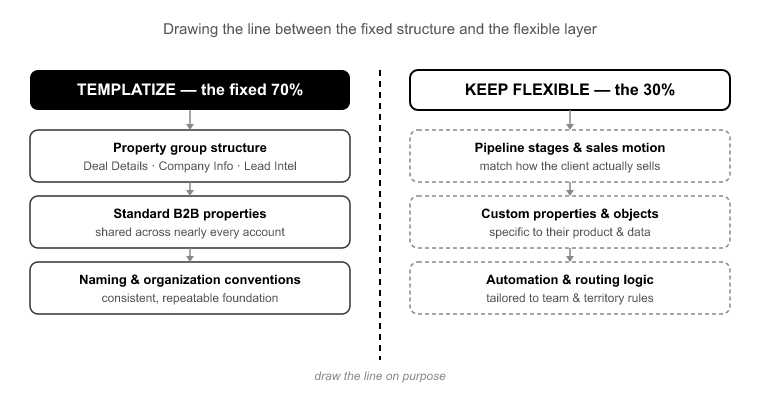
The single most useful thing I can tell you is this: roughly 70-80% of any given Hub implementation is structurally identical across clients in the same segment.[3] A B2B SaaS Sales Hub looks fundamentally like every other B2B SaaS Sales Hub. Professional services firms share a pipeline shape. The lead lifecycle stages, the core deal properties, the notification workflows, the permission tiers, these repeat.

The genuinely custom work, client-specific properties, a unique pipeline stage that maps to their actual sales motion, a bespoke integration, is the remaining 20-30%. That’s the part that justifies expert hours and premium billing.

Agencies that don’t separate these two layers rebuild the standard 70% every single time, which is where the 60-80 wasted days come from. The move is to codify the 70% once, deploy it consistently, and then spend your admin’s brain on the 30% that actually needs a brain.

Do this segment by segment. You don’t need one universal template. You need a defined standard B2B SaaS Sales Hub, a standard professional services Service Hub, and so on. Each one is a reusable asset. Each one is the raw material of a productized SKU.

Standardizing Your Modules: Building the Config Once

Standardization only works if the standard lives somewhere other than a senior admin’s head. If your “best practice” is a Notion doc people follow when they remember to, you don’t have a standard. You have a suggestion.

This is what SuprConfig is built for. You define a fully configured Hub module once, properties, property groups, pipelines, deal stages, workflows, and user permissions, and CONFIG codifies it as a deployable unit. Instead of a checklist someone re-types, your standard B2B SaaS Sales Hub becomes an actual artifact you can deploy on demand.

The immediate payoff is speed. Suprdense CONFIG’s one-click hub deployment stands up that fully configured module in one action. Against the manual 1.5-2 day build, that’s twelve minutes versus two days.[4] But speed is almost the smaller benefit. The bigger one is that delivery quality decouples from who’s available.

Because the standard is codified in CONFIG rather than reconstructed from memory, a junior deploys the same clean build your senior would have. The orphaned properties and half-configured workflows disappear, not because your junior got better overnight, but because they’re no longer building the foundation by hand. Your senior’s expertise is captured in the module once, then reused indefinitely.

Let me be precise about what this does and doesn’t do. Suprdense CONFIG deploys and standardizes configuration. It does not design the client’s business process for you. Deciding which pipeline stages match a given client’s sales motion is still expert work. CONFIG removes the mechanical rebuild, not the thinking. That’s the honest boundary, and it’s also exactly the right division of labor: automate the mechanical, bill for the strategic.

From Sandbox to Production Without the Rebuild

Here’s a failure mode every agency knows. You build and test in a sandbox, get client sign-off, then manually recreate the whole thing in production. You re-type the configs, and somewhere in the process you miss a workflow, mismatch a deal stage, or forget a required-field setting. The production instance never quite matches what was tested and approved. That’s config drift, and it’s insidious because the client signed off on something they’re not actually getting.

Suprdense CONFIG’s sandbox-to-production deployment kills this. It moves a tested, signed-off configuration from sandbox to production without manual re-creation. What you QA’d is what goes live: the same properties, the same pipelines, the same workflows, deployed as a unit rather than rebuilt by hand.

This matters more than it sounds. The gap between “what we tested” and “what we shipped” is where a huge share of post-launch support tickets start.[5] Eliminating the manual re-creation step eliminates an entire category of errors that otherwise surface only after the client is live and using the data.

Packaging the Service: Turning Standardized Builds into Fixed-Scope SKUs

You can’t sell a fixed-price onboarding package when the underlying build is bespoke and open-ended. Fixed-scope pricing requires a fixed-scope deliverable. Module standardization is what makes that possible.

Once your standard B2B SaaS Sales Hub is a codified, one-click deployment, it becomes a line item your sales team can actually quote with confidence. You know exactly what it includes and exactly how long it takes to deliver. Build tiers on top of it: a foundation package that’s the standard module deployed and lightly tailored, a mid tier that adds a defined set of custom properties and workflows, a premium tier for clients whose process needs real custom design.

This is the actual mechanism of productization. You’re not selling “however many hours it takes.” You’re selling a defined outcome at a defined price, delivered predictably, because the 70% that used to eat your margin now takes twelve minutes.

The Margin and Capacity Math

Run the numbers on your own shop. An agency doing 30 onboardings a year that cuts standard-module build time from about 2 days to under an hour per client reclaims roughly 50+ billable-equivalent days annually.[6] That’s capacity that can absorb an estimated 15-20 additional clients without a new hire.

Compare that to the hiring alternative. A mid-level HubSpot admin runs $70-95K loaded and takes 6-8 weeks to become productive on your specific standards.[2] Deployment automation converts that headcount cost into a tooling cost. Unlike a new hire, the tooling doesn’t need a ramp period and doesn’t produce variable-quality output.

The strategic point: your delivery capacity stops scaling with headcount and starts scaling with tooling. That’s the difference between an agency that grows margin as it grows revenue and one that watches margin flatten because every new client requires proportional new labor.

Where Custom Work Still Belongs

Productizing does not mean automating everything, and any vendor who tells you it does is selling you a problem. The 20-30% that’s genuinely custom, the client-specific pipeline stage that mirrors their actual sales motion, the integration with their billing system, the property architecture that reflects how they actually segment accounts, should not be productized. It should be priced as premium scope.

This is the healthy version of the model. You use Suprdense CONFIG for the standardized 70-80%, which removes the low-value mechanical rebuild. Then you spend your admin’s expensive, expert hours on the 30% that actually justifies them, and you bill that work accordingly, because it’s the part clients recognize as real strategic value.

The agencies that get this right don’t feel like they’ve commoditized their service. They feel like they’ve stopped giving away the mechanical work for free and started charging properly for the thinking.

Frequently Asked Questions

Doesn’t productizing mean every client gets the same generic setup?

No. You standardize the foundation and layer client-specific configuration on top. The standard module handles the 70-80% that’s genuinely identical across clients in a segment: the lifecycle stages, core properties, notification workflows, permission tiers. The client-specific 20-30% is where you still do custom work. A productized service isn’t a generic service. It’s a service where you stopped rebuilding the identical parts by hand so you could spend more attention on the parts that are actually unique.

How do we handle clients whose sales process genuinely doesn’t fit our standard module?

Two paths. If the deviation is moderate, deploy the standard module with Suprdense CONFIG first, then modify. It’s far faster to adjust a deployed foundation than to build from zero. If the client’s process is fundamentally different from your segment standard, that’s a signal it belongs in a premium, custom-scoped tier, priced accordingly. The key is that CONFIG makes the deploy-then-modify path fast enough to be the right default for most clients, and you reserve full custom builds for the genuine outliers.

What happens if our standard module changes, do we have to redeploy every client?

No. A CONFIG deployment stands up a configuration in a client’s portal at a point in time. It doesn’t create a live dependency that changes when you update your template. When you improve your standard module, new deployments get the new version. Already-live client instances stay as they are unless you deliberately choose to apply changes. This means you can evolve your standard over time without disrupting instances that are already in production.

How much of a HubSpot onboarding can realistically be automated?

The mechanical build, properties, property groups, pipelines, deal stages, workflows, permission sets, is what Suprdense CONFIG’s one-click hub deployment handles. That’s the 70-80% that repeats. What isn’t automated, and shouldn’t be, is the strategic scoping: understanding the client’s sales motion, deciding which pipeline stages reflect reality, designing the custom pieces. CONFIG removes the rebuild, not the thinking. Anyone promising full automation of an onboarding is overselling.

Do we need a senior HubSpot admin to set this up, or can juniors run deployments?

Both, in the right roles. Your senior admin defines the standard module once. That’s expert work, encoding your best-practice build into Suprdense CONFIG. After that, a junior can run the one-click deployment and get the same quality result, because the expertise lives in the codified module rather than in the person clicking the button. That division is the whole point: you capture senior-level quality once and deploy it at junior-level cost.

Conclusion

The agencies stuck at a margin ceiling all share the same habit. They rebuild the identical 70% of every HubSpot instance by hand, every time, and call it delivery. It’s not delivery, it’s re-typing. And it’s the single biggest drag on both margin and quality that a HubSpot agency carries.

To productize your HubSpot agency service is to draw a clean line between the standardizable foundation and the genuinely custom work, codify the foundation once, and deploy it consistently. Suprdense CONFIG is the mechanism that makes that line real: one-click hub deployment for the standard modules, sandbox-to-production deployment that kills config drift, and repeatable quality that no longer depends on who’s free that week. The custom 20-30% stays custom, priced as premium scope, done by experts.

Start with one segment and one Hub. Define your standard B2B SaaS Sales Hub, deploy it in twelve minutes instead of two days, and package it as a fixed-scope SKU. Then count the days you get back. That reclaimed capacity is the difference between hiring your next admin and absorbing your next fifteen clients without one.

References

  1. HubSpot Solutions Partner Program, “Implementation and Onboarding Delivery Benchmarks,” HubSpot Partner Resources, 2023.
  2. Glassdoor and Payscale aggregated compensation data, “HubSpot Administrator Salary and Ramp Benchmarks,” 2023-2024.
  3. Diginomica / RevOps practitioner surveys, “Standardization Patterns in CRM Implementation,” 2023.
  4. Suprdense internal deployment benchmarks, “Manual vs. CONFIG Hub Build Timings,” 2024.
  5. Zendesk, “Post-Launch Support Ticket Analysis in CRM Implementations,” Customer Experience Trends Report, 2023.
  6. Agency Operations Report, “Delivery Efficiency and Capacity Modeling for HubSpot Partners,” 2024.
Pipedrive to HubSpot Migration: Step-by-Step Playbook

Here is what actually kills a pipedrive to hubspot migration: not the number of records, but the three days after go-live. A rep opens a deal in HubSpot and finds no contact attached. The sales manager pulls a pipeline report and half the deals are owned by “Admin” instead of the reps who closed them. Someone goes looking for the call history on a six-month account and it’s simply gone.

None of those are volume problems. They’re structural mismatch problems. Pipedrive and HubSpot model deals, activities, leads, and associations differently. Most teams discover exactly how differently while the migration is already running, after records are broken and the cleanup clock has started.

This playbook flips that order. With SuprSwitch, the schema mismatches, ownership gaps, and association logic get resolved in the first two days, before a single live record moves. By the time data actually transfers, it’s a validated execution, not a gamble. A full Pipedrive org migrates in 3 to 4 days with every record checked before go-live, not the 3 to 6 weeks a manual project typically runs.[1]

Why Pipedrive-to-HubSpot Migrations Break (And It’s Not the Data Volume)

Three structural differences cause the overwhelming majority of failed Pipedrive migrations. If you understand these before you start, you’ve already avoided most of the pain.

Pipedrive Leads have no HubSpot equivalent. Pipedrive’s Leads Inbox is a distinct object that sits before Deals. It holds pre-qualified pipeline that hasn’t earned a deal record yet. HubSpot has no matching object. Teams that treat every Lead as a Deal flood their pipeline with junk that inflates forecasting. Teams that ignore Leads entirely lose their pre-qualified pipeline on migration day. Neither default is correct. The Lead-vs-Deal decision has to be made deliberately.

Activity types collapse. Pipedrive splits activities into Calls, Meetings, Tasks, Emails, Deadlines, and custom activity types. HubSpot uses a narrower, unified activity model. A naive migration flattens all of that into generic “tasks,” or drops the ones it can’t map, and destroys the call and meeting history reps rely on for last-touch context. That history is often the single most-used piece of data in a rep’s daily workflow.

The association model is fundamentally different. Pipedrive historically tied a Person to a single Organization. HubSpot supports many-to-many associations between Contacts, Companies, and Deals. If your migration doesn’t explicitly preserve the Deal to Person to Organization chain, if it imports each object independently instead of as a relationship, you get the “empty deal” problem. In a 40,000-record org, that routinely means 15 to 20% of deals land in HubSpot with no contact attached.[2] That’s the failure that turns a “successful” migration into a two-week support fire.

Layer on custom field sprawl. A mature Pipedrive org carries 30 to 80 custom fields across Persons, Organizations, and Deals.[3] Add duplicate Persons from an earlier spreadsheet import, and you have the real reason these projects drag. It’s discovery and validation, not transfer speed.

Before You Move Anything: Schema Analysis and the Leads Inbox Decision

Every good migration front-loads discovery. That’s Phase 1, Schema Analysis, and it happens on Day 1 before a single record moves.

SuprSwitch scans the source Pipedrive org and surfaces the full picture: the custom field inventory across every object, record counts per object, duplicate Persons, empty required fields, and orphaned deals with no associated Person or Organization. You see exactly what you’re working with, no surprises mid-run.

Critically, the Leads Inbox gets flagged here. This is where you make the Lead-vs-Deal call, on Day 1, when it’s a mapping decision instead of a cleanup emergency. The two common paths:

  • Map qualified Leads into a dedicated early-stage Deal pipeline so pre-qualified pipeline survives without polluting your main sales stages.
  • Map Leads to Contacts with a lifecycle stage that flags them as pre-deal, keeping them out of the pipeline until a rep promotes them.

Which one is right depends on how your team actually uses the Leads Inbox: as a nurturing holding pen (Contacts) or as genuine early pipeline (Deals). The point is you decide with the full inventory in front of you, not by whatever default the import tool happens to apply.

Mapping the Pipedrive Data Model to HubSpot

Phase 2, Mapping Logic is where the transformation layer gets built, on Day 2. This is the work that manual migrations do by hand over two or three weeks, and it’s the reason they run late. SuprSwitch defines and reviews the entire mapping before the first record moves.

The core object mapping is straightforward on its face:

  • Pipedrive Persons → HubSpot Contacts
  • Pipedrive Organizations → HubSpot Companies
  • Pipedrive Deals → HubSpot Deals

The detail lives underneath. For every one of those 30 to 80 custom fields, SuprSwitch creates a matching HubSpot custom property with the correct type: Pipedrive single option to HubSpot dropdown, multiple option to multi-checkbox, monetary to number/currency, date to date. Field-type mismatches are where data silently truncates or refuses to import, so this matching happens before execution, not during it.

Deal stages and probability need explicit translation. Pipedrive stages carry per-stage probability and “rotting” settings that HubSpot doesn’t model natively. Won/Lost status and, importantly, lost-reason fields have to be mapped deliberately. Otherwise you lose the “why we lost” data RevOps uses for forecasting. SuprSwitch maps Pipedrive stage probabilities into HubSpot deal stage properties and preserves lost reasons as a dedicated property rather than dropping them.

Preserving Association Integrity and Deal Ownership

This is the section that prevents the empty-deal complaint, and it’s the reason association handling is a defined step, not an afterthought.

SuprSwitch’s association integrity mapping preserves the 1:1 Person to Deal and Organization to Deal relationships from Pipedrive, so the full Deal to Person to Organization chain reconstructs in HubSpot. Deals import as relationships, not as independent object dumps. When a rep opens a migrated deal, the contact and company are attached, exactly as they were in Pipedrive.

The second half of this phase is ownership. Pipedrive deals owned by reps whose seats were deactivated are a landmine. Import them naively and they either fail outright or default to the admin account. That silently rewrites years of ownership history and breaks commission attribution and manager reporting.

SuprSwitch’s ownership transfer engine resolves those deactivated-user gaps before execution. Each former rep’s records get mapped to a defined target: a reactivated user, a manager, or a documented fallback owner. Ownership stays accurate instead of rolling everything up to Admin. You decide the fallback logic in Phase 2, and it’s applied in Phase 4.

Migrating Activity History Without Losing the Timeline

If you take one thing from this playbook: do not migrate activity history by CSV export and re-import. CSV imports cannot reliably reconstruct the activity-to-record timeline. You lose the association between a completed call and the deal it belongs to, and reps lose last-touch context on every record.[4]

In Phase 2, SuprSwitch maps Pipedrive’s split activity types, Call, Meeting, Task, and Email, into HubSpot’s activity model, preserving timestamps, notes, and the record association. Completed calls land as logged calls attached to the right contact and deal. Meetings stay meetings. The timeline reconstructs instead of flattening into an undifferentiated pile of tasks.

Custom Pipedrive activity types get an explicit mapping decision too, rather than being dropped because there’s no obvious HubSpot equivalent. This is deterministic work when it’s done in the mapping layer, and it’s nearly impossible to fix after the fact.

Pilot First: Validating the Mapping on a Sample

You never trust a mapping until you’ve seen it run. Phase 3, Pilot Validation migrates a representative sample into HubSpot across Day 2 to 3 to prove the mapping before the full dataset moves.

The pilot migration confirms the things that break quietly. Does the full association chain reconstruct, or are deals landing empty? Does activity history format correctly with the right timestamps? Are long Pipedrive text fields truncating against HubSpot property limits? Are custom field types importing cleanly or coercing to the wrong format?

Whatever the pilot surfaces gets fixed in the mapping layer, not after a 40,000-record run when the fix means re-migrating everything. This is the single biggest reason SuprSwitch migrations don’t spill into a multi-week cleanup phase: the validation work happens before full execution, not after.

Final Execution and Proving Nothing Was Lost

Phase 4, Final Execution runs the full dataset through SuprSwitch’s migration engine into your production HubSpot portal across Day 3 to 4.

Real-time record validation runs throughout. If a deal doesn’t appear in HubSpot within the expected window, it flags immediately. You find out during the transfer, not three weeks later in a support ticket. Flagged records go through the retry mechanism, which re-attempts the individual failed record without restarting the entire job. A handful of API timeouts on a large org don’t force you to start over.

Go-live isn’t confirmed on a vibe. Post-migration record counts are reconciled against the source Pipedrive org, object by object: Contacts, Companies, Deals, and activities. You can prove nothing was dropped before you switch your team over.

For IT and security reviewers scoping the project: SuprSwitch uses a no-storage architecture. Your Pipedrive customer data is never held on SuprSwitch servers. It moves through the transformation layer and into your HubSpot portal without being retained.

Conclusion

A Pipedrive-to-HubSpot migration is not a data-volume problem. It’s a data-model problem. The Leads Inbox has no HubSpot equivalent, activity types collapse if you let them, and the Person-to-Deal association will vanish unless you migrate deals as relationships instead of independent imports. Every failed migration I’ve cleaned up traces back to one of those three, discovered too late.

The fix is order of operations. Resolve the schema mismatches, ownership gaps, and association rules in the first two days, Phase 1 Schema Analysis and Phase 2 Mapping Logic, then prove the mapping on a pilot before you run the full dataset. Do that, and the actual transfer becomes a validated, reconciled execution instead of the start of a three-week cleanup.

That’s the entire premise behind SuprSwitch’s four-phase process: move the hard discovery work to the front, validate before you commit, and confirm nothing was lost before go-live. Get the mapping right and a full Pipedrive org lands in HubSpot in 3 to 4 days with the deals, activity history, and ownership your team actually depends on still intact.

References

  1. HubSpot, “CRM Migration Best Practices and Timelines,” HubSpot Knowledge Base, 2024.
  2. Ops-focused analysis of enterprise CRM migrations, “Association Integrity Failure Rates in Object-Based Imports,” RevOps Co-op community report, 2023.
  3. Pipedrive, “Custom Fields for Deals, Persons and Organizations,” Pipedrive Help Center, 2024.
  4. HubSpot, “Importing Activities and Engagement Records via CSV Limitations,” HubSpot Knowledge Base, 2024.

Monday.com to HubSpot: How to Migrate CRM Data Without Losing Context

Here is the moment that trips up almost every monday.com to HubSpot migration. You export your boards, run the import, and half your Deal fields land blank. The company names are gone from your contacts. The notes your reps wrote, things like “client pushed the call to Q3” or “budget approved, waiting on legal,” are nowhere to be found. The rows moved. The context did not.

This is not a data-volume problem. It is a structural one. Monday.com is not a relational CRM. It is a work-management platform where “CRM” means boards, items, and columns. HubSpot is a relational object model: Contacts, Companies, Deals, and Tickets tied together by associations. The hard part of this migration is not moving rows. It is translating a flat, board-based structure into a relational one without losing the context that lives in Updates, Connect Boards columns, and Mirror/Formula fields. None of those map cleanly to a HubSpot property.

Done right, in SuprSwitch’s four-phase process, that translation is a 3 to 4 day job, not a multi-week rebuild. Most manual Monday migrations drag on for 3 to 6 weeks[1], and the reason is not the number of records. It is that column-type reconciliation, Connect Boards mapping, and Updates handling all get discovered mid-project. Move that discovery to Day 1 and the timeline collapses. Here is how to do it without losing the story behind your records.

Why Monday.com Isn’t a CRM (and Why That Matters for Migration)

In HubSpot, a Contact is an object. It has a defined schema, it associates to a Company object and Deal objects, and those associations are enforced at the data layer. You cannot have a Deal that “sort of” belongs to a Company. The relationship either exists or it does not.

Monday.com has none of that. A board is a spreadsheet with superpowers. An item is a row. A column is whatever you decide it should be: text, number, status, person, or a live reference to another board. There is no enforced relationship graph. There is no deduplication. There is no true distinction between a call, a meeting, and an email the way a real CRM tracks activity.

This is the structural gap you are actually bridging. You are not moving data from one CRM to another. You are converting a work-management structure into a relational database. That conversion requires decisions: which board becomes which HubSpot object, how Connect Boards linkages become associations, how board Groups become deal stages, and how the free-text conversation in Updates lands as activity history.

Get those decisions wrong and you get a portal full of orphaned records. Get them right and you preserve three years of sales history. The difference is entirely in the mapping layer, which is exactly where SuprSwitch does its work before a single record moves.

Mapping Monday Items to HubSpot Objects

A typical Monday CRM instance runs 5 to 15 boards[2]: separate Leads, Contacts, Accounts, and Deals boards, often duplicated by team or region. Each has its own column schema, which means the “same” field can be a Numbers column on one board and a Formula on another. Your first job is deciding what each board becomes.

The clean cases map directly. Items from a Contacts board become HubSpot Contacts. Items from an Accounts board become Companies. Items from a Deals board become Deals. Items from a support or request board become Tickets.

The messy case is Leads. Monday teams routinely run a Leads board, but HubSpot has no standalone Leads object in the traditional Salesforce sense. Leads live as Contacts, sometimes with a lifecycle stage that reflects their status. This is a mapping decision, not an export setting. You have to decide whether a Leads-board item becomes a Contact with a “Lead” lifecycle stage, or whether it becomes a Contact plus an early-stage Deal.

SuprSwitch’s contextual object mapping resolves the “which board equals which object” problem explicitly. During Schema Analysis on Day 1, every board is scanned and classified, and the object-type assignments are laid out for review before mapping begins. You are not guessing at what an import will do. You are approving a mapping plan.

Translating Boards and Groups into Pipelines and Deal Stages

Here is the single most common structure in a Monday sales setup: board Groups used as de facto pipeline stages. A Deals board with Groups labeled “New,” “Discovery,” “Proposal,” and “Closed Won” is a pipeline in everything but name. That pattern maps directly to HubSpot deal stages, as long as you catch it in mapping.

The complication is board sprawl. Teams run separate Deals boards per region, per rep, or per product line, so five boards are really one process. HubSpot wants one pipeline with a defined stage set. Consolidating those five boards into a single pipeline, while preserving which Group each deal was in as its stage, is a deliberate mapping decision.

SuprSwitch’s contextual object mapping consolidates multiple regional Deals boards into one pipeline with a defined stage set, using Groups as the stages, unless you deliberately want to keep them separate. You end up with one clean pipeline instead of five fragmented ones, and every deal lands in the stage that matches the Group it came from.

Then there is the Status column problem. Status columns in Monday are color-labeled and free-form per board. Two boards can both have a “Working on it” status that means completely different things. Before those become HubSpot property values or deal stages, they need normalization. A “Working on it” on the West Coast board and a “Working on it” on the Enterprise board have to be reconciled to a single, meaningful stage. That normalization happens in the mapping layer on Day 2, not after the data has already landed.

The Columns That Break: Mirror, Formula, and Connect Boards

This is where naive exports fall apart. Three column types in Monday do not behave like stored data, and if you treat them like they do, you lose the relationship graph and half your fields.

Connect Boards columns are Monday’s closest thing to an association. When a Deals-board item links to an item on the Accounts board, that is a Connect Boards column. If your migration does not map those linkages, a Contact loses its Company and a Deal loses its Contact. You would rebuild the entire relationship graph by hand, for every record.

SuprSwitch’s association integrity mapping translates each Connect Boards linkage into the correct HubSpot association, Contact to Company and Deal to Contact, preserving the 1:1 relationships instead of dumping flat records into a portal. This is the core value of the whole migration. Your relationship graph survives the move.

Mirror and Formula columns are the second trap. Neither stores a value. A Mirror column is a live reference. A Deals board mirroring “Company Industry” from a linked Accounts board shows data on screen but exports empty, because there is no value there to export, only a pointer. A Formula column is a computed result that recalculates on the fly. Run a raw export and these land blank or return stale numbers. Anyone who has done a Monday migration knows the “why are half my fields blank?” moment.

The fix is to resolve these columns to actual values before mapping. You read what the Mirror is pointing at and what the Formula computes, then store those resolved values. SuprSwitch’s Schema Analysis flags every Mirror column, Formula column, and Connect Boards relationship on Day 1, so you know exactly which fields need resolution before anything moves, not on Day 20 when you are staring at empty columns in production.

Preserving Context: Migrating Updates, Not Just Columns

The real context in a Monday CRM does not live in the columns. It lives in the Updates thread on each item: the back-and-forth, the “client rescheduled,” the “sent revised quote, waiting to hear back.” Migrate only the columns and you carry the skeleton of the record but lose the story that makes it useful.

Monday’s activity model is thin to begin with. It does not distinguish calls, meetings, and emails the way HubSpot does with distinct activity types. Most of what a rep would call “history” is sitting in Updates as free-text conversation. That means Updates are not a nice-to-have in this migration. They are the primary activity record.

SuprSwitch maps the Updates thread on each item to HubSpot Notes and Activities attached to the migrated object. The context stays attached to the correct record. The note about the pushed call lands on the deal it belongs to, not floating unassigned. Your reps open a contact in HubSpot and see the same conversation they had in Monday, in the right place.

Handling Ownership, Duplicates, and Deactivated Users

Two more things break quietly if you do not plan for them.

First, ownership. Monday tracks record owners in People columns. When a rep leaves and their Monday account is deactivated or removed, they often still sit in the People column of dozens of items. Import that raw and those deals land unassigned in HubSpot, a mess someone has to reassign by hand. SuprSwitch’s ownership transfer engine resolves these People-column gaps before the run, applying ownership logic so deals land with a valid owner instead of falling into the void.

Second, duplicates. Monday has no native deduplication, so the same contact routinely appears on multiple boards: once on the Leads board, again on the Contacts board, maybe a third time on a regional Deals board. Import all three and you get three HubSpot Contacts where you wanted one. SuprSwitch’s Schema Analysis flags duplicate items across boards on Day 1, so the dedup logic is decided in mapping, not discovered when a rep complains that a client is in the system three times.

The 4-Phase SuprSwitch monday.com to HubSpot Migration Timeline

The reason a manual Monday migration drags on for 3 to 6 weeks[1] is not the data. It is that the hard discoveries, column-type chaos, broken Connect Boards linkages, and Updates handling, surface mid-project after live data has already started moving. SuprSwitch front-loads that discovery. Here is the four-phase frame.

Phase 1, Schema Analysis (Day 1). SuprSwitch scans every board and identifies custom columns, record counts, and data-quality issues: Mirror columns, Formula columns, Connect Boards relationships, duplicate items across boards, and People-column gaps. Nothing moves. You end Day 1 knowing exactly what you are dealing with.

Phase 2, Mapping Logic (Day 2). The transformation layer maps Monday boards to the HubSpot data model. Items-to-objects assignments are set, HubSpot custom properties are created, association rules translate Connect Boards linkages, Groups become deal stages, Status columns are normalized, and ownership transfer logic is defined. The full mapping is reviewed before the first record moves.

Phase 3, Pilot Validation (Day 2 to 3). A representative sample migrates into HubSpot. This is where you confirm the hard cases landed right: resolved Formula and Mirror values are populated, association chains hold, Updates formatted correctly into Notes and Activities, and no field truncation occurred. Anything wrong gets fixed in the mapping layer, not in production.

Phase 4, Final Execution (Day 3 to 4). The full dataset runs through SuprSwitch’s migration engine. Real-time record validation checks every record as it lands. If a record does not appear in HubSpot within the expected window, it flags immediately instead of surfacing in a support ticket three weeks later. The retry mechanism automatically re-runs failed records without restarting the entire job. And throughout, SuprSwitch’s no-storage architecture means your Monday data is never held on our servers. It moves from source to destination without sitting anywhere in between.

Conclusion

A monday.com to HubSpot migration is not really a data-transfer job. It is a translation job. You are converting a flat, board-and-item work-management structure into HubSpot’s relational object model, and the value you are protecting is not the rows. It is the context: the associations buried in Connect Boards columns, the resolved values behind Mirror and Formula fields, and the conversation history sitting in Updates.

Every part of that context has a specific failure mode if you skip the mapping work. Connect Boards linkages become orphaned records. Mirror columns land empty. Updates disappear. Deactivated users leave deals unassigned. Cross-board duplicates multiply. None of these break because the data is large. They break because the discovery happens too late, when live data has already moved.

That is the whole point of doing this in four phases. SuprSwitch’s Schema Analysis surfaces the column-type chaos on Day 1, the mapping layer resolves it on Day 2, the pilot proves it on Day 3, and real-time validation confirms every record on Day 4. Three to four days, with your relationship graph and your context intact, not a three-week rebuild that leaves your reps guessing at what happened to their history.

References

  1. HubSpot Solutions Partner Program, “CRM Migration Delivery Benchmarks and Common Delays,” HubSpot Partner Resources, 2024.
  2. Monday.com, “CRM Board Structures and Work Management Templates,” Monday.com Product Documentation, 2024.

Why Manual HubSpot Onboarding Is Dead (And What Replaces It)

Every scaling agency hits the same moment. You have ten HubSpot onboardings running, your two senior admins are booked solid, and a new client just signed. To take them on, you need a third admin. Not because the work is complex, but because your best people are spending 15 to 40 hours per project rebuilding the same Sales Hub scaffolding they have built dozens of times before.[1] Properties. Property groups. Pipeline stages. Permission sets. The same workflows, keyed in by hand, one client at a time.

That is not a staffing problem. It is a model problem. And it is why the future of HubSpot onboarding does not look like hiring more admins. It looks like building your configuration once and deploying it over and over. The agencies pulling ahead right now are not the ones with the biggest teams. They are the ones who stopped treating every onboarding as a custom build.

The Math That Kills Manual Onboarding

Manual onboarding has a hard equation behind it: delivery capacity = number of admins × hours per admin. There is no way around it when every project is hand-built. Your ceiling is fixed by headcount, and your margin is fixed by how many billable hours each project eats.

Run the numbers on a standard Sales Hub setup. Properties and property groups, one or two pipelines with correctly configured deal stages, permission sets, and a handful of workflows. Built from scratch, that is two full admin days minimum.[1] Add Service Hub and Marketing Hub and you are looking at a full week of a senior person’s time before you have done a single piece of client-specific strategy.

Now put that against a fixed-price package. If you sell “HubSpot onboarding” at a flat rate and your delivery cost swings between 20 and 30 hours depending on who built it and how many times they got interrupted, you are not running a product. You are running a margin gamble on every deal. A 20-hour build at a loaded admin rate can quietly turn a profitable engagement into a break-even one, and you will not see it until you look at utilization across the quarter.[2]

Agencies stuck in this model cannot productize, because they cannot predict delivery cost. And they cannot scale, because scaling means hiring. Both problems trace back to the same root: the mechanical rebuild labor is chained to a human.

What Actually Breaks in a Hand-Built Onboarding

The cost of manual onboarding is not just hours. It is the errors that hours introduce, and they do not surface on delivery day. They surface weeks later, in a client’s first month-end report, when nobody remembers which build introduced the problem.

Configuration drift is the quiet killer. When an admin recreates a pipeline across 20 clients by hand, no two are identical. A deal stage probability gets entered as 40% instead of 60%. A required property gets left optional. A property group ends up named slightly differently. Each mistake is tiny on its own. Together, they mean your “standard” onboarding is not standard at all. It is 20 slightly different builds, each with its own hidden defects.

Deal stage probability mismatches are the classic version of this. The admin tests a pipeline in sandbox with correct probabilities, the forecast reconciles, and everyone signs off. Then in the production rebuild, one stage gets fat-fingered. Nobody notices, because the pipeline looks right. The client’s weighted forecast is quietly wrong for months.

Skipped required properties break data quality at the source. A property that was required in the tested config gets rebuilt as optional under time pressure. Reps start creating deals without it. Six weeks later the client asks why half their pipeline has no source attribution, and there is no clean way to backfill it.

Workflow enrollment triggers that worked perfectly in sandbox with clean test data misfire in production because they were rebuilt slightly differently. The logic looks the same. The enrollment criteria are not. Now leads route to the wrong owner, or lifecycle stages stop advancing, and the client is losing trust in the system you just built.

Every one of these traces back to the same moment: the rebuild. Which brings us to the actual bottleneck.

Why Sandbox-to-Production Is the Real Bottleneck

Here is the part of HubSpot onboarding that nobody warns you about until you have lived it: HubSpot’s sandbox does not cleanly push configuration to production.[3] You build and test everything in the sandbox, properties, pipelines, deal stages, workflows, then validate it, get client sign-off, and then you have to build it all a second time in the live portal by hand.

Think about what that means. You are doing the most error-prone work, manual recreation of complex configuration, at the exact moment the stakes are highest, because now you are in the client’s live environment. The safety net of the sandbox is gone. Every property you re-key, every stage probability you re-enter, every workflow trigger you rebuild is a fresh chance to introduce the drift errors above.

This is why the second build is where migrations and onboardings quietly go wrong. It is not that admins are careless. It is that you have asked a human to perfectly replicate a complex configuration from memory and notes, under time pressure, with no tolerance for error. That is not a reasonable thing to ask, and the failure rate proves it.

The double build also doubles the labor. Every hour you spent in sandbox, you spend again in production. So the 20-hour project is not really 20 hours of unique work. It is 10 hours of work done twice. Remove the second build and you do not just remove the risk. You cut the mechanical labor roughly in half.

The New Model: Standardized, Template-Driven Deployment

The replacement for manual onboarding is not a faster typist. It is a different unit of work. Instead of hand-building each client’s configuration and rebuilding it in production, you build your best-practice hub configuration once, validate it, and deploy it repeatably as a baseline for every client.

This is what productized onboarding actually means. Your Sales Hub template, the properties, property groups, pipeline structure, deal stages with correct probabilities, standard workflows, and permission sets that represent your agency’s proven approach, becomes a reusable asset instead of tribal knowledge in a senior admin’s head. When that admin leaves, the configuration does not leave with them.

The economics change completely. Delivery cost becomes predictable, so you can sell fixed-scope, fixed-price packages without gambling on margin. Configuration becomes consistent, because you deploy the same validated template every time instead of rebuilding it from scratch. Deal stage probabilities are identical across every client. Required properties are required every time. Workflow triggers fire the same way in production as they did in test, because they are the same configuration, not a hand-copied approximation of it.

And this matters most: delivery capacity decouples from headcount. When the mechanical rebuild is gone, one admin can deliver what used to take three. You break the equation that capped your growth.

How Suprdense CONFIG Collapses a Two-Day Build Into Twelve Minutes

This is the mechanism I built Suprdense Config to handle, because I got tired of watching good admins burn days on rebuild labor. Suprdense CONFIG’s one-click hub deployment pushes a fully configured Sales, Marketing, or Service Hub module, properties, property groups, pipelines, deal stages, workflows, and user permissions, from sandbox directly to production in a single action.

The two-day manual rebuild becomes roughly a twelve-minute deployment.[1] Not because anything is magic, but because you are moving validated configuration instead of re-keying it. The highest-risk, most error-prone step in the entire process, the sandbox-to-production second build, simply goes away. You test it once, you deploy exactly what you tested, and what shipped matches what you validated.

Because deployment is templated rather than hand-built, configuration consistency is a byproduct, not an extra step. Deal stage probabilities, required properties, and workflow enrollment triggers are identical every time you deploy. The drift errors that surface weeks later in broken reporting never get introduced, because there is no manual recreation to introduce them.

Let me be precise about what Config does and does not do, because credibility here matters more than the pitch. SuprConfig does not do discovery, process design, or client-specific strategy. It does not decide what your client’s pipeline should look like or which properties their sales process needs. That thinking still belongs to the practitioner, and it should. What CONFIG removes is the repetitive build-and-rebuild labor, the mechanical scaffolding work that consumed your admin’s days without requiring their judgment. The strategy stays human. The typing goes away.

What Agencies Gain and What Doesn’t Change

What you gain is straightforward: repeatability that lets you productize onboarding as a fixed-price offering, margin protection because delivery cost becomes predictable instead of variable, and capacity without headcount because your admins spend their hours on strategy instead of scaffolding.

What does not change is where your value actually lives. The client did not hire you to key in properties. They hired you because you understand how to translate their sales process into a HubSpot data model that reports cleanly and scales. That work, discovery, process mapping, the client-specific customization layer that sits on top of your standardized baseline, is exactly what you should spend senior time on. Template-driven deployment does not diminish that expertise. It stops burying it under mechanical labor.

The agencies that understand this distinction are the ones defining the future of HubSpot onboarding. They are not selling hours. They are selling a productized outcome, delivered on a predictable timeline, at a margin that improves with every client instead of eroding.

Conclusion

Manual HubSpot onboarding did not die because admins got worse. It died because the model has a ceiling built into it: delivery capacity chained to headcount, margin eroded by rebuild labor, and configuration drift introduced at the exact moment stakes are highest. You can be the best admin in the world and still hit the wall, because the wall is structural, not personal.

The replacement is not more people. It is a different unit of work: build your configuration once, validate it, and deploy it repeatably. That is what turns onboarding from a custom gamble into a productized offering with predictable cost and consistent quality. Suprdense CONFIG handles the mechanical half of that, the one-click push from sandbox to production that eliminates the double build, while your team keeps the strategy where it belongs.

The future of HubSpot onboarding is already here for the agencies who have standardized. They are taking on their eleventh client without hiring their third admin, shipping consistent configurations every time, and protecting margin as they scale. The ones still building by hand will keep hitting the same ceiling, until they stop rebuilding what they have already built.

References

  1. Suprdense internal benchmarking across HubSpot agency onboarding projects, comparing manual Sales Hub build time (2 full admin days) against templated CONFIG deployment (~12 minutes), 2024.
  2. HubSpot Solutions Partner Program, agency delivery economics and utilization guidance, HubSpot, 2024.
  3. HubSpot Knowledge Base, “Understand HubSpot sandbox accounts and their limitations,” HubSpot, 2024.

How to Manage 20+ HubSpot Clients Without Burning Out Your Team

Your team isn’t burning out because you have too many clients. It’s burning out because every new client onboarding starts like it’s the first one you’ve ever done. A blank portal. A senior admin rebuilding the same Sales Hub property groups by hand. The same three pipelines, the same twelve workflows, the same permission sets. Different logo, identical build. That’s the rebuild tax, and it’s why five admins can only carry fifteen clients before the delivery calendar seizes up.

The fix isn’t hiring another admin for every six accounts. It’s recognizing that roughly 80% of any HubSpot onboarding is mechanically identical across clients, and the only thing stopping you from standardizing it is that you’ve never codified the baseline.[1] This post is about how to manage multiple HubSpot clients by killing the repeat configuration and saving your senior hours for the 20% that’s actually client-specific.

Why agency headcount scales with client count and why it shouldn’t

Here’s the math nobody wants to run. A standard Sales Hub onboarding, properties, property groups, two to three pipelines with defined stages, eight to twelve workflows, deal-based automation, and user permissions, takes an experienced HubSpot admin 12 to 16 hours to build cleanly by hand.[1] Across 20 clients, that’s 240 to 320 hours of configuration that produces zero differentiated value. You’re paying senior salaries to retype “Lead Status” property values for the fortieth time.

Because that work is manual, it all competes for one calendar. Win three clients in the same month and you’ve just dropped about 45 hours of setup onto a single admin’s plate. Go-live dates slip by weeks. The bottleneck isn’t demand, it’s setup labor. That’s why the industry rule of thumb lands around one admin per six to eight clients when onboarding is done by hand.[2]

The tell is that your delivery capacity depends on how fast people can click through HubSpot’s settings, not on how good your strategy is. When the mechanical rebuild eats your senior hours, you can’t scale without scaling headcount at the same rate. That’s linear scaling, and it’s the enemy of margin.

Separate the repeatable 80% from the custom 20%

Before you standardize anything, audit what you actually rebuild every time. Pull your last five onboarding projects and list every object you configured. You’ll find two piles.

The repeatable pile is larger than you think. Contact and Company property groups you create for nearly every B2B client. A standard deal pipeline with stages that map to a normal sales motion: new, qualified, demo, proposal, closed won/lost. Lifecycle stage automation. Lead rotation workflows. Deal-stage-based task creation. Notification workflows for stage changes. User permission sets by role. Most agencies rebuild 80% of this identically across their entire book.[1]

The custom pile is where the thinking lives: which specific pipeline structure a client’s sales process actually needs, their unique qualification criteria, integrations with their existing stack, custom objects for their business model, reporting dashboards tied to their KPIs. This is the 20% that justifies your fee, and the 20% your senior people should spend their time on.

The problem is that manual onboarding blends these together. Your admin spends the first day and a half on the repeatable 80% before ever touching the work that’s worth doing. Standardization means peeling those apart so the mechanical layer deploys in minutes and the human hours go to the custom layer.

Standardize your deployment baseline before anything else

Once you’ve identified the repeatable 80%, codify it once. This is the core lever for everything that follows: a single, clean configuration baseline that every client starts from.

This is what SuprConfig is built for. You define your standard Sales Hub module once, the property groups, the pipelines and deal stages, the workflows, the permission sets, and then deploy that fully configured module into a client’s production portal with one-click hub deployment. What took an admin 12 to 16 hours by hand lands in minutes.

The point isn’t just speed, though the speed is real. It’s that you’re no longer rebuilding, you’re deploying a known-good baseline. The workflow logic you tested and refined across your last ten clients gets applied identically to the eleventh. No one is retyping stage definitions from memory at 6pm and introducing a typo that breaks reporting three months later.

Kill configuration drift with one-click deployment

Configuration drift is the silent killer of agencies that scale past ten clients. It happens when Client A’s “Lead Status” values don’t match Client B’s, when one admin builds pipelines one way and another builds them differently, when nobody’s onboarding looks like anybody else’s six months later.

When agencies run cross-client health checks, the single most common finding is inconsistent property naming and non-standard pipeline stage definitions.[3] Those are exactly the things that make portfolio-level reporting impossible. You literally cannot roll up “average time in Proposal stage across all clients” if every client’s Proposal stage is named and structured differently.

Deploying every client from the same CONFIG baseline is the anti-drift mechanism. Because the standardized module templates apply the same property internal names, the same stage definitions, and the same workflow logic to every portal, consistency is the default state instead of something you have to enforce through documentation nobody reads. You get schema uniformity as a byproduct of how you deploy, not as a separate governance project.

To be clear about what this does and doesn’t do: CONFIG keeps your base configuration consistent. It does not stop a client from later renaming a property in their own portal. But it eliminates the drift that comes from your delivery process, which is where most of it starts.

A sandbox-to-production workflow that doesn’t double your work

Most agencies build changes in a sandbox, then manually re-create them in production because there’s no reliable promotion path. That’s not caution, that’s doing the work twice. And every manual re-creation is a chance to introduce a transcription error. The classic failure: a workflow fires perfectly in sandbox, then silently doesn’t fire in production because a trigger property got renamed during the manual rebuild.

Native HubSpot portal cloning doesn’t solve this either. It doesn’t cleanly carry workflows, permission sets, and inter-object dependencies, so admins who try the “clone a template portal” workaround end up manually reconciling the gaps anyway.[4] You’ve traded one manual process for a slightly shorter manual process, and you’re still hunting for the workflow that didn’t come across.

Suprdense CONFIG’s sandbox-to-production promotion is built to remove that second build entirely. You build and validate your configuration in a sandbox, confirm the workflows fire and the dependencies resolve, then deploy the same configuration to production in one click. The thing you tested is the thing that ships. No transcription layer, no silent trigger-property mismatch, no discovering in a client QA call that automation you swore you built isn’t running.

Reporting across 20 clients when your configs finally match

Here’s the payoff most agencies don’t anticipate. Once every client is deployed from the same baseline, portfolio-level reporting becomes possible for the first time.

When property internal names and pipeline stage definitions are consistent across your book, you can run cross-client health checks that actually mean something. You can spot the client whose deals are stalling in Qualification relative to the rest of your portfolio. You can turn QA into a checklist instead of an archaeology dig through each portal’s bespoke setup. You can benchmark one client against your own aggregate.

None of that is reachable when every config is a snowflake. Standardized deployment isn’t just a delivery-speed play, it’s the precondition for treating your client base as a portfolio you can actually measure and manage.

Restructure your team around the tooling

The final shift is organizational. As long as onboarding requires 12 to 16 hours of expert configuration, your senior admin is the bottleneck. They gate every deployment, every client queues behind them, and when they take PTO the delivery calendar stops.

Once the repeatable 80% is codified in SuprConfig, a junior team member can run the standard deployment reliably. The judgment that used to be required, remembering how you structure a pipeline, which workflows to build, how permissions should be set, is now baked into the baseline. Deployment becomes execution, not expertise.

That decoupling is what moves an agency from “one admin per six to eight clients” toward “one admin per fifteen-plus.”[5] Your senior people stop rebuilding and start doing the discovery, the client-specific process design, and the custom work that only they can do. You’ve turned a linear cost into a leveraged one.

The honest boundary here matters: CONFIG removes the mechanical rebuild, not the thinking. It won’t run your discovery call, decide which pipeline a client actually needs, or design a custom object model for a business you don’t yet understand. It handles the repeatable configuration layer so your people can spend their hours on the parts that require judgment. That’s the whole point. Put the machine on the repetition and the people on the decisions.

Conclusion

Agencies don’t hit a wall at 15 clients because demand dries up. They hit it because onboarding labor scales linearly with client count, and the same senior admin can only rebuild the same portal so many times before the calendar, and the team, breaks.

The way out is to stop treating repeatable configuration as skilled work. Codify your standard build once, deploy it from a single baseline, and save your expert hours for the client-specific 20% that actually earns your fee. That’s how you manage multiple HubSpot clients without adding a headcount for every handful of accounts, and how you get cross-client reporting as a bonus, because your configs finally match.

Start with one module. Codify your standard Sales Hub build in Suprdense Config, deploy it to your next client, and time it against your last manual onboarding. The gap between those two numbers is your margin, and your team’s weekends.

References

  1. HubSpot Solutions Partner Program, “Onboarding Delivery Benchmarks for Sales Hub Implementations,” 2023.
  2. RevOps Co-op, “Agency Staffing Ratios and Delivery Capacity in HubSpot Partner Agencies,” 2023.
  3. Databox, “The Most Common Data Quality Issues Found in Multi-Client HubSpot Portfolios,” 2022.
  4. HubSpot Community Knowledge Base, “Limitations of Portal Cloning: Workflows, Permissions, and Object Dependencies,” 2023.
  5. HubSpot Partner Day, “Scaling Delivery Without Scaling Headcount: Agency Operations Panel,” 2023.

How to Reduce HubSpot Time-to-Value from 3 Months to 2 Weeks

Here’s what nobody scoping a HubSpot onboarding wants to say out loud: the reason it takes three months isn’t HubSpot. I’ve run more than 120 CRM migrations into HubSpot, and the platform has almost never been the bottleneck. The delay lives in the delivery model. Agencies rebuild the same Sales, Marketing, and Service Hub configuration by hand for every client, then run migration, validation, and training as a chain of handoffs where each phase waits on the one before it.

Fix those two problems and the three-month hubspot time to value drops to about two weeks. Not by working faster or cutting corners, but by treating configuration as a deployable artifact instead of a manual checklist, and by running data migration in parallel with setup instead of after it. That is exactly what SuprConfig and SuprSwitch were built to do. Below I’ll walk through the actual mechanics.

Why HubSpot implementations actually take three months (it’s not the platform)

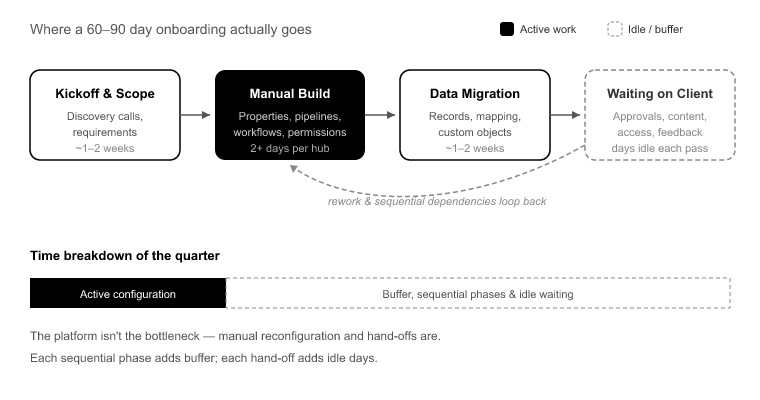
Partner-led HubSpot onboarding is usually scoped at 60 to 90 days.[1] When you break down where that quarter goes, very little of it is active configuration work. Most of it is buffer for sequential phases and idle time waiting on the client.

Start with the manual reconfiguration tax. Standing up a single Sales Hub by hand, meaning properties, property groups, pipelines, deal stages, workflows, and user permissions, takes two days minimum. Add custom objects and it takes more. Do that across three hubs and you’ve burned a week of pure setup before a single record moves. Here’s the part that stings: it’s the same work every time. The senior admin rebuilds a near-identical configuration for client after client, and human error compounds at every step. A mistyped deal stage here, a workflow enrollment trigger set wrong there.

Then there’s sequential delivery. Teams finish setup, then start migration, then start validation, then start training. Each phase sits in a queue behind the last. The actual labor might be ten working days, but stretched across handoffs, sign-off waits, and idle time, it eats a quarter.

Layer on client-side stalls. Time-to-value gets measured from kickoff, but that clock keeps running while the agency waits on data exports, field-mapping sign-off, and access provisioning. None of that is technical work, and all of it stops the project cold.

And finally, the killer: migration discovery lag. Records get imported, everyone assumes it worked, and three weeks after go-live a rep opens a ticket because half the deal history is missing or the contact-company associations are orphaned. The error was there on day one. You just didn’t find it until it was expensive to fix.

The two-week delivery model: parallel, not sequential

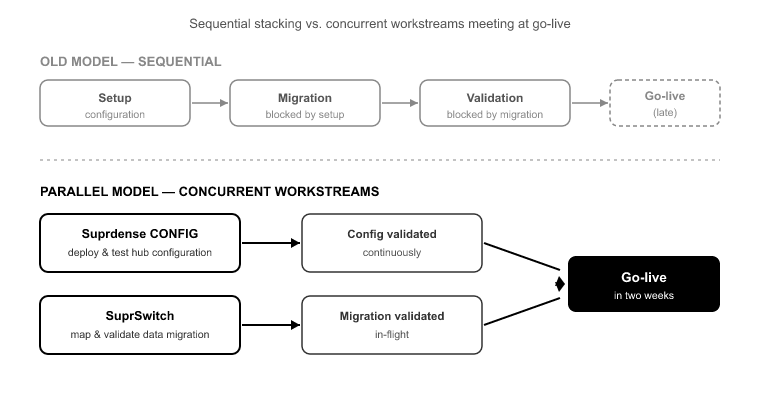
The reframe is simple to state and hard to do without the right tooling: configuration and migration should run as concurrent workstreams, with validation built into the migration itself.

In the old model, setup blocks migration and migration blocks validation. In the parallel model, Suprdense Config deploys and tests the hub configuration while SuprSwitch maps and validates the data migration at the same time. The two tracks meet at go-live instead of stacking end to end.

This only works if two conditions are met. First, setup has to stop being a manual checklist. You can’t run it in parallel if it ties up a senior admin for a week. Second, migration errors have to surface during the migration, not after go-live. If validation is a separate downstream phase, you’ve just recreated the sequential problem with extra steps. Both conditions are solvable, and that’s the rest of this article.

Compress setup: deploy hubs as artifacts, not checklists

The single biggest lever on hubspot time to value is killing manual reconfiguration. Suprdense CONFIG’s one-click hub deployment takes a fully configured Sales, Marketing, or Service Hub module, meaning properties, property groups, pipelines, deal stages, workflows, and user permissions, and deploys it from sandbox to production in one action.

What used to take an agency admin two days per hub now takes roughly twelve minutes.[2] Across three hubs, that’s the difference between a full week of setup and an afternoon.

The sandbox-to-production promotion model matters more than the speed. The classic failure mode is building the config in a sandbox, then rebuilding it by hand in production and hoping it matches. It never fully matches. A workflow gets missed, a property group lands in the wrong order, a permission set doesn’t carry. With CONFIG, you build and test the configuration once, then promote the exact artifact. What you tested is what ships.

The second-order win is repeatability. When your setup is a deployable baseline instead of tribal knowledge, your senior admin’s expertise stops being a bottleneck. A junior team member can run the deployment without reinventing the config. For an agency running 30 projects a year at two to three days of senior admin time per hub, that’s more than 180 admin-days a year spent on work that is basically identical every time.[3] CONFIG turns that into a template you deploy, not a project you rerun.

Migrate in parallel without breaking associations or ownership

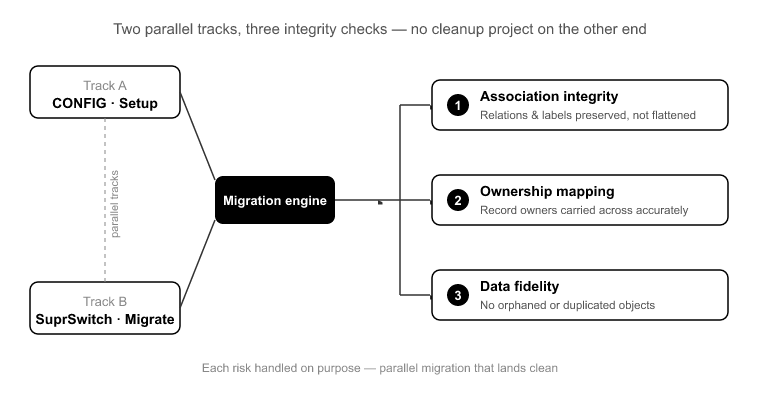
While CONFIG handles setup, SuprSwitch runs the migration on a parallel track. But parallel migration only saves time if it doesn’t create a cleanup project on the other end. Three things break most migrations, and each has to be handled on purpose.

Association integrity. HubSpot’s data model is relational. Contacts associate to companies, companies to deals, deals to tickets, and many of those carry association labels. A naive import flattens or orphans those relationships. SuprSwitch’s association mapping preserves the contact-company-deal structure and the labels, so the relationships survive the move intact instead of landing as disconnected records.

The Activities split. This one catches teams migrating off Salesforce every single time. Salesforce stores Activities as two separate objects, Tasks and Events. HubSpot uses one unified Activities model. If your migration doesn’t reconcile that split, you lose call and meeting history, and you find out when a rep goes looking for last quarter’s touchpoints and they’re gone. SuprSwitch handles the reconciliation so the unified timeline lands correctly.

Ownership transfer. Picture a 40,000-contact Salesforce org where 15% of records are owned by deactivated users. Without explicit ownership logic, those 6,000 records land in HubSpot unassigned, which means they fall out of every workflow, every report, and every rep’s view. SuprSwitch’s ownership transfer handles deactivated-user records explicitly so nothing lands orphaned.

Catch failures during migration, not after go-live

Post-import discovery is what actually blows timelines. The migration “finishes,” the project moves to training, and the errors sit undetected until they surface as support tickets weeks later. At that point you’re debugging a live production instance instead of a migration run.

SuprSwitch’s real-time record validation checks every record as it lands. If a contact doesn’t appear in HubSpot within the expected window after migration, it flags the failure right away instead of letting you find it three weeks later. You catch gaps during the run, when they’re cheap to fix, not after go-live when they’re expensive and visible to the client.

This also solves the most dangerous “fix” in migration work: the re-run. When teams discover a partial migration, the instinct is to re-import to fill the gaps. Without validation and dedup logic, that re-run duplicates contacts and multiplies associations, turning a 20,000-record job into a 35,000-record cleanup.[4] Real-time validation plus a built-in retry mechanism means you re-attempt only the flagged records, not the whole set.

The setup sequence that fits in two weeks

Here’s the concrete practitioner timeline. It assumes the client can deliver data exports and access on schedule. More on that limit below.

Week 1, days 1–2: Kickoff, scope confirmation, and access provisioning. In parallel, build and test the hub configuration in a sandbox using SuprConfig. At the same time, begin field mapping in SuprSwitch against the client’s export schema.

Week 1, days 3–5: Promote the tested configuration to production with CONFIG’s sandbox-to-production promotion. In parallel, run a validation pass in SuprSwitch against a sample data set. Confirm association mapping, ownership transfer, and the Activities reconciliation behave correctly before the full run.

Week 2, days 6–8: Execute the full migration with real-time record validation active. Resolve any flagged records via retry. Because setup already shipped in week 1, migration isn’t waiting on anything.

Week 2, days 9–10: Final validation reconciliation, user permission checks, and team training against the now-populated, correctly configured instance. Go-live.

The whole thing fits in ten working days because setup and migration ran at the same time and validation was continuous, not a downstream phase.

What two weeks doesn’t fix and where the clock still slips

I won’t oversell this. Two weeks is achievable, but the tooling compresses the technical work. It doesn’t erase the human and organizational work around it.

Client data readiness is the most common slip. If the client can’t produce clean exports or takes a week to sign off on field mapping, the clock runs regardless of how fast your deployment is. Set that expectation at kickoff.

Complex custom-object logic can extend the timeline for good reason. A 12-custom-object enterprise org with intricate cross-object automation needs more mapping and testing than a standard three-hub SMB setup. The parallel model still applies, it just runs a bit longer.

Change management takes real time. You can deploy a perfect instance and migrate every record cleanly, and a sales team still needs to actually adopt the new pipeline and logging habits. Tooling doesn’t fix behavior.

Conclusion

The three-month HubSpot implementation is a delivery-model problem, not a platform problem. The quarter disappears into manual reconfiguration, sequential handoffs, and errors discovered after go-live, not into work that inherently takes that long.

Fix the two structural causes and hubspot time to value compresses to two weeks. Treat setup as a deployable artifact with Suprdense Config’s one-click hub deployment, run migration in parallel with SuprSwitch, and bake validation into the migration itself so failures surface during the run instead of in a support ticket three weeks later.

Start with your next project. Deploy the hub configuration as an artifact, run the migration alongside it, and measure how much of your usual 60 to 90 day window was never technical work in the first place. That gap is your margin, and your client’s time-to-value, back on the table.

References

  1. HubSpot, “HubSpot Onboarding Overview” partner-led onboarding scoping and typical implementation windows.
  2. Suprdense internal benchmarks measured single-hub deployment time using CONFIG one-click hub deployment versus manual configuration.
  3. Suprdense agency delivery analysis senior admin hours per hub deployment across a 30-project annual delivery volume.
  4. SuprSwitch migration case data record volume increase from duplicate contacts and multiplied associations on unvalidated re-import runs.

HubSpot vs Salesforce vs Pipedrive: Which CRM Should You Migrate To?

Most teams pick a CRM by comparing feature checklists side by side, sign the contract, and then find out mid-migration that their source objects don’t map cleanly to the target. That’s when the project stalls. A Salesforce Lead has no native HubSpot equivalent. Pipedrive doesn’t carry the association depth HubSpot expects between Companies and Contacts. By the time you discover this, you’ve already committed to a platform and a timeline.

The hubspot vs salesforce vs pipedrive crm decision isn’t really about which tool has the nicer interface or the longer feature list. It’s about which platform’s data model, cost curve, and RevOps ceiling match where your company will be in three years, not where it sits today. Each of these platforms fails a specific type of company badly. The trick is knowing which type you are before you sign.

I’ve run more than 120 migrations across these three platforms and half a dozen others. What follows is the practitioner’s version of this comparison: where each one breaks, what the migration actually costs, and how to make that cost visible before you commit.

The Real Question Isn’t “Which CRM Is Best” It’s Which Data Model Fits Your Next Three Years

Feature checklists mislead buyers because every CRM demo looks capable when the dataset is clean and the use case is simple. The failure modes only show up under real complexity: custom object relationships, multi-team pipelines, years of activity history, and reps who’ve come and gone.

Salesforce is the ceiling for genuinely complex object relationships. If you need deeply custom objects, granular sharing rules, and 80 active workflows firing across 12 custom objects, nothing else touches it. But that capability buries SMBs in admin overhead. I’ve seen 15-person sales teams paying enterprise pricing and employing a full-time admin just to keep the org from collapsing under its own configuration.

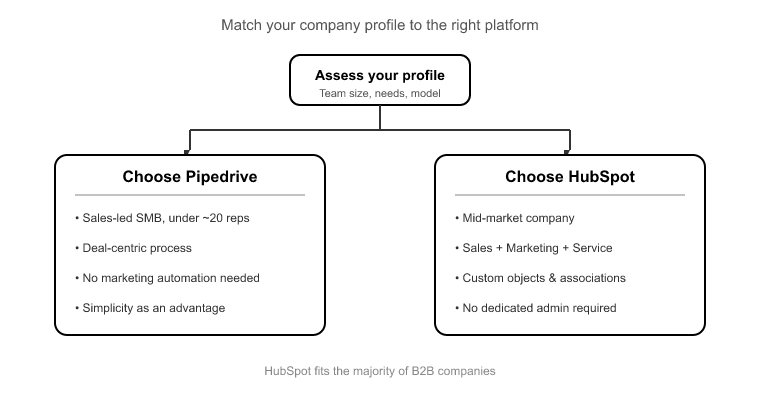
Pipedrive is deal-first and deliberately light. Organizations and Persons are thinner than HubSpot’s Companies and Contacts. For a sales team under 20 reps that lives in the pipeline, that simplicity is the feature. But mid-market teams outgrow it fast. The moment you need custom objects, association labels, or reporting that spans marketing and service, Pipedrive tops out.

HubSpot sits in the middle and covers most mid-market to lower-enterprise needs. You get a unified data model across Sales, Marketing, and Service Hub, with custom objects and association labels that Pipedrive lacks, and without the admin tax Salesforce imposes. It frustrates true enterprise orgs that need the object-relationship depth only Salesforce provides, but that’s a narrow band of companies.

Pick the platform whose ceiling you’ll hit at year three, not the one that clears the bar at year one.

Data Model Differences That Actually Break Migrations

This is where the hubspot vs salesforce vs pipedrive crm comparison stops being theoretical. The differences between these data models are exactly what causes data loss during a migration if nobody plans for them.

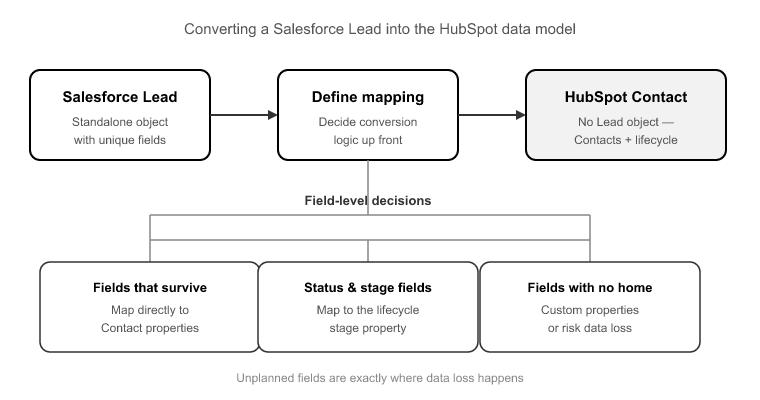
Salesforce Leads have no HubSpot equivalent. HubSpot uses Contacts plus a lifecycle stage property instead of a separate Lead object. Every Salesforce-to-HubSpot migration has to decide the Lead-to-Contact conversion logic up front: which Lead fields survive, which map to lifecycle stage, and how converted versus unconverted Leads are handled. Skip this and you either lose Leads or duplicate them against existing Contacts.

Salesforce splits activities into Tasks and Events, two separate objects. HubSpot unifies everything into one Activities engagement model, split by type. If your migration doesn’t collapse the Tasks and Events split into HubSpot’s unified Activities correctly, you lose call logs and meeting history. That history is the actual value of years spent on a CRM, and it’s the first thing a naive CSV import shreds.

Pipedrive structures activities differently again, and its Persons and Organizations don’t carry the association depth HubSpot expects. Pipedrive Persons map to HubSpot Contacts and Organizations map to Companies, but the contact-to-company and deal-to-contact association chains have to be rebuilt intentionally on the way in. Pipedrive simply doesn’t store those relationships at the depth HubSpot does.

Then there are the failures common to all three: orphaned associations where a deal points to a deleted contact, and deactivated-user ownership gaps where records are owned by reps who left two years ago. Import those as-is and you wake up to thousands of unassigned records on Day 1 of your new instance.

This is where SuprSwitch’s association integrity mapping does the work a CSV import can’t. It preserves the 1:1 relationships between objects so the deal-to-contact and activity-to-record chains survive the move intact.

Total Cost of Ownership, Not Sticker Price

Buyers compare monthly license fees and stop there. That’s the sticker price, not the total cost of ownership, and the gap between them is where budgets blow up.

Pipedrive has the lowest entry cost, priced per seat and focused on deal pipeline. For an SMB sales team, the sticker price is close to the real price because there’s little to integrate and little to administer.[1]

HubSpot starts freemium, but the real cost lives in the Sales, Marketing, and Service Hub tiers plus contact-tier scaling. As your marketing contact database grows, so does the bill. The upside is that the all-in-one model reduces integration spend, because you’re not stitching together five point solutions.[2]

Salesforce carries the highest total cost of ownership once you factor in admin headcount, third-party integrations, and implementation partners. The license is only the beginning. A real Salesforce org needs ongoing administration that Pipedrive and HubSpot don’t demand at comparable scale. That cost is justified at genuine enterprise complexity and nowhere else.[3]

Then there’s the migration cost, which is invisible at evaluation time because you’re comparing dollars per month, not the data-model translation work. A Salesforce-to-HubSpot move means reconciling two fundamentally different activity models, ownership structures, and pipeline architectures. That reconciliation is the cost most teams never price in.

Which Company Profile Should Choose Which Platform

Here’s the direct recommendation, by profile, without hedging.

Choose Pipedrive if you’re a sales-led SMB under roughly 20 reps, your process is deal-centric, and you don’t need marketing automation or custom objects. Its simplicity is a genuine advantage until you outgrow it.

Choose HubSpot if you’re mid-market, need Sales plus Marketing plus Service in one data model, and want custom objects and association labels without hiring a dedicated admin. This covers the majority of B2B companies between 20 and a few hundred employees.

Choose Salesforce if you have genuinely complex object relationships, multiple business units with different processes, and the admin resources to run it. If you’re not using that complexity, you’re paying enterprise pricing for SMB usage, and that’s the single most common reason teams migrate off Salesforce.

The fear that keeps companies on the wrong platform is switching cost. They believe migration means three to six weeks of downtime and lost sales history. That belief is outdated, and it’s worth understanding exactly what a modern migration involves.

What Migration Between These Platforms Actually Involves

Most migrations quoted at 3 to 6 weeks aren’t delayed by data volume. A 400,000-record Salesforce org doesn’t take longer than a 5,000-record Pipedrive account because of size. It takes longer because of unmanaged complexity. The delay comes from manual field mapping, late-discovered broken associations, and post-migration cleanup.[4]

SuprSwitch compresses that to 3 to 4 days by moving the discovery and validation work to the front, before any live data moves. Here’s the four-phase process.

Phase 1, Schema Analysis (Day 1). SuprSwitch scans the source CRM database and identifies custom fields, record counts, property types, and data quality issues like duplicates, broken associations, and empty required fields, all before anything moves. It’s also the honest evaluation tool: it turns “how hard will migrating be?” from a guess into a Day 1 report.

Phase 2, Mapping Logic (Day 2). The transformation layer maps legacy objects to the HubSpot data model. This is where the object-type mismatches get resolved: Salesforce Leads with no HubSpot equivalent, Tasks and Events collapsing into unified Activities, and Pipedrive Persons and Organizations mapping to Contacts and Companies. Custom properties are created, association rules are defined, and the ownership transfer engine resolves deactivated-user gaps so records don’t land unassigned. The mapping is reviewed before the first record moves.

Phase 3, Pilot Validation (Day 2 to 3). A representative sample migrates to HubSpot through a pilot migration to validate relational integrity, activity history formatting, field-level truncation, and association chains. Issues caught here get fixed in the mapping layer, not after the full run, when fixing them means re-migrating.

Phase 4, Final Execution (Day 3 to 4). The full dataset runs through the migration engine into your production HubSpot portal. Real-time record validation flags failures during transfer, not three weeks later in a support ticket, and the retry mechanism automatically retries failed records without restarting the entire job. Every record is validated post-migration before go-live is confirmed.

For IT and technical buyers: SuprSwitch runs on a no-storage architecture. Customer data is never held on SuprSwitch servers during the migration. That matters when you’re moving between any two of these platforms and answering to a security review.

How to De-Risk the Switch Before You Sign

The smartest thing you can do in the hubspot vs salesforce vs pipedrive crm evaluation is make the migration cost visible before you commit to a platform. Most teams sign first and discover the data-model problems second. Reverse that order.

Run Schema Analysis on your current CRM before you sign anything. It surfaces your custom field count, record volumes, duplicate load, and broken associations in a Day 1 report. That report tells you whether your migration is a clean two-phase mapping job or a complex reconciliation, and it does it before you’ve spent a dollar on a new license.

The migration is no longer the reason to stay on the wrong platform. When the switch takes 3 to 4 days with the discovery work done up front, the switching-cost objection stops being a real barrier and starts being an excuse.

Conclusion

The hubspot vs salesforce vs pipedrive crm decision comes down to matching a data model to your trajectory. Pipedrive for deal-centric SMB simplicity, HubSpot for mid-market all-in-one RevOps, Salesforce for genuine enterprise object complexity. Pick the ceiling you’ll reach in three years, and be honest about whether you’re actually using the complexity you’re paying for.

The migration between them is not the obstacle it used to be. What breaks migrations, like Leads with no target equivalent, split activity models, orphaned associations, and deactivated-user ownership gaps, is predictable and solvable when you surface it before live data moves. That’s the whole point of doing Schema Analysis and mapping first: no surprises mid-run.

So stop letting switching-cost fear keep you on the wrong platform. Run a Schema Analysis on your current CRM, see the real shape of your data, and make the platform decision with the migration cost in front of you instead of hidden behind the contract.

References

  1. Pipedrive, “Pricing Plans and Per-Seat Cost Structure,” Pipedrive Official Documentation, 2024.
  2. HubSpot, “Sales, Marketing & Service Hub Pricing and Contact-Tier Scaling,” HubSpot Pricing Guide, 2024.
  3. Nucleus Research, “The Total Cost of Ownership of Enterprise CRM Deployments,” CRM Technology Report, 2023.
  4. Gartner, “Why CRM Migration Projects Overrun: Complexity vs. Data Volume,” Gartner RevOps Research Note, 2023.

How to Build a Repeatable HubSpot Onboarding Process

Here’s the pattern I see in almost every agency stuck below their revenue ceiling: they treat every HubSpot onboarding as a one-off build. A new client signs, and a senior admin sits down to rebuild the same property groups, the same base pipelines, the same lead-rotation workflows, the same permission sets. From memory. The same ones they built for the last client three weeks ago. They call it craftsmanship. Really, it’s unbilled labor with a consistency problem.

Here’s the uncomfortable truth: roughly 70% of a standard B2B Sales Hub configuration is identical across clients.[1] The structural layer barely changes. That means property groups, base properties, pipeline scaffolding, standard automation, and permission architecture. What changes is the client’s actual sales process logic, their data model exceptions, and their reporting needs. That’s the 30% that deserves human judgment. Repeatable HubSpot onboarding means you templatize the 70% and save your skilled hours for the 30%, with validation gates between milestones so you never build stage two on a broken stage one.

Why every “custom” onboarding is 70% identical

Walk through what a standard Sales Hub build actually contains. You’ve got 30 to 50 custom properties spread across 4 to 6 property groups. Two or three pipelines, each with 5 to 8 deal stages. Eight to twelve workflows covering lead rotation, deal-stage automation, and internal notifications. And a permission model that separates reps from managers from admins.

An experienced admin builds all of that by hand in about two days.[2] Now do it across 20 clients a year. That’s 40 or more admin-days spent on structural work that is fundamentally the same every time. You’re paying senior-rate labor to retype the same lifecycle-stage property group into a fresh portal for the twentieth time.

The problem compounds because HubSpot has no native way to copy most configuration from one portal to another.[3] So agencies build in a sandbox or template portal, then manually recreate everything in the client’s production instance. That double-work is exactly where config drift creeps in. One admin names a stage “Closed – Won,” another writes “Closed Won.” One builds a “Deal Region” property as a dropdown, another as free text. Six months later, when you try to build a cross-client reporting standard or train a new hire, nothing lines up. Your process lives in one senior person’s head, and it walks out the door when they do.

Draw the line: what to templatize vs. what to keep flexible

The failure mode here goes both ways. Over-templatize, and you force every client into a rigid setup that doesn’t fit their sales motion. Under-templatize, and you rebuild everything from scratch. Most teams have never drawn the line on purpose, so they drift between the two.

Here’s where I draw it.

Templatize the structural layer (the fixed 70%):

  • Property groups and how they’re organized, like Deal Details, Company Info, and Lead Intelligence
  • Standard properties that nearly every B2B client needs, like lead source, deal type, next-step date, and MRR/ARR fields
  • Base pipeline scaffolding, meaning the number of pipelines and the general shape of the funnel
  • Standard workflows, like lead rotation, deal-rot alerts, and task creation on stage change
  • Permission architecture, meaning the roles and what each can see and edit

Keep flexible (the client-specific 30%):

  • Their actual deal-stage names and exit criteria, which map to how they really sell
  • Data model exceptions, like a custom object for their specific business or unusual association labels
  • Reporting and dashboards tied to their KPIs
  • Edge cases in their sales process that don’t generalize

The rule of thumb: if it’s structurally the same across clients and only the labels change, it’s a template. If it encodes a judgment about how this client sells, it’s human work. The stage exit criteria are flexible. The fact that you have a five-to-eight-stage pipeline with rotation on entry is fixed.

The correct sequence for HubSpot setup and why order breaks things

Sequencing is the part most teams get wrong, and it’s the part that causes the failures you discover weeks later. HubSpot’s data model has a dependency chain. If you build out of order, you create automation that references objects that don’t exist yet.

The order that works:

Property Groups → Properties → Pipelines → Deal Stages → Workflows → Reports → Permissions.

Break it and here’s what happens. Build a workflow before the property it enrolls on exists, and the enrollment trigger silently never matches. I’ve seen a rep-assignment workflow fail this exact way. It referenced an owner property that was created after the workflow was built, so enrollment never fired and leads simply stopped getting assigned. Nobody noticed until reps started asking why their queues were empty.[4]

Same story with reports built on deal stages that later get renamed. Your forecast returns garbage because the report points at a stage internal name that no longer exists. And import data before pipelines are configured, and your deals land with no stage or the wrong one, orphaning records you then have to clean up by hand.

Order isn’t a preference. It’s the difference between a portal that works on day one and a portal that quietly breaks in week three.

Templatize your baseline once, deploy it per client repeatable HubSpot onboarding in practice

This is where the manual model breaks down and tooling earns its place. The whole point of repeatable HubSpot onboarding is that you build your standard configuration once, refine it until it’s right, and then deploy it into each new client’s production portal without retyping any of it.

That’s what Suprdense Config does. You build your standard Sales, Marketing, or Service Hub module (property groups, properties, pipelines, deal stages, workflows, and user permissions) and then push it into a client’s production portal with one-click hub deployment. The two-day manual build becomes roughly a twelve-minute deployment.[5]

It solves the sandbox-to-production gap directly. Instead of building in a template portal and then manually recreating everything in production, which is the exact step where drift and typos creep in, CONFIG moves the configuration for you. Your baseline stays consistent across every client because it’s literally the same template being deployed, not a senior admin’s best recollection of what the last build looked like.

And because CONFIG deploys the structural layer, it maps cleanly onto the fixed/flexible line. It handles the 70%, the repeatable structure. Then you customize the client-specific 30% on top. That’s repeatability without rigidity: consistency enforced where it should be, human judgment reserved for where it matters.

One honest boundary worth stating plainly: Config deploys and standardizes configuration, it does not migrate the client’s data. Moving their existing contacts, companies, deals, and activity history into the structure you’ve deployed is a separate job, and that’s what SuprSwitch handles. Config builds the structure. SuprSwitch moves the records into it. Two tools, two jobs, so don’t expect one to do the other.

Validation gates: prove each milestone before you build on it

Deploying a template fast doesn’t remove the need to validate. It makes validation more important, because you’re now deploying at scale. A single misconfigured property in your template propagates to every client you push it to. So gate each milestone.

Here’s what I check, in order:

After properties deploy: Confirm every property type is correct. A field that should be a dropdown but deployed as free text will break every workflow branch and report that depends on clean values. Check that the enumeration options match, too.

After pipelines and deal stages deploy: Verify the stage internal names, not just the display labels. Workflows and reports reference internal names. If those don’t match what your automation expects, nothing downstream fires correctly.

After workflows deploy: Test enrollment on a sample record. Does the trigger actually match? Does the action fire? This is where the “workflow references a property that doesn’t exist” failure gets caught, before a client sees it, not after.

After permissions deploy: Log in as each role and confirm scope. A rep who can see every other rep’s deals, or a manager locked out of forecasting, is a trust problem on day one.

Validate each layer before you build the next on top of it. Errors caught at the property stage cost minutes to fix. The same error caught after you’ve built workflows and reports on top of it costs hours of rework and a hard conversation with the client.

Layering the client-specific 30% on top of the deployed baseline

Once the baseline is deployed and validated, you’re finally doing the work that’s worth a senior admin’s rate. This is where you map the client’s real sales process onto the template: renaming and redefining deal stages to match how they actually sell, setting exit criteria per stage, and adjusting the base pipeline shape to their funnel.

This is also where you handle the exceptions: the custom object for their particular business model, the unusual association labels, the reporting that reflects their specific KPIs rather than a generic template. Client-specific edge cases in their sales motion get configured here, by a human who understands the nuance.

The value of the Config-first approach is that by the time you reach this stage, all the tedious structural work is done and validated. Your skilled hours go entirely to the judgment-heavy 30%, not to retyping property groups. That’s how you deliver a working, configured portal in the first few days of an engagement instead of the first few weeks. Clients judge the relationship in those first two weeks,[6] and standing up a functional portal fast changes the entire dynamic.

From onboarding to a productized delivery motion

When the structural layer is templatized and deployed, onboarding stops being a cost center and becomes a scalable service line. Do the capacity math: if a manual Sales Hub build consumes two admin-days and CONFIG deployment plus customization takes a fraction of that, you’ve freed up the majority of your delivery hours per client.

Across 20 clients a year, that’s the difference between hiring an admin for every handful of new accounts and scaling client volume without scaling headcount 1:1. Margin stops eroding as you grow.

It also solves the training problem. When your onboarding runs on a deployed, documented baseline instead of one senior person’s memory, you can onboard new team members to your delivery motion in a fraction of the time. The process lives in the template, not in someone’s head. That’s what productized delivery actually means: repeatable, teachable, and consistent across every client you take on.

Conclusion

The agencies that scale HubSpot delivery aren’t the ones with the most admins. They’re the ones who stopped treating every onboarding as a blank canvas and started treating the structural layer as a deployable asset. The 70% that’s identical across clients should never be built by hand more than once.

Draw the fixed/flexible line explicitly. Sequence your setup so you never build automation on properties that don’t exist. Validate each milestone before the next. Deploy your baseline with SuprConfig, layer the client-specific 30% on top by hand, and move the records in with SuprSwitch when the structure is ready. That’s the whole motion.

Do that, and onboarding stops being the thing that caps your growth and becomes the thing that scales it: repeatable, teachable, and consistent from the first client to the fiftieth.

References

  1. HubSpot Solutions Partner Program, “Sales Hub Implementation Patterns Across B2B Onboardings,” HubSpot Partner Resources, 2023.
  2. HubSpot Solutions Partner Program, “Onboarding Delivery Benchmarks for Sales Hub Implementations,” HubSpot Partner Resources, 2023.
  3. HubSpot Developer Documentation, “Portal Configuration and Asset Portability Limitations,” developers.hubspot.com, accessed 2024.
  4. RevOps Co-op Community, “Common HubSpot Workflow Enrollment Failures and Root Causes,” revopscoop.com, 2023.
  5. Suprdense Internal Deployment Benchmarks, “CONFIG Hub Deployment Timing Across Partner Onboardings,” 2024.
  6. Gartner, “Customer Onboarding and the First-Value Window in B2B SaaS Engagements,” Gartner Research, 2022.

From 60 Days to 6 Days: How Agencies Are Cutting HubSpot Onboarding Time

The 60-day HubSpot onboarding timeline that most agencies quote clients isn’t a measure of complexity. It’s a measure of how long it takes to hand-build the same portal configuration you’ve already built forty times before. Discovery, the part that actually requires thinking, is fast. What eats the calendar is the two to three weeks of manually recreating properties, pipelines, deal stages, and workflows in every new client portal. The bottleneck isn’t strategy. It’s deployment.

Agencies that have cut onboarding to under a week didn’t skimp on scoping. They stopped rebuilding their standard hub setup from scratch every time. That’s the whole story behind hubspot onboarding speed. If you deploy a tested, templated configuration in minutes instead of hand-building it over days, the 60-day project collapses. Not because you skipped anything, but because you stopped paying the repetition tax.

Where the 60 days actually goes (it’s not where you think)

Break down a real onboarding timeline and the picture is clear. HubSpot’s own guided onboarding is scoped at 30 to 90 days depending on tier[1], and agencies typically inherit or exceed that window because they layer custom configuration on top of it. But when you audit where the hours land, discovery isn’t the culprit.

A proper discovery and requirements workshop for a mid-market B2B client takes two to four sessions. Call it a week of calendar time, most of which is spent waiting for the client’s stakeholders to align on process. That part is genuinely necessary, and it doesn’t compress much. Nor should it.

The time sink is what comes after. Manual Sales Hub configuration for a standard B2B setup realistically runs 12 to 20 admin hours[2]: 30 to 50 custom properties organized across property groups, one or two pipelines, deal stage automation, lead routing workflows, and permission sets. Then Marketing Hub adds a similar load. Then Service Hub adds another. You’re looking at 30 to 40 hours of pure configuration labor before a single revision.

And the revisions are where calendar time really goes. The client reviews the build, requests changes, the admin reconfigures, then schedules another review call two days out. Each cycle burns days on maybe six hours of actual work. Three revision cycles is two weeks of elapsed time. That’s the real 60 days. Not complexity, but slow reconfiguration multiplied by the natural back-and-forth of client review.

The repetition tax: why every agency rebuilds the same portal

Most agencies have a “standard” Sales Hub setup. It lives in a Google Doc, a Notion page, or worse, in the head of one senior admin. Everyone knows what the standard looks like: the same 40 properties, the same six deal stages, the same twelve workflows for lead routing and deal rotation.

And every single time a new client signs, someone rebuilds it by hand. They open a fresh portal, create the properties one at a time, group them, build the pipeline, wire up the stage automation, and recreate the workflows from memory or by copying screenshots. This isn’t delivery. It’s repetition tax, labor you pay again and again for output you’ve already designed once.

The economics quietly kill agency margin. If one client takes 40 admin hours to configure, ten clients take 400. You can’t grow throughput without hiring another HubSpot admin roughly every 15 clients, because setup labor doesn’t compress on its own. Your revenue scales linearly with headcount, which means your margin per project stays flat no matter how many onboardings you run.

There’s a second, quieter cost: inconsistency. A senior admin’s portal setup looks nothing like a junior’s. Property naming conventions drift. Workflow logic varies. QA becomes manual because there’s no baseline to check against. The client experience depends entirely on who got assigned to the project, which is a terrible thing to leave to chance when you’re charging a fixed fee.

What one-click hub deployment actually changes for hubspot onboarding speed

This is where Suprdense CONFIG changes the math. Instead of hand-building your standard setup on every client, you build it once, save it as a deployable configuration, and deploy it with one-click hub deployment into any client portal.

A full Sales Hub module, including properties, property groups, pipelines, deal stages, workflows, and user permissions, deploys in roughly twelve minutes[3]. The two-day manual build becomes a coffee break. Marketing and Service Hub modules deploy the same way.

Here’s the concrete before-and-after. Manual Sales Hub build: 12 to 20 hours of an admin clicking through property creation, pipeline setup, and workflow wiring, with the error rate that comes from doing repetitive work by hand. With Suprdense CONFIG: a twelve-minute deployment of a configuration you’ve already tested, followed by review. You’ve turned 30-plus hours of config labor into two hours of deployment plus a client walkthrough.

The improvement in hubspot onboarding speed isn’t marginal. It’s an order-of-magnitude change on the part of the project that was actually slow. And because you’re deploying a saved configuration rather than rebuilding from memory, junior and senior admins ship identical output. Standardization stops being a policy you hope people follow and becomes a property of the deployment itself.

Killing sandbox-to-production drift

Anyone who has moved a build from a HubSpot sandbox to production knows the failure mode. You test everything in the sandbox: properties, pipelines, automation. You sign off, and then face the manual work of replicating all of it in production. Objects get recreated. Permission sets get rebuilt. And workflows, the most fragile part, often get rebuilt by hand because they don’t clone cleanly.

Workflows are the most common casualty of manual sandbox-to-production moves[4]. They silently don’t carry over, or a stage mapping gets fat-fingered during the rebuild, and the error doesn’t surface until weeks later when a deal enters the wrong stage or a routing rule misfires. By then you’re debugging live automation on a client portal, the worst possible place to discover drift.

Suprdense CONFIG moves a tested module configuration from sandbox to production without manual replication. What you validated in the sandbox is what goes live. You eliminate the gap between what was tested and what shipped, which is exactly where drift lives. No rebuilding workflows from memory, no re-wiring pipeline stages by hand, no surprise misfires three weeks post-launch.

The revision loop is where speed compounds

The initial build is only half the time savings. The bigger, less obvious win is what fast deployment does to the revision loop.

Every agency knows this scenario. The client reviews the portal and says, “We need three more deal stages and a different lead-scoring workflow.” Under the manual model, the admin spends half a day reconfiguring, then schedules another review call two days out. The client finds one more issue on that call. Now you’re on cycle three. Three revision cycles equals two weeks of calendar time on maybe six hours of actual work.

When reconfiguration takes minutes instead of half a day, the loop collapses. You adjust the configuration and redeploy on the same call. The client sees the change live while they’re still on the line, approves it, and you move on. You’re not waiting two days between cycles because there’s nothing slow enough to require scheduling around.

This is where the compounding happens. Fast deployment doesn’t just shrink the initial build, it collapses every subsequent revision cycle. The 60-day timeline was never mostly build time. It was build time plus a dozen slow feedback loops. Kill the slowness in each loop and the whole timeline drops to under a week.

The margin math: what 6-day onboarding does to agency economics

Run the numbers on a typical fixed-fee onboarding. Say you charge $6,000 for a standard Sales and Marketing Hub onboarding. Every hour of manual config eats directly into that fee. At 30 hours of configuration labor plus revision cycles, your margin is thin and your senior admin is booked solid.

Cut those 30 configuration hours down to two hours of deployment and review, and the same $6,000 becomes dramatically more profitable. Or you use the labor savings to undercut competitors on price while protecting your margin. Either way, you’ve broken the linear relationship between headcount and throughput.

That’s the real story behind productizing onboarding delivery. Suprdense CONFIG turns bespoke, labor-heavy setup into a repeatable product line. Same fee, a fraction of the labor, consistent output regardless of who runs the project. Your throughput stops being capped by how many admin hours you can hire.

What still takes real time (and should)

Here’s the honest boundary. Suprdense CONFIG deploys the configuration. It does not do discovery, requirements scoping, or client change management for you. The six-day number assumes discovery is still done properly. CONFIG removes the manual build labor, not the strategic thinking.

Discovery still takes real time, because understanding a client’s sales process, their data model, and their reporting needs is genuinely necessary work. Data migration is also a separate workstream. That’s what SuprSwitch handles, with real-time record validation and association mapping to move contacts, companies, deals, and activity history without breaking associations. Migration doesn’t compress into a twelve-minute deployment, and any tool that claims it does is lying.

Templated deployment saves the most time on the 80% of setup that’s genuinely standard across clients. Where a client’s process is truly non-standard, you’ll still build custom. But you deploy your standard config first as the foundation and customize from there, rather than starting from an empty portal. Even non-standard clients benefit from not rebuilding the common 80% by hand.

Frequently Asked Questions

Does faster onboarding mean cutting corners on discovery or QA?

No. What compresses is configuration labor, the manual rebuilding of properties, pipelines, and workflows. What doesn’t compress is discovery, requirements scoping, and data migration. Those still require the same rigor. In fact, QA improves under templated deployment because you’re shipping a configuration you’ve already tested rather than a fresh hand-build that needs to be checked property by property. Standardization makes quality consistent instead of person-dependent.

What happens to workflows when I move from sandbox to production?

Manual sandbox-to-production moves are where workflows most commonly break. They don’t clone cleanly and often get rebuilt by hand, introducing errors that surface weeks later. Suprdense CONFIG moves the tested module configuration, including workflows, from sandbox to production without manual replication. What you validated in the sandbox is what goes live, which closes the drift gap where automation silently fails to carry over.

Can I customize a deployed config, or is it all-or-nothing templates?

You can customize. The templated configuration is a starting foundation, not a locked box. You deploy your standard setup, then adjust properties, stages, or workflows for the specific client. The point isn’t to force every client into an identical portal. It’s to stop rebuilding the common 80% by hand every time so your admins spend their hours on what’s actually unique.

How does this handle data migration is that part of the six days?

Data migration is a separate workstream. Suprdense CONFIG handles setup and configuration; SuprSwitch handles migration, with contextual object mapping, ownership transfer, and real-time record validation to move your historical data without breaking associations. Depending on data volume and source CRM, migration runs on its own timeline alongside the configuration work.

What if a client’s setup is genuinely non-standard?

Templated deployment saves the most time where setup is standard, which is the majority of most B2B onboardings. For genuinely non-standard clients, you still build custom. But you start from your deployed standard config as a foundation rather than an empty portal. You never lose time by deploying first; you only save it.

Conclusion

The 60-day HubSpot onboarding timeline was never a complexity problem. It was a repetition problem: the same standard configuration hand-built on every client, multiplied by revision cycles that moved at the speed of manual reconfiguration. When you attack that directly, the timeline drops to under a week without touching the parts that matter.

The improvement in hubspot onboarding speed comes from three places: deploying a tested configuration in minutes instead of building it over days, eliminating sandbox-to-production drift so nothing silently breaks, and collapsing revision loops from multi-day cycles into same-call adjustments. None of that requires cutting corners on discovery, QA, or data migration.

Build your standard hub configuration once. Deploy it on every client with Suprdense CONFIG. Spend your admin hours on the strategy that’s actually unique to each client, and stop paying the repetition tax on the 80% that isn’t.

References

  1. HubSpot, “HubSpot Onboarding Overview and Guided Onboarding Timelines,” HubSpot Knowledge Base.
  2. HubSpot Solutions Partner Program, “Sales Hub Implementation Effort Benchmarks,” Partner Delivery Guidelines.
  3. Suprdense, “Suprdense CONFIG Deployment Performance and Module Benchmarks,” Suprdense Product Documentation.
  4. HubSpot Community, “Common Issues Migrating Workflows from Sandbox to Production Environments,” HubSpot Developer and Admin Forums.

HubSpot Onboarding vs HubSpot Implementation: What’s the Difference?

I’ve had this conversation more times than I can count. A RevOps lead buys HubSpot, adds the paid onboarding tier, and expects to wake up in six weeks with 60,000 Salesforce contacts migrated, 40 workflows rebuilt, and their custom deal pipeline live in production. Then week two arrives. The “onboarding” turns out to be a series of guided sessions where a HubSpot specialist teaches them how to build those things themselves. Nobody is migrating their data. Nobody is rebuilding their pipelines. The contract is signed, the timeline is locked, and the gap between what they bought and what they needed is now their problem to solve.

That gap is the whole point of this article. HubSpot onboarding vs implementation is not a semantic distinction. It’s the difference between someone teaching you to use a tool and someone actually building your CRM. Confuse the two at scoping time and the mismatch shows up mid-project, after the money is committed. Let me draw the line clearly so you don’t pay for guidance calls when what you needed was a migration and a data-model build.

The two words buyers use interchangeably and the project that breaks because of it

Scope mismatch is the single most common source of friction I see in HubSpot projects.[1] The buyer expects a done-for-you system. The seller, whether that’s HubSpot directly or a partner’s onboarding tier, scoped a teach-you-the-tool engagement. Both sides think they agreed to the same thing. They didn’t.

The failure mode is predictable. An agency quotes a fixed onboarding package. Then reality lands: the client has three custom objects that need mapping, three years of historical activity to preserve, and a five-stage sales pipeline that has to be rebuilt from scratch. Now the agency is staring at work that was never in the quote. They either eat the margin or renegotiate awkwardly with a client who was told “onboarding” covered it.

On the buyer side, the damage is trust. Teams announce “go-live” because onboarding is complete, the users know how to navigate HubSpot, but the instance isn’t actually configured to reflect the business. Sales logs in the first week, can’t find their deals in the right stages, and writes off the whole platform. You then spend the next quarter clawing back credibility you never needed to lose.

The root cause is simple. “Onboarding” and “implementation” get used as synonyms. They are not. They are two distinct workstreams, and when there’s a CRM migration involved, there’s a third.

What HubSpot onboarding actually is (and what it isn’t)

HubSpot onboarding, whether it’s HubSpot’s own Professional or Enterprise onboarding or a partner’s onboarding tier, is enablement. It’s guided sessions, a success plan, and a specialist who teaches your team how to use the features you bought.[2] That’s genuinely valuable work. Adoption is where most CRM investments die, and structured enablement moves the needle on it.

But be precise about what onboarding does not include:

  • Data migration. Nobody on the onboarding side is moving your 60,000 contacts out of Salesforce, deduplicating them, and mapping their associations into HubSpot.
  • Custom development. If you need custom objects modeled, API integrations wired up, or bespoke automation logic, that’s outside the enablement scope.
  • Hands-on configuration of your specific processes. The onboarding specialist will show you how to build a workflow. They won’t build your 40 workflows for you.

Read HubSpot’s own onboarding documentation and this is all there. The problem isn’t that HubSpot hides it. It’s that practitioners consistently misread “onboarding” as “setup.” Onboarding ends when your people know how to use HubSpot. It does not end when HubSpot reflects your business.

What HubSpot implementation actually involves

Implementation is the build. It’s the workstream that turns a blank HubSpot instance into a system that mirrors how your company actually sells, markets, and services customers. That means:

  • Data model design: Contacts, Companies, Deals, Tickets, and any Custom Objects, plus the association structure and association labels that connect them.
  • Properties and property groups: every field your team relies on, organized so reps can actually find them.
  • Pipelines and deal stages: rebuilt to match your real sales process, not HubSpot’s default five-stage template.
  • Workflows and automation: lead routing, stage-based tasks, notification logic, the whole operational layer.
  • User permissions and teams: who sees what, who owns what, who can edit what.
  • Integrations: connecting HubSpot to the rest of your stack.

This is not teaching. This is building. And here’s the part that catches agencies: most of this build work is repeatable. The same Sales Hub configuration, properties, pipeline, deal stages, core workflows, and permission structure, gets rebuilt by hand for client after client. An agency running 10 to 50 onboardings a year that hand-builds each Sales Hub setup burns 1 to 2 admin days per client on configuration alone,[3] before a single client-facing enablement session happens. That’s the hidden cost of treating the build as if it were part of onboarding.

This is exactly where Suprdense CONFIG lives. CONFIG is the implementation layer, not the onboarding layer. It deploys a fully configured Sales, Marketing, or Service Hub module, properties, property groups, pipelines, deal stages, workflows, and user permissions, from sandbox to production in one click. The two days of manual rebuild collapse into roughly a twelve-minute deployment. You build and test your configuration in a sandbox, then move the module intact to production without drift or manual re-entry.

To be clear about the boundary: Suprdense CONFIG deploys configuration, not data. It does not migrate records, and it does not run your client-training sessions. It handles the repeatable build layer, which is precisely the part that shouldn’t be manual.

Where they overlap and where the handoff should happen

Implementation builds the instance. Onboarding enables the people. The sequence matters more than most teams realize: you don’t onboard on a half-built system.

When you run enablement sessions on an instance that isn’t finished, pipelines still in default state, properties missing, workflows not yet live, you’re teaching people to use something that will change under them next week. Every training session you run against an incomplete build is a session you’ll partially redo. Worse, you erode confidence. Reps learn a layout that then shifts, and they conclude the platform is unstable.

The clean handoff looks like this. Implementation finishes the build. The data model reflects the business, pipelines match the real sales process, permissions are set, and automation is live. Only then does onboarding begin, teaching people to work inside a system that’s actually done. When the build is deployed cleanly through Suprdense CONFIG’s one-click hub deployment, that handoff is crisp: the configuration is in production, verified, and stable before the first enablement call.

The migration wildcard: the third workstream nobody scoped

Here’s the part that wrecks timelines. If you’re moving off Salesforce, Pipedrive, or Zoho, that’s a migration, and migration is neither onboarding nor standard implementation. It’s a third workstream with its own failure modes, and a standard onboarding checklist never touches any of them.

A mid-market Salesforce org with custom objects and active workflows is a 3 to 6 week migration project when done carefully, covering validation, deduplication, association mapping, and ownership transfer.[4] Try to bundle that into a 30-day onboarding and the project slips by definition. The specific traps:

  • The Activities split. Salesforce stores Activities as separate Tasks and Events objects. HubSpot has one unified Activities object. If your migration doesn’t handle that split, three years of call and meeting history doesn’t appear after import, and onboarding will never warn you, because it’s not in scope.
  • Orphaned associations. Records import, but the links between them don’t. You end up with contacts floating free of their companies and deals detached from their contacts.
  • Deactivated-user ownership gaps. Records owned by former employees who no longer have active seats have nowhere to land, so ownership silently breaks.
  • Duplicate multiplication. Import without dedup logic and existing records collide with incoming ones, and your database doubles.

This is SuprSwitch territory. SuprSwitch handles migration specifically: contextual object mapping, real-time record validation, association integrity, and ownership transfer, without storing your customer data on the platform. Its real-time record validation flags a failed record the moment it doesn’t appear in HubSpot within the expected window, rather than letting you discover the gap three weeks later in a support ticket. The point for scoping: migration, implementation, and onboarding are three distinct workstreams. Suprdense CONFIG addresses the implementation build, SuprSwitch addresses the migration, and onboarding is the enablement on top.

How to scope the project correctly the first time

Before you sign anything, answer one question honestly: are you buying enablement, a build, a migration, or all three? Most buyers need at least two of the three but scope for one.

Run this checklist:

  • Is your HubSpot instance already configured to your business? If not, you need implementation, the build, no matter what the onboarding package promises.
  • Is your data already in HubSpot? If you’re coming from another CRM, you need a migration workstream with its own timeline. Don’t let it become a line item inside onboarding.
  • Do your people know how to use HubSpot yet? That’s the enablement question, and it’s the one thing onboarding actually covers.
  • What’s the sequence? Migration and implementation before onboarding. Never train on an unfinished system.

If the answer to the first two questions is “no,” which it almost always is for a new buyer, then buying onboarding alone leaves you with a system nobody built and data that never moved. That’s the mismatch, spelled out before you sign instead of discovered in week two.

How agencies separate the build from the teach and protect margin

For agencies, conflating the two workstreams doesn’t just create friction. It destroys repeatability and eats margin. If you’re hand-building each client’s Sales Hub configuration, you’re re-solving a solved problem every engagement and never templatizing the build layer.

The fix is to separate the build cost from the enablement cost explicitly. Use Suprdense CONFIG to productize the implementation build: deploy a proven, tested configuration across clients instead of rebuilding from scratch. Build your reference Sales Hub module once in a sandbox, then use one-click hub deployment to push it to each client’s production instance in minutes. The 1 to 2 admin days per client that used to disappear into manual setup now go to the client-facing enablement that clients actually perceive as value.

That’s the operating model that scales. CONFIG handles the repeatable build, SuprSwitch handles migration when a client is coming off another CRM, and your team’s hours go to strategy and training instead of clicking through property setup for the fortieth time.

Frequently Asked Questions

Does HubSpot’s paid onboarding include data migration?

No. HubSpot’s Professional and Enterprise onboarding is delivered as guided sessions and a success plan focused on enablement.[2] It explicitly excludes data migration, custom development, and hands-on configuration of your specific processes. If you’re moving records from another CRM, that’s a separate migration workstream, SuprSwitch territory, not something the onboarding tier covers.

Can I skip implementation if I buy onboarding?

Only if your instance is already fully configured and your data is already in HubSpot. For a new buyer, neither is true. The pipelines aren’t built, the properties don’t exist, the workflows aren’t live, and the data is still sitting in your old CRM. Onboarding teaches people to use a system, it doesn’t build one. Skip implementation and you’ll be onboarding your team onto an empty instance.

How long does a HubSpot implementation take versus onboarding?

Onboarding runs as weeks of guided enablement sessions. Implementation depends on data complexity, custom objects, and integrations, so the build itself can take days to weeks. The repeatable configuration layer, though, doesn’t have to take days. With Suprdense CONFIG’s one-click hub deployment, deploying a full Sales Hub module compresses from roughly two admin days to about twelve minutes.[3] If a migration is also involved, add 3 to 6 weeks for a mid-market org with custom objects and active workflows.[4]

We’re moving from Salesforce is that onboarding or implementation?

Neither, exactly. It’s a migration layered on top of implementation, with onboarding after. You have three distinct workstreams: move the data (migration), build the instance (implementation), teach the people (onboarding). Watch specifically for the Activities split. Salesforce separates Tasks and Events, HubSpot unifies them, which is a classic way to lose call and meeting history if your migration doesn’t handle it.

As an agency, how do I stop rebuilding the same HubSpot setup for every client?

Templatize the build. Instead of hand-configuring each client’s Sales Hub, build a reference module once and deploy it with Suprdense CONFIG. Its one-click hub deployment moves properties, pipelines, deal stages, workflows, and permissions from sandbox to production intact, so you separate the repeatable build cost from the enablement work. That protects margin and frees up admin hours.

Conclusion

Onboarding teaches your people. Implementation builds your system. Migration moves your data. Three workstreams, three timelines, three sets of failure modes, and the expensive mistake is scoping one when you needed all three. That confusion doesn’t stay hidden. It surfaces in week two, after the contract is signed and the timeline is fixed, when the reality of custom object mapping and historical activity migration hits a package that was priced for guidance calls.

Scope it correctly at the start and the whole project changes shape. Build first, migrate carefully, enable last, and never train a team on a half-built instance. That sequence protects both the timeline and the trust of the sales team who’ll judge HubSpot in their first week using it.

For agencies, the leverage is in separating the build from the teach. Suprdense CONFIG handles the repeatable implementation build so your hours go where clients actually see value, and when a client is coming off another CRM, SuprSwitch handles the migration as the distinct workstream it is. Name the three workstreams before you sign. That’s the difference between a project that lands and one that slips.

References

  1. HubSpot Community and Solutions Partner forums, discussions on onboarding scope mismatch as a leading source of project friction.
  2. HubSpot, “Customer Onboarding” official documentation on Professional and Enterprise onboarding scope and enablement-first delivery.
  3. Suprdense internal agency delivery benchmarks on manual Sales Hub configuration time versus one-click hub deployment.
  4. SuprSwitch migration project data on mid-market Salesforce-to-HubSpot timelines including validation, deduplication, association mapping, and ownership transfer.